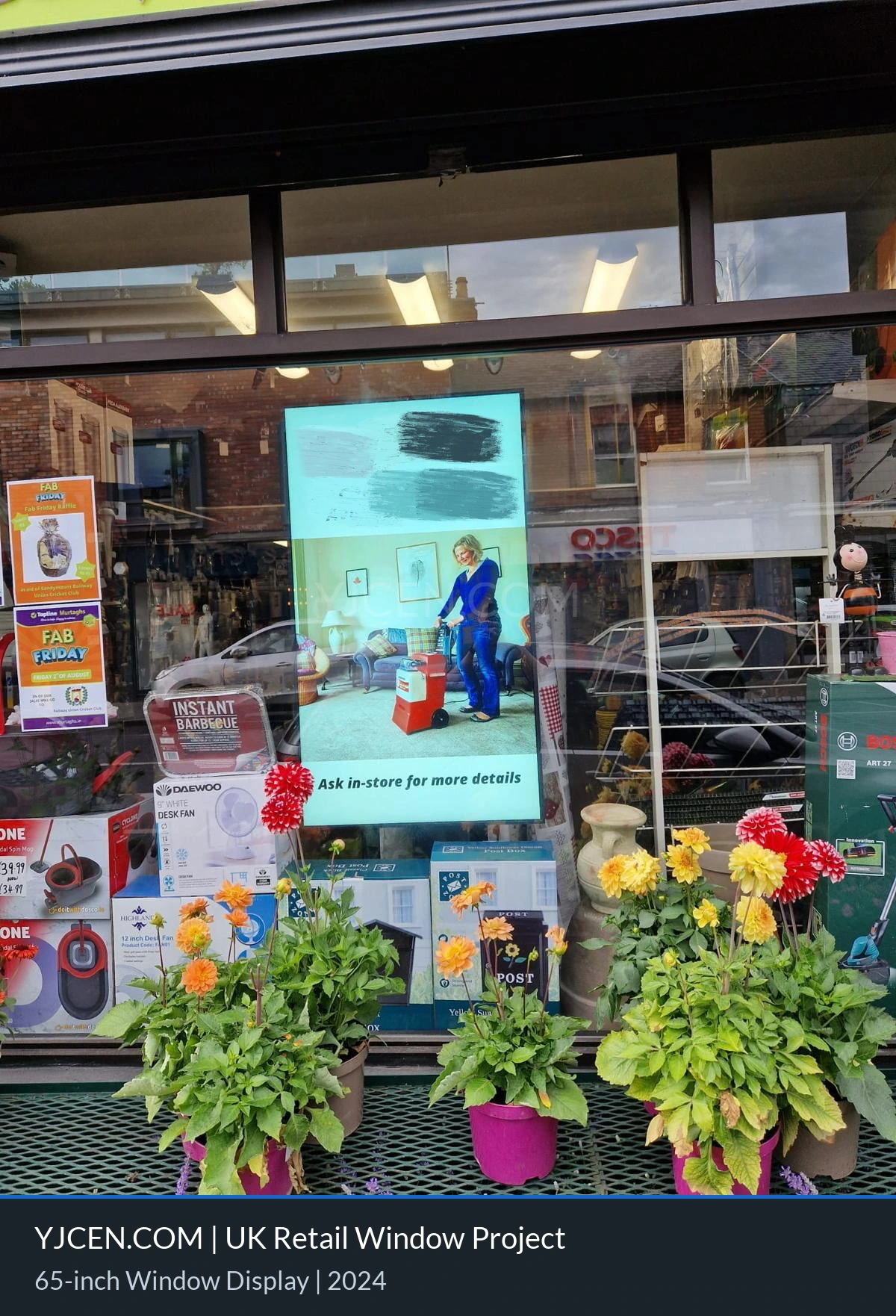
In 2024, YJCEN supplied a high-brightness window-facing display for a customer in the UK. The project uses one 65-inch, single-sided commercial screen in a freestanding installation.
The display provides 3,000 nits of brightness for a location affected by changing natural light. An ambient light sensor supports automatic brightness adjustment throughout the day.
The system also includes fan-based cooling and an integrated content management system. The CMS supports remote publishing, playback scheduling and device-status monitoring. The display is configured for continuous 24/7 operation.
UK Window Display Project Summary
- Location: United Kingdom
- Deployment year: 2024
- Display size: 65 inches
- Display format: Single-sided
- Brightness: 3,000 nits
- Installation: Freestanding
- Brightness control: Automatic adjustment based on ambient light
- Cooling: Fan-based cooling
- Software: Integrated CMS
- CMS functions: Remote publishing, playback scheduling and device-status monitoring
- Operating mode: 24/7 continuous operation
The project information does not include measured footfall, sales, energy savings or equipment-lifespan results. This case therefore focuses on the confirmed configuration and the planning requirements for a comparable window display.
Why a High-Brightness Screen Was Required
A retail window has very different lighting conditions from an indoor wall. Daylight and reflections from glass can reduce perceived contrast. A standard indoor screen may become difficult to see from outside the premises.
The 3,000-nit panel was selected to provide stronger output in this window-facing environment. It allows advertising and information to remain more visible when surrounding light is bright.
Brightness alone does not determine readability. Screen direction, distance from the glass, nearby reflections and the viewer’s position also affect the result. These conditions should be checked at the intended installation point.
Automatic Brightness for Changing Daylight
Natural light in the UK can change quickly during the day. A storefront may move between direct sunlight, cloud cover and lower evening light.
The ambient light sensor allows the screen to adjust its brightness as these conditions change. Higher output can support daytime visibility. Lower output can provide a more suitable viewing level when the environment becomes darker.
The sensor should be positioned where it can read representative ambient light. It should not be blocked by the enclosure or influenced by a local lamp. Brightness behaviour should be tested during different operating periods.
Freestanding Installation Near a Window
This project uses a freestanding display instead of a wall-mounted screen. The unit can function as a standalone presentation point near the retail window.
A freestanding design still needs careful positioning. The installation team should confirm floor space, screen orientation, viewing distance and the location of the glass. The unit should not block entrances, customer routes or emergency access.
- Measure the available floor area and normal viewing distance.
- Check the direction of daylight and visible reflections.
- Confirm the power outlet and cable route.
- Leave enough space for ventilation and maintenance.
- Keep the base clear of normal pedestrian movement.
- Review stability requirements for the selected position.
The source information confirms a freestanding installation. It does not specify the exact base dimensions, anchoring method or distance from the window.
Fan Cooling and 24/7 Operation
A bright display can generate heat during long operating periods. Sunlight through the glass may add further thermal load. The project therefore uses fan-based cooling.
Cooling performance depends on an unobstructed airflow path. Ventilation openings should not be placed directly against glass, furniture or decorative panels. The installer should also provide access for inspection and cleaning.
The screen is configured for 24/7 operation. This describes its intended operating mode, but it does not remove the need for routine maintenance. Fans, filters where fitted, cables and visible ventilation areas should be checked according to the final maintenance plan.
Remote Content Management
The integrated CMS allows authorised users to publish content without visiting the display for every update. It also supports playback scheduling and device-status monitoring.
Retail teams can prepare different campaigns for specific dates or operating periods. A schedule can help coordinate product launches, seasonal promotions and general brand information.
Device monitoring can show information made available by the selected CMS. The exact alerts and reporting fields depend on the platform configuration. Users should confirm which functions are required before deployment.
Content Design for People Outside the Store
A passerby may see a window display for only a few seconds. The first message should therefore be easy to identify from the expected distance.
- Use one main message: Avoid competing headlines on the same screen.
- Choose large text: Test size at the real viewing distance.
- Maintain contrast: Keep text distinct from images and backgrounds.
- Limit detail: Move long explanations to another channel.
- Control timing: Leave important content visible long enough to read.
- Test through glass: Review the final material from outside the premises.
Content should also be checked in bright and low-light conditions. A layout that looks clear on a desktop monitor may not remain readable through a storefront window.
Planning the Content Workflow
The CMS needs a clear operating process. The business should decide who creates, approves, schedules and removes each campaign.
File format, resolution, orientation and playback duration should match the display configuration. Expired offers should be removed promptly. A naming and approval process can reduce the risk of publishing outdated material.
If several displays are managed together, the team should define whether they show the same campaign or location-specific content. Access permissions should reflect staff responsibilities.
Installation Checks Before Commissioning
The project should be tested from the viewer’s side of the glass. Commissioning is not complete when the screen simply turns on.
- Confirm that the complete screen is visible from the intended approach.
- Review reflections at different times of day.
- Check automatic brightness response in changing light.
- Confirm airflow and service clearance.
- Test scheduled content and remote publishing.
- Verify the available device-status information.
- Inspect power and data cable routing.
- Confirm that the unit is stable in its final position.
Any local electrical, building or accessibility requirements should be reviewed by the project owner and qualified installers.
How to Evaluate the Display After Installation
This project description does not provide quantified marketing results. A retailer that wants to assess performance should record a baseline before the screen is installed.
Possible measurements include content uptime, schedule accuracy, screen visibility checks and the number of support incidents. Retail metrics such as store visits or campaign response should be collected using the business’s own measurement method.
Operational data and marketing data should remain separate. A screen operating correctly does not by itself prove that a campaign increased sales or footfall.
Information Needed for a Similar Project
Accurate site details help determine whether a 3,000-nit freestanding display is suitable for another window. Buyers should provide:
- Installation country and site photographs
- Window direction and normal sunlight exposure
- Available floor space and distance from the glass
- Expected viewing distance
- Required screen orientation and quantity
- Daily operating schedule
- Power and network availability
- Content source and CMS requirements
- Ventilation and maintenance access
The final specification may change if the screen is moved outdoors, mounted on a wall or installed in a location with different environmental conditions.
Frequently Asked Questions
Is 3,000 nits suitable for a UK retail window?
It provides substantially higher output than a standard indoor screen. Final suitability depends on sunlight direction, glass reflections, viewing distance and screen position.
Can the screen adjust brightness automatically?
Yes. This project uses an ambient light sensor to support automatic brightness adjustment as surrounding light changes.
Why does the display use fan cooling?
Fan-based cooling helps move heat away from internal components during extended operation. The installation must preserve airflow and maintenance access.
What can the CMS manage?
The confirmed functions are remote content publishing, playback scheduling and device-status monitoring. Exact controls depend on the final CMS configuration.
Can the unit operate continuously?
The project is configured for 24/7 continuous operation. Routine inspection and maintenance are still required.
What is not confirmed by this case?
The source does not provide measured sales, footfall, energy-saving or lifespan results. It also does not state a resolution, IP rating or anti-glare specification.
Explore Window-Facing Display Solutions
Review YJCEN commercial digital signage displays for retail and showroom applications. You can also browse more client cases or request a window display quotation using your site details.