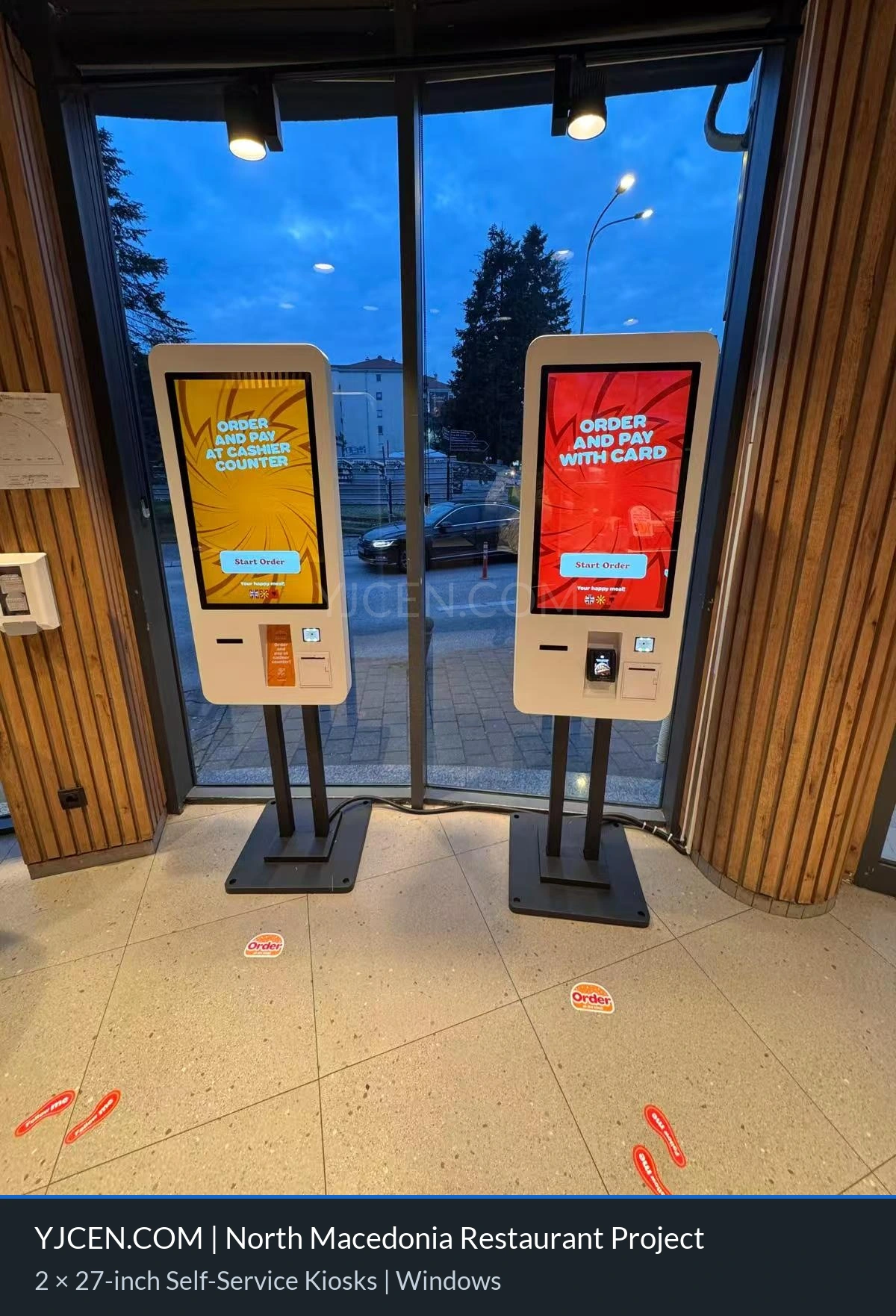
This project supplied two 27-inch floor-standing ordering kiosks to a restaurant chain in North Macedonia. The terminals run Windows and use capacitive multi-touch screens. They support ordering, payment and queue ticketing.
The client integrated its own POS and payment systems with the hardware platform. This kept software selection and business workflow under the client’s control. The floor-standing units provide separate ordering points without using counter space; they still require clear floor space.
Project Specifications
- Product Type: Floor-standing self-service ordering terminal
- Display: 27-inch touchscreen (2 units)
- Operating System: Windows
- Touch Technology: Capacitive multi-touch
- Core Functions: Integrated ordering, payment and queue ticketing
- Software Solution: Client-integrated POS and payment systems
- Installation: Floor-standing design
- Project Location: Restaurant in North Macedonia
- Application Scenarios: Self-service ordering for fast-food outlets and restaurant chains
Self-Service Ordering Kiosks for Restaurant Chains
A kiosk provides another place to order besides the staffed counter. Customers can browse, select items, review the basket and pay through the configured software. The queue information then guides the next step. This project description does not include measured changes in waiting time or sales.
The two kiosks in this project support the route from menu selection to payment and ticketing. The client integrated them with its business software. This connection matters because a placed order must reach the restaurant’s established process.
Why a 27-Inch Touchscreen Is Suitable for Ordering
The 27-inch screen provides space for menus, product images and an order summary. The software layout still determines how much can be shown clearly. Use readable labels and touch targets that are easy to select.
Screen size alone does not make ordering easy. Use clear menu categories and short instructions. Keep the basket, back button and payment action easy to find. Let the customer check items and prices before confirming.
Windows Platform and Software Integration
The terminals use Windows. In this project, the client independently integrated its selected POS and payment gateway. The chosen software handles the restaurant’s menu, prices, orders and payment workflow.
For a similar project, list the required software and accessories before ordering. These may include payment devices, printers or kitchen-system connections. Such items are requirements to confirm, not a statement that every listed accessory was supplied in this project.
Managing Queues During Peak Hours
Demand can rise quickly at meal times. A kiosk adds an ordering point, but does not increase kitchen capacity by itself. Watch the order queue and collection area together. More ordering points are useful only when the rest of the service can handle the work.
Queue ticketing can also help create a more orderly customer experience. After placing an order, customers can receive a ticket or queue reference while staff process the order through the restaurant’s normal system. The exact workflow can be customised by the client according to its chosen POS, payment and kitchen process.
Floor-Standing Installation Considerations
A floor-standing kiosk is designed to be placed where customers can approach and use it comfortably. Before installation, the restaurant should assess available floor space, customer flow, power access, network connection and the position of the service counter. The terminal should not block entrances, emergency routes or normal movement through the restaurant.
- Location: Position the kiosk where customers can see it soon after entering the restaurant.
- Queue flow: Leave enough space for customers to order without blocking other guests or counter-service lines.
- Power and network: Plan the required electrical supply and connectivity before installation.
- Software compatibility: Confirm POS, payment, ticketing and menu-management requirements in advance.
- Accessibility: Consider screen height, touch reach and clear operating instructions for the intended users.
- Maintenance: Allow suitable access for cleaning, cable checks, software support and future service.
Planning a Similar Restaurant Installation
The following checklist is general project guidance. It is not an account of additional work or measured results at the North Macedonia site.
Map the Order Route
Write down what happens after a customer confirms an order. Identify the system that receives it, the payment status staff see and the reference used at collection. Agree who owns each connection before installing the hardware.
- Confirm where menus, prices and sold-out items are managed.
- Check whether an order is sent to staff before or after payment confirmation.
- Define what happens if payment is cancelled or fails.
- Confirm how the customer finds the collection point and order reference.
Test the Selected Software
Use test orders that reflect the real menu. Include a simple item, an item with choices and a cancelled basket. Check the screen message and the result in the restaurant system for each case.
Test the supported payment methods with the payment provider’s approved process. Do not assume that an on-screen success message proves that all connected systems recorded the same result. Agree how staff will check and resolve a mismatch.
Prepare Staff Support
Place a short help message near the start of the order flow. Decide which staff member can assist a first-time user. Keep the staffed service route clear for customers who prefer it or cannot use the kiosk.
Staff should know how to recognise an incomplete order, report a payment problem and contact the responsible software team. Give them the agreed support steps instead of expecting them to change technical settings.
Review Operation After Launch
For a future rollout, compare similar service periods before and after installation. Record waiting time, completed orders and requests for help. Note changes in staffing or demand so they are not mistaken for kiosk effects.
Use these observations to improve the menu layout and customer route. This case does not supply a percentage gain, payback period or guaranteed reduction in queues.
Frequently Asked Questions
Can a self-service ordering kiosk connect to an existing POS system?
Yes. This project uses a hardware platform that allows the client to integrate its selected POS and payment systems. Compatibility should be confirmed before deployment according to the restaurant’s software environment and workflow.
Can the kiosk support payment and queue ticketing?
Yes. The terminals in this project support ordering, payment and queue ticketing. The final configuration depends on the selected software, payment gateway and restaurant operating process.
Why use a floor-standing kiosk in a restaurant?
A floor-standing kiosk can provide an additional ordering point without requiring counter space. It can help customers order independently and support restaurants during busy periods when queues are longer.
What information is needed for a quotation?
Please provide the required quantity, installation country, intended restaurant layout, screen size preference, software platform, POS and payment requirements, network conditions and any required peripherals. These details help YJCEN recommend a suitable self-service ordering terminal solution.
Explore Self-Service Kiosk Solutions
Explore YJCEN self-service kiosk products for restaurants and customer-facing applications. You can also review digital signage client cases or contact YJCEN for a self-service ordering kiosk quotation.