Does digital signage need an internet connection?
Not always. Supported USB or local-storage playback can run offline, while remote updates and internet-based services need the appropriate connection.
- USB or local playback: staff update content at the screen or player.
- Local network: a compatible on-premise system can manage screens without an external internet connection.
- Cloud CMS: supports remote management through internet connectivity.
- Check outage behaviour with the selected player; cached files and live online content may behave differently.
The decision between an online or offline solution depends entirely on your specific needs. For a single screen with content that rarely changes, a simple offline method like a USB drive is perfectly sufficient and cost-effective. However, for a network of screens spread across multiple locations, an internet-connected, cloud-based system is essential for efficient management and scalability.
This guide will break down the primary methods for updating digital signage—both online and offline—to help you determine the best fit for your business goals. We'll explore USB playback, local network solutions, and the capabilities of cloud-based Content Management Systems (CMS).
The Simplest Method: Offline Digital Signage via USB
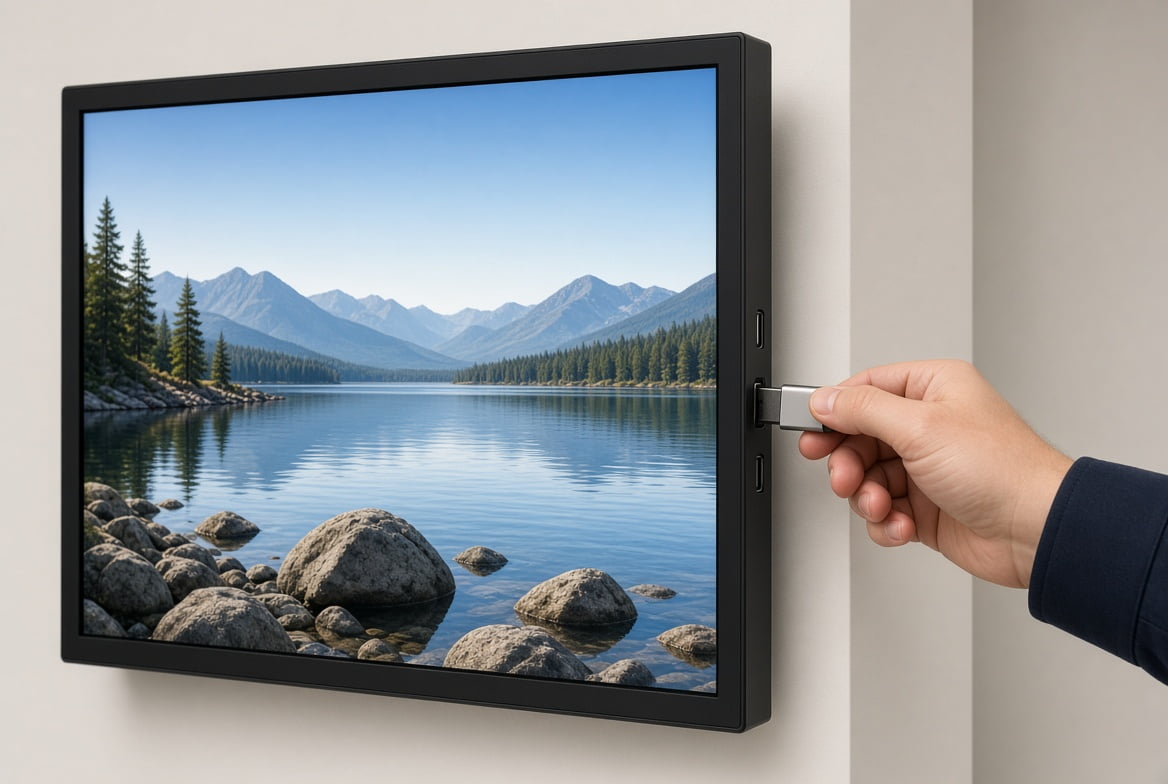
The most straightforward way to run digital signage without the internet is the "plug-and-play" method using a USB flash drive. This is often referred to as an offline digital signage or "sneaker-net" solution because it requires you to physically walk to each screen to update content.
How it works:
- Create Content: Design your images, videos, or simple playlists on your computer.
- Load the USB: Save the media files onto a standard USB drive.
- Plug and Play: Insert the USB drive into the designated port on your commercial display. The built-in media player will automatically recognize the files and begin playing them in a loop.
This method is ideal for small businesses with one or two screens in a single location, such as a local restaurant displaying its menu or a reception area showing a welcome video.
- Pros: Extremely simple to use, no internet costs, highly secure as it's not connected to any network.
- Cons: Inefficient for more than a few screens, requires manual, on-site updates, offers no remote management, and has very limited scheduling capabilities.
Local Network Updates: Control Without Internet Access
If you have multiple screens within the same building but want more control than a USB offers, a Local Area Network (LAN) solution is an excellent middle ground. This setup does not require an external internet connection to function.
How it works: Your digital signage screens and a central computer are all connected to the same local network via Ethernet cables or a dedicated Wi-Fi router. You use on-premise software installed on your computer to push content updates and schedules to the screens over this private network. The router manages the internal traffic but doesn't need to be connected to the wider internet.
This is a popular choice for corporate campuses, hospitals, schools, and large retail stores where all screens are located within one physical site.
- Pros: Centralized control over all screens in one location, more efficient than updating each screen by USB, secure and self-contained network.
- Cons: Limited to a single geographic location, requires initial setup of a local network, and the on-premise software may involve a one-time license fee.
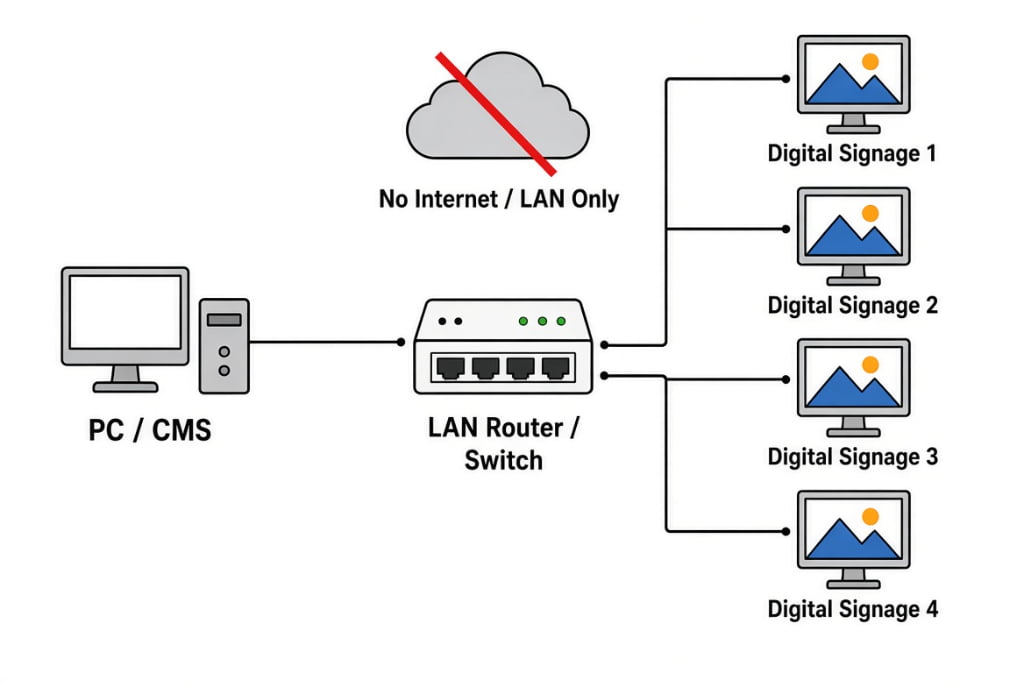
Local area network (LAN) digital signage system architecture diagram illustrating offline content management solution. Setup shows PC/CMS workstation connected via LAN router/switch to multiple digital signage displays (1-4) without internet dependency.
The Power of Connectivity: Cloud-Based Digital Signage (CMS)
When you need to manage screens across different offices, cities, or even countries, a cloud-based solution is the industry standard. This method requires a stable internet connection (Wi-Fi or Ethernet) for each screen.
A cloud-based Content Management System (CMS) is a software platform hosted on the internet. It allows you to log in from any web browser, anywhere in the world, to manage your entire network of screens.
How it works:
- Connect Screens: Each digital signage player connects to the internet and is registered to your cloud CMS account.
- Manage Remotely: You log into your CMS portal on your laptop or PC.
- Deploy Content: From the portal, you can upload media, create complex playlists, schedule content to play at specific times or days, and deploy it to individual screens, groups of screens, or your entire network with a few clicks.
This is the most flexible and scalable solution, used by retail chains, quick-service restaurants (QSR), corporate communications, and Digital-Out-of-Home (DOOH) advertising networks.
- Pros: Ultimate flexibility to manage screens from anywhere, instant remote updates, advanced scheduling and zoning (dividing the screen into multiple content areas), easily scalable, provides valuable analytics and proof-of-play reporting.
- Cons: Reliant on a stable internet connection, typically involves a recurring subscription fee for the CMS software.
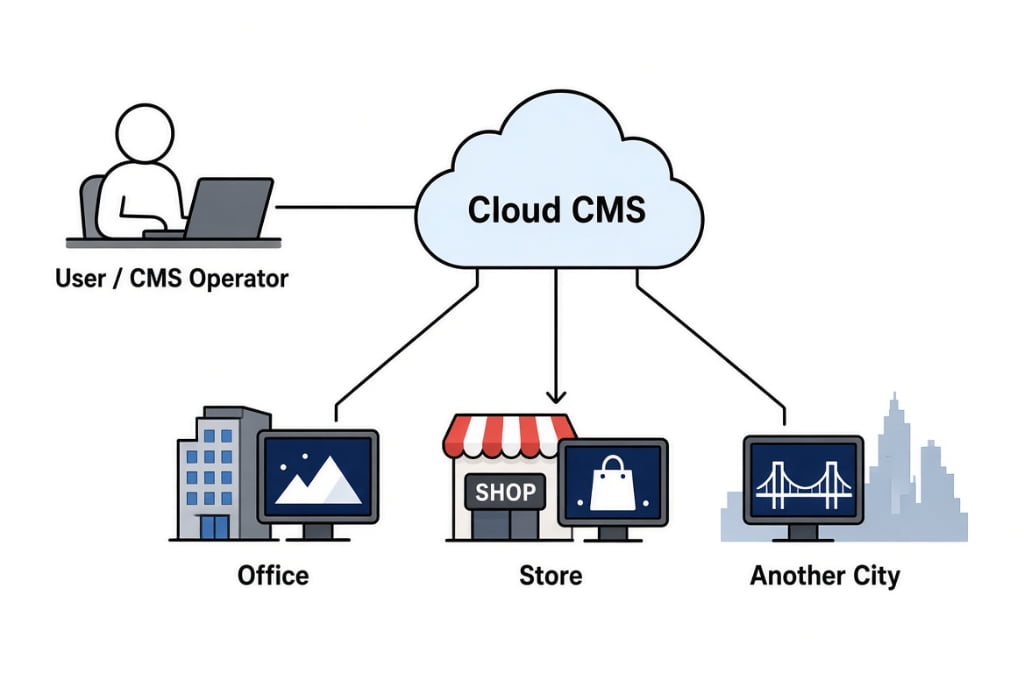
Cloud digital signage content management system (CMS) network architecture diagram. Illustrates centralized cloud-based platform enabling single user/CMS operator to remotely manage and distribute content to multiple digital signage displays across different locations - corporate office, retail store, and remote cities. Perfect for understanding cloud digital signage solutions, remote content management, multi-location display networks, SaaS signage platforms, and enterprise-wide digital communication systems.
What Happens if the Internet Connection is Lost?
This is a critical and common question for anyone considering a cloud-based solution. The good news is that professional digital signage players are designed with reliability in mind. They use a "store and forward" technology.
When you send a playlist from your cloud CMS to a screen, the media player downloads all the necessary files (videos, images) and the schedule onto its local storage. The player then runs this downloaded playlist directly from its internal memory.
If the internet connection drops, the screen will continue to play the last successfully downloaded content according to its schedule. It will operate smoothly as if it were an offline unit. Once the internet connection is restored, the player will automatically reconnect to the CMS, report its status, and download any new content or schedule changes you may have sent.
Key Features That Absolutely Require an Internet Connection
While basic playback can happen offline, an internet connection is non-negotiable for certain advanced features. If your strategy involves any of the following, you will need a cloud-based CMS:
- Remote Management: The ability to update content, change schedules, or troubleshoot screens that are not in your immediate physical location.
- Live Data Feeds: Displaying real-time information such as weather forecasts, stock tickers, news headlines, flight schedules, or social media walls (e.g., an Instagram feed).
- Interactive Content: Integrating features like wayfinding with live directory updates or QR codes that link to dynamic web pages.
- Network Monitoring & Analytics: Viewing the real-time status (online/offline) of your screens, generating proof-of-play reports, and analyzing content effectiveness.
- Instantaneous Updates: Pushing out emergency alerts or time-sensitive promotional messages across your entire network simultaneously.
Making the Right Choice: Which Solution is Best for You?
Choosing between online and offline digital signage comes down to balancing cost, convenience, and capability. Here’s a simple guide to help you decide.
For a Single Screen or a Few Screens in One Location
If you have 1-3 screens in the same building and your content updates are infrequent (e.g., weekly or monthly), an offline USB solution is often the most practical and budget-friendly starting point. If you find the manual updates becoming a chore, upgrading to a LAN-based system can provide centralized control without the need for internet subscriptions.
For Multiple Screens Across Different Locations
If you are managing a network of screens (even as few as two) in different branches, cities, or public spaces, a cloud-based CMS is the only viable option. The initial investment in subscription fees is quickly offset by the immense savings in time and labor. The ability to ensure brand consistency, deploy targeted campaigns instantly, and monitor your entire network from one dashboard is invaluable for any growing business or enterprise.
| Feature | USB Offline | LAN (On-Premise) | Cloud-Based CMS |
|---|---|---|---|
| Best For | 1-2 screens, single location | Multiple screens, single building | Multiple screens, multiple locations |
| Update Method | Manual (Physical) | Centralized (Local Network) | Remote (Internet) |
| Scalability | Very Low | Low (Limited by location) | Very High |
| Initial Cost | Very Low | Low to Medium | Low (Player cost) |
| Ongoing Cost | None | Low (Potential maintenance) | Medium (Subscription fee) |
| Flexibility | Low | Medium | High |
Explore a Smarter Solution: Get a Free CMS for Your Screens
After weighing the pros and cons, you might be drawn to the flexibility of a cloud CMS but hesitant about the ongoing subscription fees. For many businesses, finding a solution that offers remote control without adding to operational costs is the primary challenge.
We understand this perfectly. That's why we provide a powerful, free Content Management System (CMS) with all our Android-based digital signage hardware. You get a complete remote management solution without paying any extra software subscription fees.
Our free CMS allows you to easily enjoy the core benefits of cloud management—upload content remotely, create and schedule playlists, and monitor screen status from anywhere. It provides the perfect starting point, combining powerful functionality with ultimate cost-effectiveness, whether you're managing a single display or a growing network.
Ready to achieve more efficient management at a lower cost?