Choosing the right LCD video wall is a critical decision for any commercial project aiming to captivate audiences with dynamic visual content. A successful video wall is more than just buying screens and hanging them on a wall; it requires a thoughtful assessment of your specific needs, environmental factors, and key technical specifications.
To make the right choice, you must focus on four core areas:1) The key specifications of the display panels themselves (like bezel, brightness, size, and resolution); 2) The video wall controller (the brain of the operation);3) The mounting structure and serviceability; and 4) Your specific application. Overlooking any of these can lead to a subpar result or an overspent budget. This guide provides a clear framework to help you systematically evaluate these factors and make an informed purchasing decision.
What should you compare when choosing an LCD video wall?
Choose the video wall as a complete system for the content, viewing distance and installation site, rather than comparing panels alone.
- Compare panel size, resolution, brightness and bezel-to-bezel spacing against the intended content.
- Specify source inputs, layouts and the controller or distribution method.
- Confirm wall support, alignment, cooling and access for servicing individual panels.
- Include controllers, mounts, cables, installation and ongoing support in the project budget.
Define Your Needs: Application and Viewing Distance Are Paramount
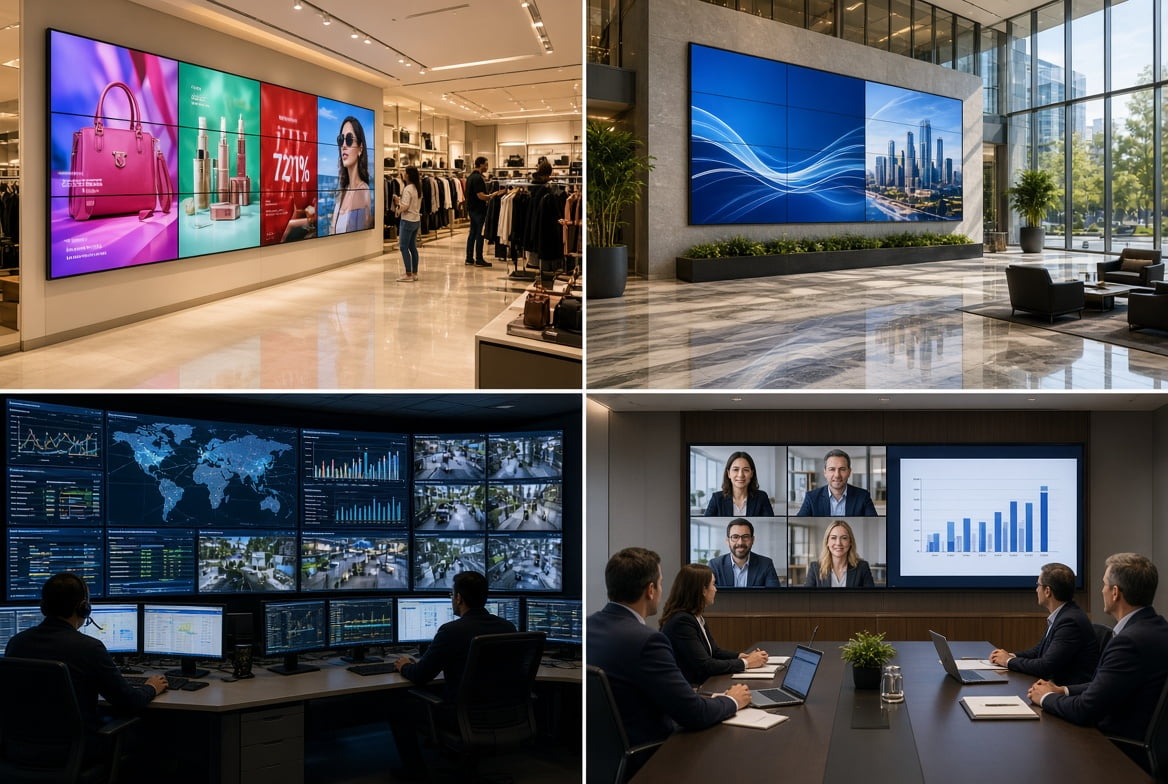
Before looking at any technical specs, the first step is to clearly define where and for what purpose your LCD video wall will be used. Different applications have vastly different requirements.
- Retail Stores & Malls: The goal is to attract customers, convey brand messaging, and run promotions. This requires high brightness, vibrant colors, and dynamic content. Since viewers are often in motion, the bezel requirement can be more lenient, but the overall visual impact is crucial.
- Corporate Lobbies & Reception Areas: The objective is to enhance brand image and the visitor experience. Aesthetics are key, so ultra-narrow bezels and a clean installation are essential. Content might include welcome messages, corporate videos, or digital art.
- Control Rooms & Command Centers: Examples include traffic hubs, security centers, or data centers. The top priority here is the clear and accurate display of critical data and multiple video feeds. Screens must be rated for 24/7 operation, with high resolution and extreme reliability. Bezels need to be as narrow as possible to avoid disrupting information displayed across multiple screens.
- Conference Rooms & Auditoriums: Used for presentations, video conferencing, and collaboration. The screen must have sufficient resolution to ensure even those in the back can read fine details (like spreadsheets or text). Anti-glare coatings and wide viewing angles are also very important.
Understanding your application and viewing distance will provide the foundation for all subsequent technical decisions.
LCD or direct-view LED for the same wall?
LCD panels offer a fixed pixel grid with visible joins between panels. Direct-view LED uses modular LED cabinets; pixel pitch and the total canvas size determine its available resolution. Compare the smallest text at the nearest viewing position and the continuity of graphics across the wall. Then compare complete systems at the same width and height, including controllers, mounts, installation and service access.
Choose viewing distance around the actual task. A wall showing large promotional images and one showing small control-room labels can need different layouts at the same diagonal. Screen diagonal alone cannot define a universal reading-distance range.
The Core Decision: Selecting the Right LCD Video Wall Panels
The display panels are the building blocks of your video wall. Here are the key specifications you must compare carefully when making your selection.
Bezel Width: The Key to Visual Continuity
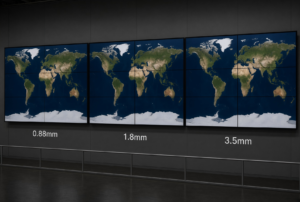
The bezel is the border of a display panel. The “bezel-to-bezel” width is the combined width of two adjacent bezels, forming the black lines on the video wall. It is one of the most critical factors affecting the overall viewing experience. A narrower bezel means a more seamless and immersive image.
- Ultra-Narrow Bezel (0.88mm – 1.8mm): This is the premium choice, ideal for control rooms and high-end showrooms where detailed charts, maps, or high-quality video are displayed. It minimizes the grid effect, providing a nearly seamless canvas.
- Standard Bezel (3.5mm): This is the most cost-effective option and is widely used in retail, restaurants, and corporate lobbies where budget is a concern but a strong visual impact is still required. While the lines are visible, their impact is reduced when playing dynamic video and when viewed from a distance.
Recommendation: If your content needs to flow seamlessly across screens (like data analysis) or if you are aiming for a premium aesthetic, invest in an ultra-narrow bezel. If your budget is tight and the content consists mostly of separate dynamic video blocks, a 3.5mm bezel is a very practical choice.
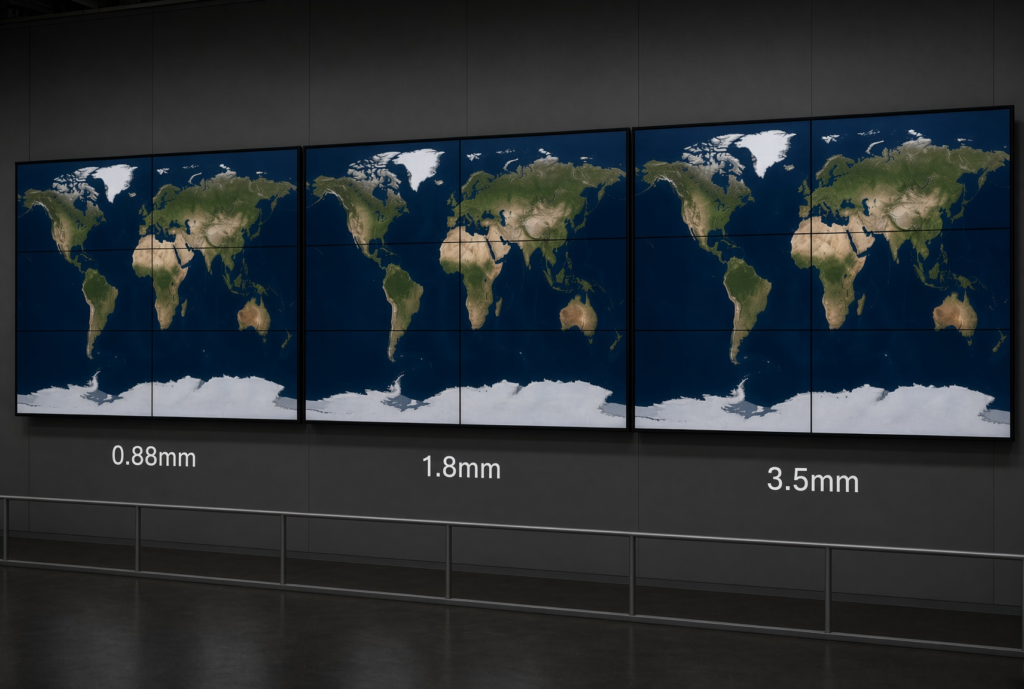
Side-by-side comparison of LCD video wall bezel sizes: ultra-narrow 0.88mm, narrow 1.8mm, and standard 3.5mm bezels. World map display demonstrates visual seamlessness differences across bezel widths. Ideal for control rooms, command centers, corporate lobbies, and digital signage applications requiring minimal screen gaps. Choose bezel width based on viewing distance, budget, and visual continuity requirements.
Compare LCD video wall bezel sizes.
Brightness and Contrast: Adapting to Ambient Light
Brightness, measured in nits, determines the screen’s visibility in ambient light.
- Standard Brightness (500 nits): Suitable for most indoor environments with controlled lighting, such as conference rooms, offices, or retail interiors away from direct sunlight.
Contrast ratio affects the image’s depth and detail. A high contrast ratio makes blacks deeper and whites brighter, creating a more dynamic and layered picture. Look for commercial-grade panels with a contrast ratio of at least 1200:1 or higher.
Size and Resolution: The Foundation of Clarity
- Size: Common panel sizes include 46″, 49″, and 55″. The choice depends on your total wall space and budget. Using larger panels can reduce the number of screens required and the total length of bezel lines.
- Resolution: Most modern video wall panels have a native resolution of Full HD (1920×1080). It’s crucial to understand the difference between
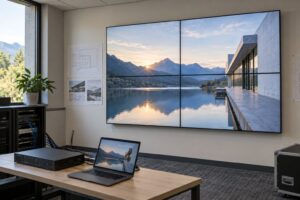
- panel resolution and total video wall resolution. For example, a 2×2 video wall made of four 1080p panels creates a total canvas resolution of 4K (3840×2160). Ensure your video wall controller and content source can support the total resolution you aim to achieve.
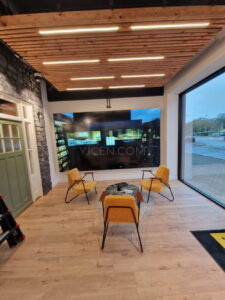
The Irish furniture-showroom project used four 65-inch Full HD panels in portrait orientation, arranged side by side in a single row.
Duty Cycle and Reliability
A key difference between a commercial video wall display and a consumer TV is its ability to run for extended periods.
- 16/7 Operation: Designed for most commercial settings, such as retail stores or corporate applications during business hours.
- 24/7 Operation: Built for mission-critical environments that require round-the-clock operation, like control rooms, airports, and transportation hubs. These displays use more durable components and superior thermal management.
The Brain and Nerves: The Importance of the Video Wall Controller
If the display panels are the “muscles” of the video wall, the controller is the “brain.” The controller’s job is to take one or more content sources, process them, and correctly display them across the individual screens of the video wall.
- Hardware-Based Controllers: These are dedicated hardware appliances known for their stability, reliability, and low latency. They typically feature multiple input and output ports, allowing you to display a single large image or multiple independent sources across the wall. Ideal for security applications that need to display many real-time camera feeds.
- PC-Based Controllers: This solution uses a high-performance PC with specialized graphics cards. It offers tremendous flexibility, allowing you to open, move, resize, and layer content windows anywhere on the video wall. Perfect for creative displays or data visualization centers that require complex layouts and frequent content changes.
Your choice depends on the complexity of your content. If you’re only playing a single full-screen video, a simple daisy-chain feature or an entry-level controller might suffice. If you need to display content from multiple sources (PCs, cameras, web pages) simultaneously and arrange them freely, a powerful PC-based controller is necessary.
Compare video wall controller inputs and layouts.
The Foundation: Mounting and Serviceability
A professional installation is not just about aesthetics; it’s about safety and future maintenance.
- Fixed Mounts: The most basic and low-cost option, holding the screen flush against the wall. The major disadvantage is that servicing is extremely difficult, as you cannot easily access the back of the screens for cabling or repairs.
- Pop-Out Mounts: This is the professional standard. These mounts allow an individual screen to be pushed and “popped out” from the wall, providing easy access for service or replacement without having to dismantle the entire video wall. While slightly more expensive upfront, they save significant time and labor costs during long-term maintenance.
- Other Structures: Options also include floor stands, mobile carts, and ceiling mounts, which can be chosen based on your specific spatial needs.
Furthermore, ensure adequate ventilation is part of the installation design. LCD video walls generate heat, and proper airflow is key to their long-term reliability and performance.
Budget and Total Cost of Ownership (TCO)
Your budget should account for more than just the cost of the screens. The Total Cost of Ownership (TCO) for a complete video wall project includes:
- Hardware Costs: Display panels, controller, mounting brackets, cables.
- Software Costs: Licensing fees for a Content Management System (CMS), if needed.
- Installation Costs: Labor for a professional installation team. This is not an area to cut corners, as professional calibration and alignment are vital for the final look.
- Operational Costs: Primarily electricity. Look for products with energy-efficient features.
- Maintenance Costs: Consider the product’s warranty period and the vendor’s service and support policies. Choosing a brand with strong after-sales support can save you significant trouble down the line.
It is wise to factor in all these elements at the beginning of your project rather than just comparing the unit price of the display panels.
Conclusion: A Successful Systems Integration
Choosing the right LCD video wall is a systematic process, not a simple product purchase. It begins with a deep understanding of your needs and continues through a careful balancing of technical details like bezel width, brightness, controller type, and mounting. Remember, the best video wall isn’t the most expensive one; it’s the one that best fits your application, budget, and long-term operational needs. By balancing these key factors, you will be able to build a successful project that is not only visually stunning but also reliable and easy to manage.
Ready to build a stunning video wall for your project?
Our team of experts has extensive industry experience and can provide a free consultation and customized solution based on your specific requirements.