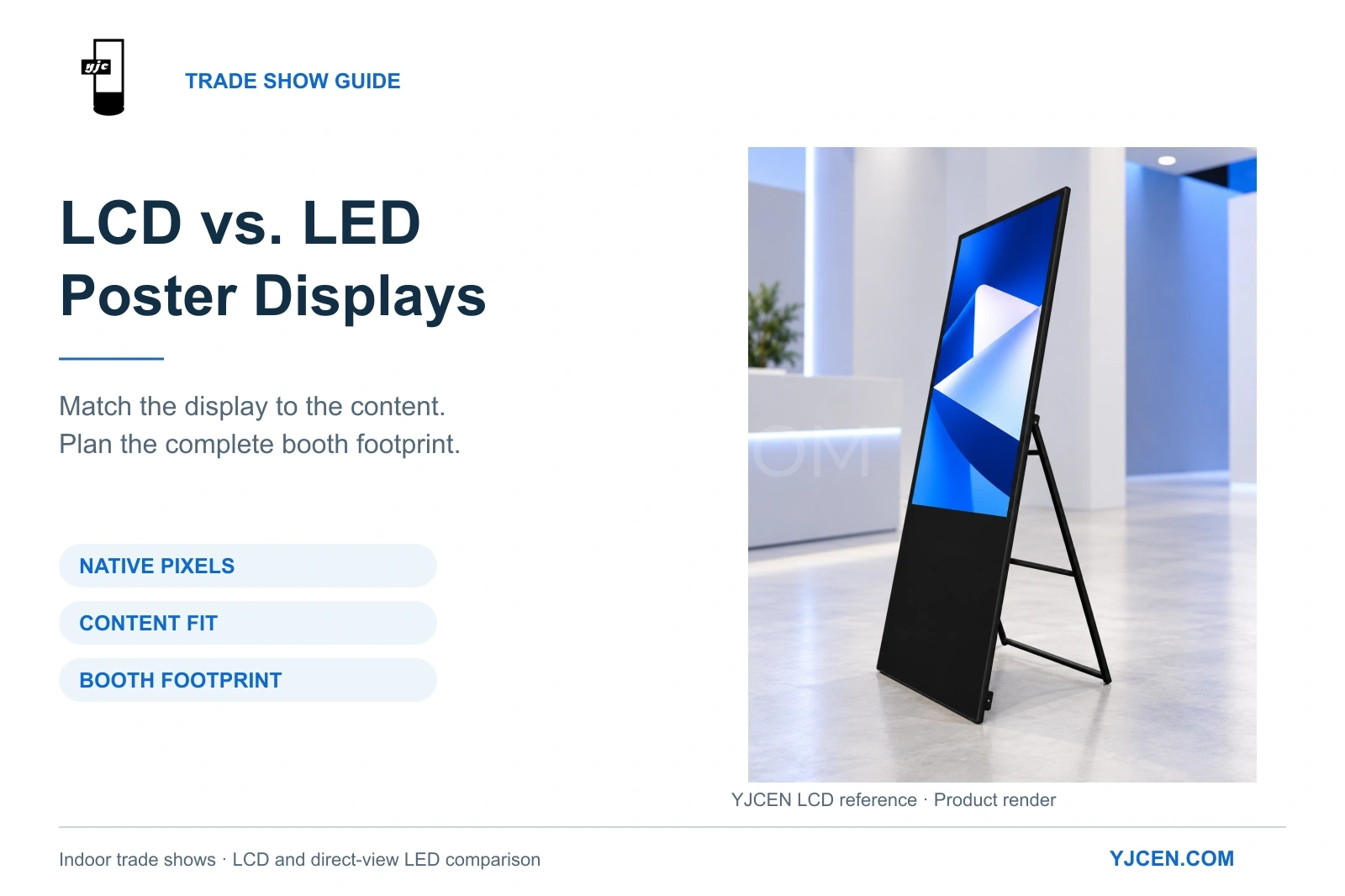
Select an indoor poster display around the content detail, native canvas and deployed booth footprint. The illustrated YJCEN LCD unit retains the product’s folding rear-support format.
Executive Summary: Selecting between an LCD and a direct-view LED poster display for an indoor trade show requires balancing viewing distance, content resolution, and physical footprint. Using YJCEN’s Portable Digital Signage as the LCD baseline and standard 2.5 mm LED specifications, this guide compares native pixel layout, floor space (depths up to 530 mm), and operating requirements (60W-75W) to help AV integrators specify the correct hardware.
A useful selection starts with the closest meaningful interaction: what must a visitor understand after stopping at the display? A screen that attracts attention across the hall can still be a poor place to present a detailed product comparison.
1. Core Technology: LCD Panel vs. Direct-View LED
An LCD poster utilizes a liquid-crystal panel with an integrated backlight. A direct-view LED poster forms the picture using an array of light-emitting pixels, where its “pixel pitch” defines the distance between adjacent pixel centers.
This distinction is critical for procurement: an LCD with an LED backlight remains an LCD display. In a purchasing brief, identify the underlying display technology, native pixel dimensions, and installed format instead of relying on the ambiguous term “LED.”
For this technical comparison, the LCD reference is YJCEN’s standard indoor, mains-powered portable range. Published NEC poster specifications and Samsung’s technical guidance provide the LED baselines.
2. Viewing Distance & Pixel Density: Up-Close Reading vs. Aisle Visibility
For specification tables, product labels, and detailed diagrams beside a demonstration station, specify an LCD poster. For large headlines, animated brand graphics, or directional messaging viewed from across the hall, an LED poster is suitable—provided its pixel pitch aligns with that viewing distance.
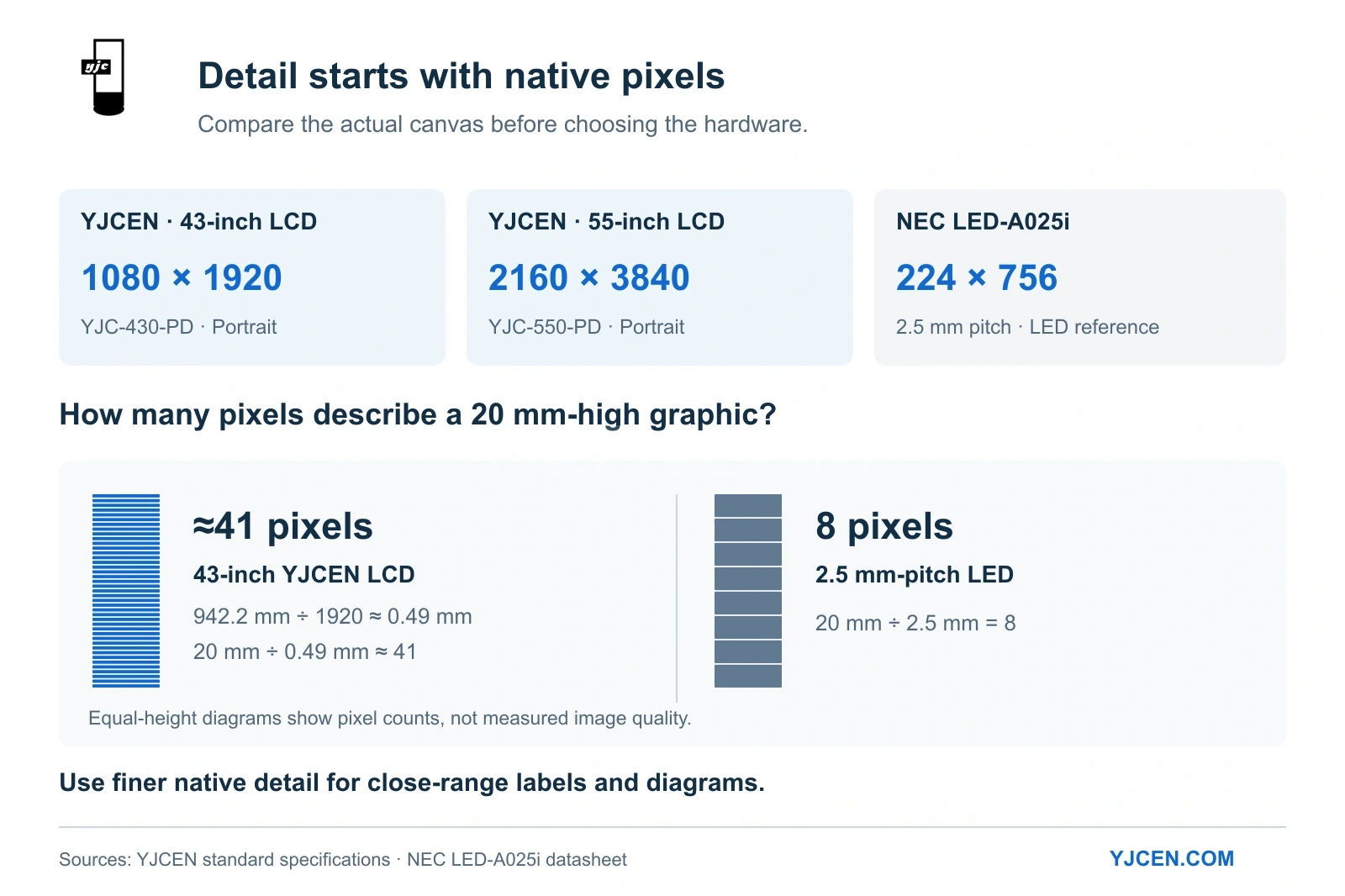
The structural difference is evident when comparing native pixels rather than physical screen height:
| Display Reference | Native Pixel Dimensions (Portrait) | Provided Content Canvas |
|---|---|---|
| YJCEN 43-inch YJC-430-PD (Standard) | 1080 × 1920 | A Full HD portrait canvas for product information and fine images. |
| YJCEN 55-inch YJC-550-PD (Standard) | 2160 × 3840 | A UHD portrait canvas with high pixel density for detailed artwork. |
| NEC LED-A025i (2.5 mm LED reference) | 224 × 756 | A strictly narrow pixel canvas requiring specialized content layout. |
YJCEN’s baseline figures are sourced from our 43-inch specifications and 55-inch specifications (axes expressed in portrait orientation). The LED baseline is from the NEC LED-A025i datasheet.
The 43-inch YJCEN panel features a 942.2 mm active height in portrait use. Dividing that by 1920 pixels yields a vertical pixel spacing of approximately 0.49 mm. Therefore, a graphic element 20 mm high spans about 41 pixels on the LCD, compared to just 8 pixels on a standard 2.5 mm-pitch LED display.
This geometric comparison demonstrates why fine labels or line drawings display significantly more detail on an LCD. (For deeper integration data on physical text size and viewing distance, review our digital signage pixel density guide).
Brightness is another critical specification: YJCEN rates its indoor LCD range at 400 cd/m², while the cited NEC LED example peaks at 1000 cd/m². Always evaluate hardware candidates against planned booth lighting and ambient reflection.
3. Native Resolution & Aspect Ratio Limitations
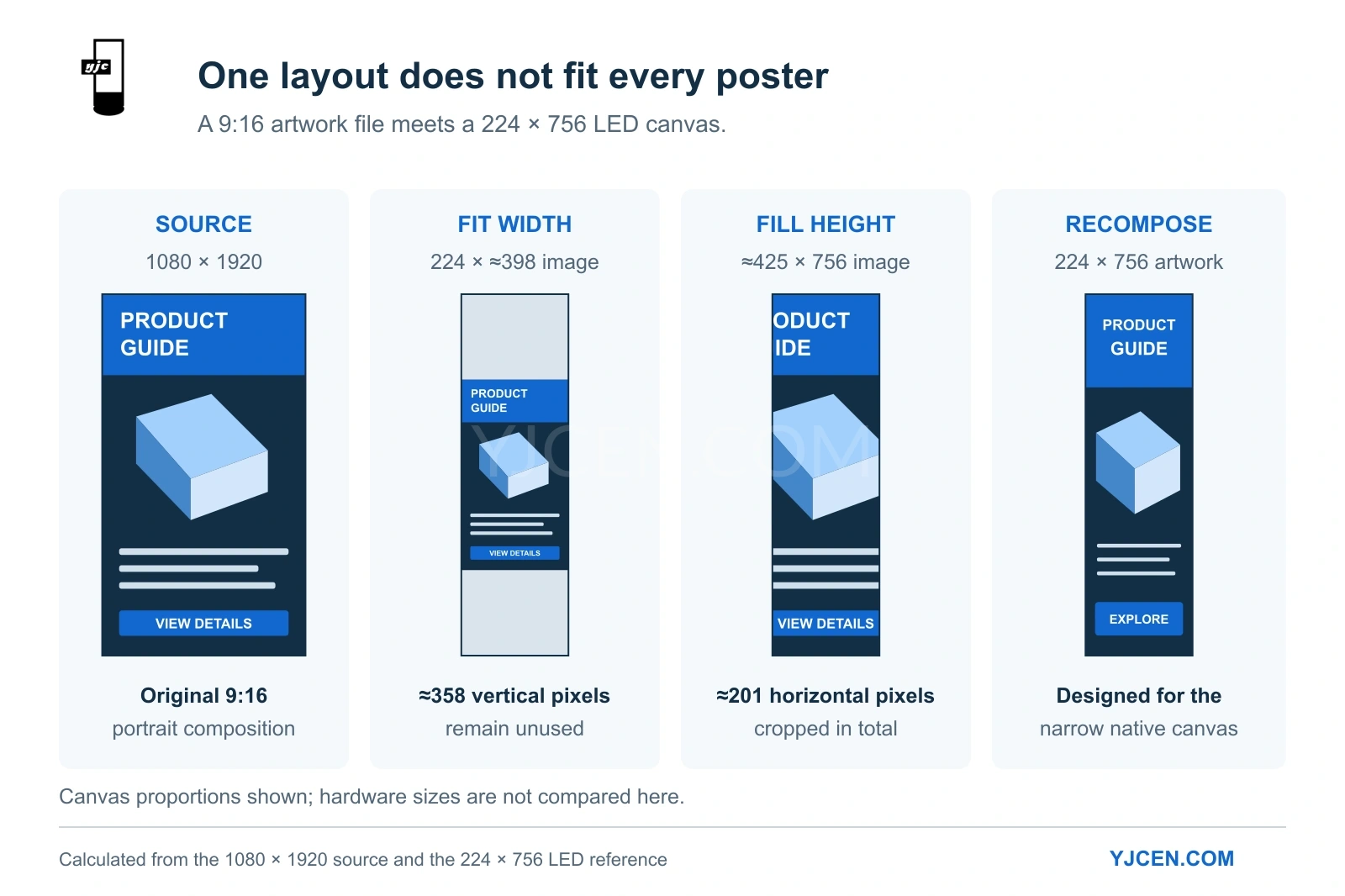
Both technologies display portrait content, but their canvas proportions differ drastically. The YJCEN LCD examples utilize a standard 9:16 portrait ratio; the 224 × 756 LED reference is proportionally much narrower.
Based on those dimensions, scaling a 1080 × 1920 image proportionally to fit the LED width produces an image of about 224 × 398 pixels, leaving roughly 358 vertical pixels unused (letterboxing). Scaling to fill the LED height crops approximately 201 pixels across the width, cutting off critical edge content.
Engineering Recommendation: Prepare separate compositions for each canvas. For narrow LED posters, stack text and hero images vertically. For a 9:16 LCD, utilize the full width for product comparisons. Review our display aspect ratio guide for differences between fitting, cropping, and stretching.
4. Hardware Footprint & Logistics: Space, Weight, and Packaging
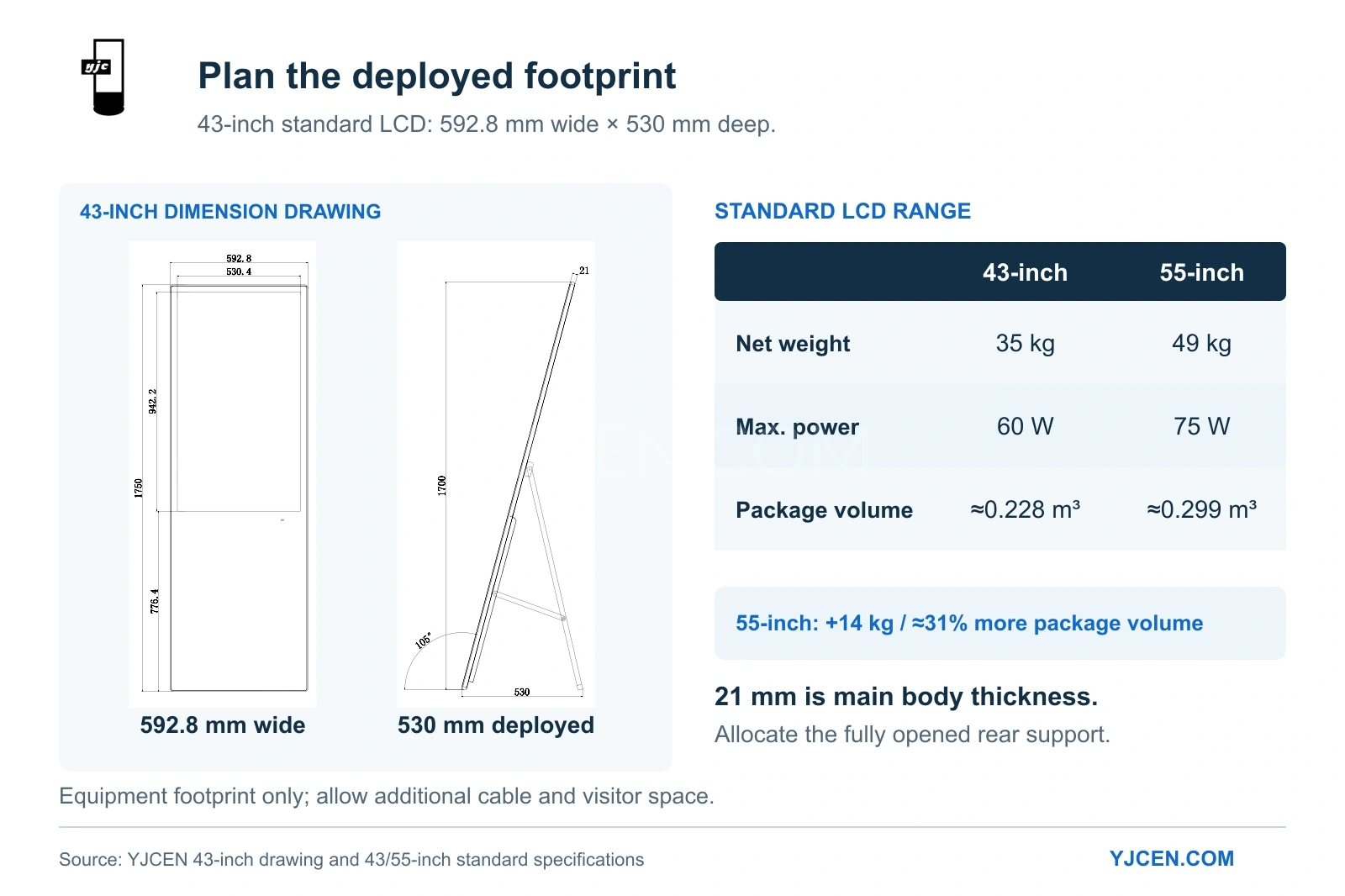
A slim enclosure does not equal a small booth footprint. While YJCEN’s 43-inch dimension drawing indicates a 21 mm main body thickness, the fully deployed unit extends 530 mm from front to back via its rear support.
At 592.8 mm wide, this requires a physical equipment footprint of roughly 0.59 × 0.53 m, excluding cable routing or visitor standing room.
Transport logistics also scale with display size:
| Standard YJCEN LCD Configuration | 43-inch YJC-430-PD | 55-inch YJC-550-PD |
|---|---|---|
| Net Equipment Weight | 35 kg | 49 kg |
| Listed Package Dimensions | 1860 × 720 × 170 mm | 2020 × 870 × 170 mm |
| Calculated Package Volume | ~ 0.228 m³ | ~ 0.299 m³ |
| Rated Maximum Power | 60 W | 75 W |
The 55-inch unit adds 14 kg in weight and approximately 31% more package volume. Select the 43-inch format when booth space or freight capacity is restricted; specify the 55-inch model only when the extra native pixels directly support the viewing task.
5. AV Setup, Power Draw, and Local Playback
For prepared promotional loops, the YJCEN range supports local USB media loading. This establishes a reliable, offline playback workflow that circumvents unstable venue Wi-Fi networks.
For booth power planning, four standard 43-inch units operating at their 60 W maximum rating will draw 240 W of display load, independent of other booth equipment.
As detailed in YJCEN’s portable display installation manual, the rear bracing support must open to its limit position before deployment. Allocate the full stand area on the CAD plan and route the power cable away from high-traffic zones.
6. Maintenance and Hardware Reliability
Protect the screen face, chassis, and connectors during transit, and execute a full image and playback test prior to show opening.
For LCD equipment, troubleshooting centers on the panel, media player, power supply, and stand. For modular LED equipment, service plans must account for individual LED modules, receiving cards, and color calibration after part replacement. If the on-site team cannot execute technical repairs during a tight show schedule, deploying a fully assembled backup unit is often more viable than sourcing loose parts.
Application Checklist: Choosing Between LCD and LED Posters
| Core Booth Task | Recommended Hardware | Engineering Rationale |
|---|---|---|
| Explain products beside a staffed demonstration | Full HD or UHD LCD Poster | High native pixel density supports fine text, comparison graphics, and close-range viewing. |
| Show a bold message across an aisle | Direct-View LED Poster | Pitch chosen for distance viewing; content designed with large shapes and limited text. |
| Create one continuous image across several units | Documented Linked-Display System | Requires dedicated controllers, pixel mapping, and specialized mechanical alignment. |
For an indoor booth combining a product loop with detailed information read at close range, our LCD digital poster line is the optimal starting point. Select the size based on content requirements, then factor the 530 mm deployed depth and power draw into your event CAD plan.
Sourcing Exhibition Display Hardware?
Send our engineering team your booth plan, closest viewing distance, representative content files, and delivery destination. Include power availability details so we can specify the correct indoor LCD configuration and provide precise dimensional drawings and wholesale quotations.