How does LCD digital signage work?
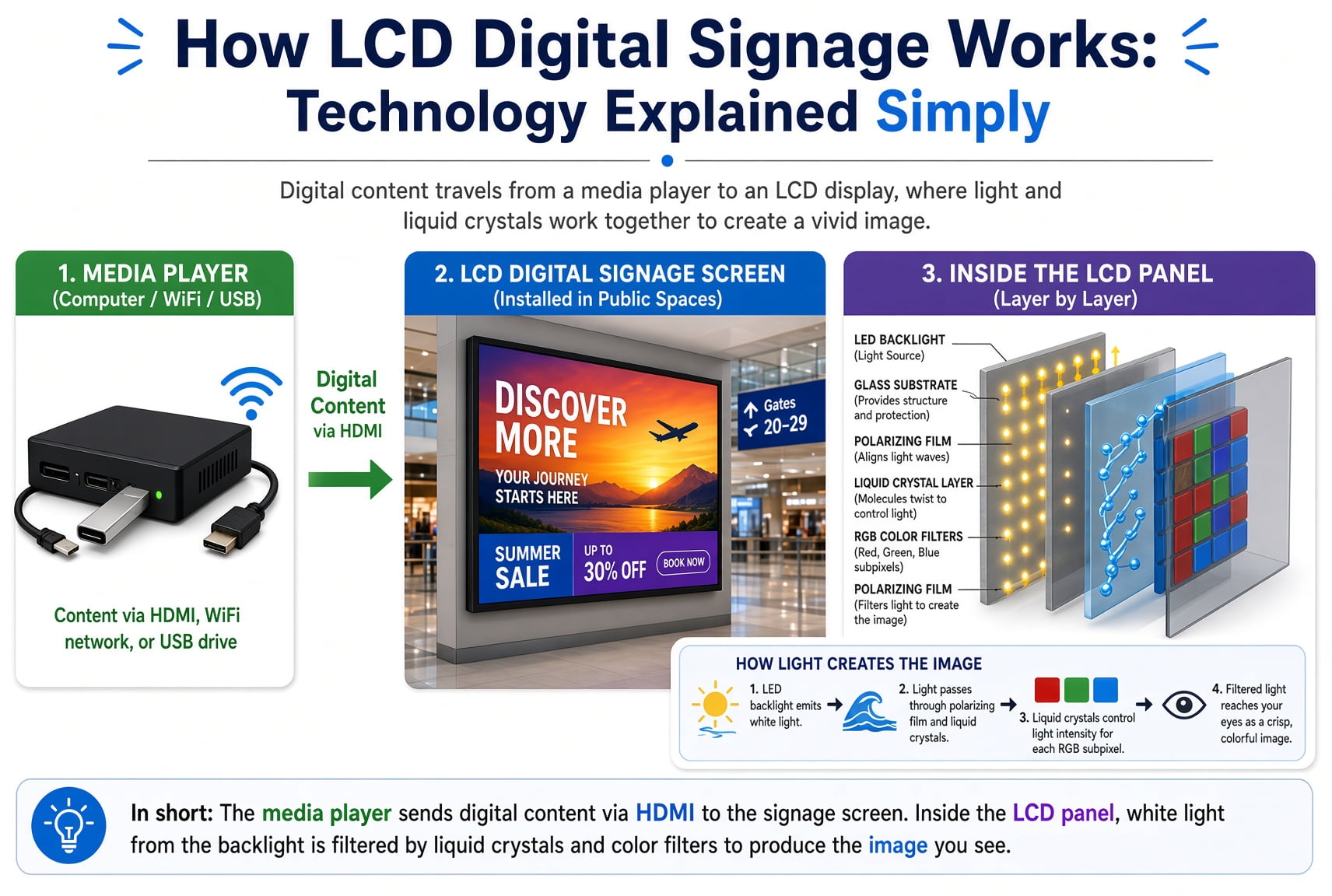
An LCD signage system combines content, a media player and a display. The player prepares the video signal, and the LCD controls light from its backlight to form the visible image.
- Content can come from local storage, USB, an application or a connected CMS.
- The player decodes the content and sends frames to the display electronics.
- The display drives the panel's pixels to produce the image.
- Remote publishing and monitoring depend on the chosen software and connection; supported local playback can work without continuous internet access.
The Main Parts of an LCD Digital Signage System
A complete installation has several layers of hardware and software. The exact arrangement differs between products, but most systems contain the following functions:
LCD panel: Creates the visible pixel pattern by controlling light from the backlight.
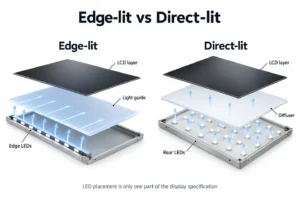
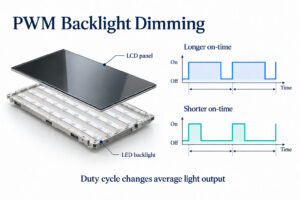
LED backlight: Supplies light behind the liquid crystal layer.
Display controller: Converts incoming video data into timing and pixel-driving signals.
Media player: Decodes and outputs images, video or web-based content.
Content source: Local storage, USB, an application or a CMS.
Power system: Supplies the display, backlight, controller and player.
Enclosure and mount: Support the equipment in the intended environment.
Networking, touch input, speakers, cameras and remote monitoring are optional system elements. They should not be assumed from the presence of an LCD screen.
How an LCD Pixel Creates Colour
Each pixel is normally divided into red, green and blue subpixels. By changing the light level of those subpixels, the panel can produce a wide range of colours.
The backlight first sends light toward the rear polarizer. Thin-film transistors apply electrical signals to individual subpixels. Those signals change the behaviour of the liquid crystal layer.
The liquid crystal does not emit light. It changes how polarized light passes through the pixel structure. The light then passes through red, green or blue colour filters and the front polarizer before reaching the viewer.
The display controller repeats this process across the complete pixel grid for every image frame. The viewer sees a continuous picture rather than the individual switching events.
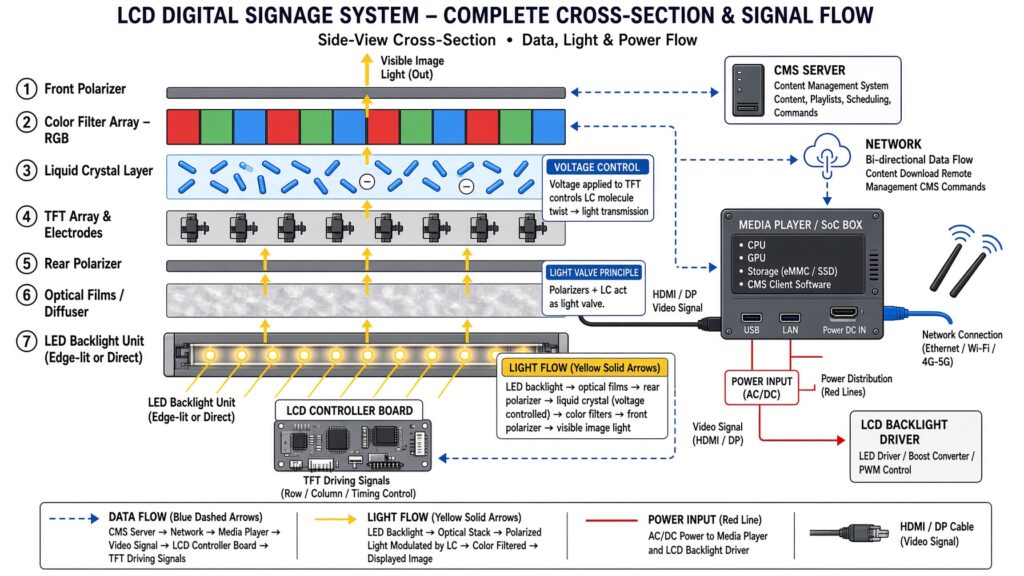
The diagram shows a typical LCD signage signal and light path. The detailed layer arrangement and electronics vary by panel design.
From Content File to Screen Image
The display process begins with a content file or application. A media player reads that source and decodes the image or video data.
The CMS, USB drive, local storage or application provides the content.
The media player decodes the file and prepares a video frame.
The video signal reaches the display controller.
The timing controller addresses the pixel rows and columns.
TFT circuits apply the required voltage to each subpixel.
The liquid crystal and polarizers control light transmission.
RGB filters create the visible colour image.
The player may be an external device or part of the display. Supported file types, resolutions and applications depend on the player and software.
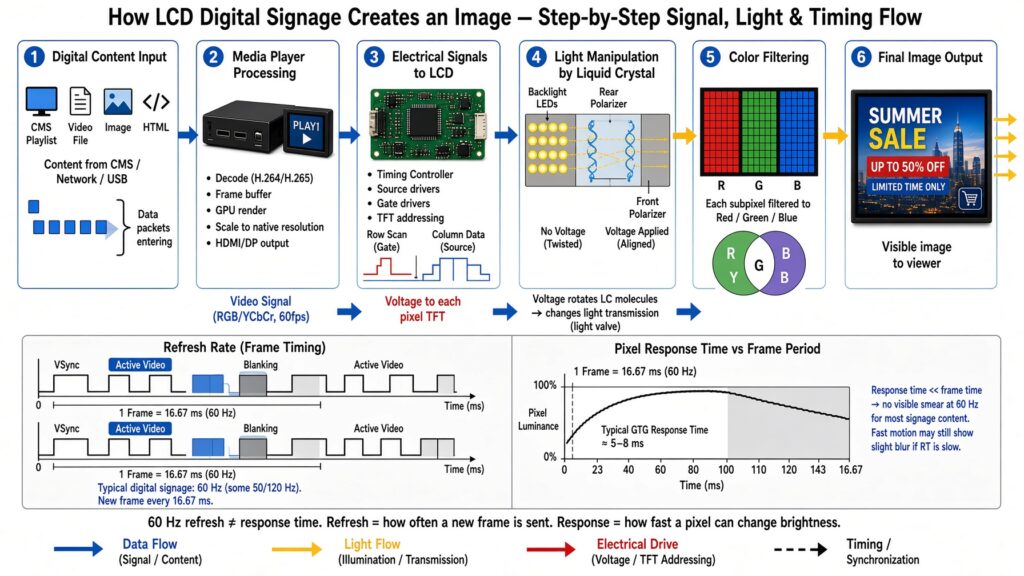
This workflow illustrates the main processing stages. It does not define the specifications of every LCD signage product.
The Role of the Media Player
The media player converts stored or streamed content into a signal the display can show. It may run a playlist, an application, a web page or a scheduled campaign.
Processor, memory and storage requirements depend on the content. A simple image playlist needs fewer resources than several high-resolution video layers or an interactive application.
The player must also provide an output compatible with the display. Resolution, frame rate, orientation and connector type should be confirmed during system design.
What a Content Management System Does
A CMS can help authorised users upload, organize, schedule and publish content. Networked systems may manage several screens from one interface.
Typical functions can include:
Creating playlists
Scheduling content by date or time
Assigning content to selected displays
Managing user permissions
Reporting playback or device status when supported
Downloading content to a player's local storage
Features differ between platforms. Real-time monitoring, proof of play, emergency messaging and third-party integrations must be confirmed for the selected CMS.
Local Playback and Network Playback
A screen does not always need a continuous internet connection. A player can store content locally and continue a scheduled playlist after the files have been downloaded.
USB playback can suit a simple installation where staff update content at the screen. Network management is more useful when content changes often or several locations require central control.
The best method depends on update frequency, number of displays, network availability and management responsibility.
Wired, Wi-Fi and Cellular Connections
Ethernet can provide a stable connection when cabling is available. Wi-Fi may reduce cabling work, but signal quality and network congestion need to be checked at the installation point.
Cellular service can support locations without a suitable fixed network. Coverage, data limits, antenna position and ongoing service cost should be considered.
Fiber may be appropriate for long distances or larger network infrastructure. A local network designer should select the connection based on bandwidth, distance, reliability and site requirements.
None of these connections is automatically required. A locally stored playlist may continue without an active connection, while live data needs a working path to its source.
Resolution and Content Detail
Resolution describes the number of pixels in the image. A higher pixel count can show more detail when the screen size, viewing distance and source content support it.
The content canvas should match the display's orientation and native resolution where practical. Incorrect aspect ratio can stretch the image or create unused areas.
Resolution should not be selected alone. A distant viewer may not see the difference between two pixel densities, while small text can remain unreadable even on a high-resolution panel.
Brightness and Ambient Light
Brightness affects visibility in the surrounding light. An indoor display in controlled lighting needs a different output from a screen facing a bright window or operating outdoors.
The correct value depends on direct sunlight, reflections, viewing distance and content contrast. There is no single brightness level that suits every outdoor or window-facing project.
Automatic brightness adjustment may be available in some configurations. The sensor and control behaviour should be verified for the selected display.
Contrast, Viewing Angle and Image Quality
Contrast describes the difference between bright and dark image areas. Ambient light can reduce perceived contrast even when the panel specification is unchanged.
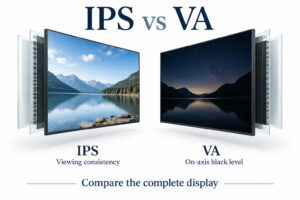
Viewing angle matters when people approach from the side or see the screen from several positions. The installation team should test the real angles rather than rely only on a brochure value.
Colour calibration may be important for brand content or multi-screen installations. When several panels operate together, brightness and colour differences can become more visible.
Refresh Rate and Response Time
Refresh rate describes how often the panel receives a new image frame. Response time describes how quickly pixels change between levels.
These values affect motion differently. Fast video may reveal blur or other motion artefacts, while a static information screen may place less demand on motion performance.
The player output and display input must support compatible timing. A higher number is not automatically useful when the content and signal remain at a lower frame rate.
Commercial Operation and Thermal Management
Commercial displays may be designed for longer operating schedules than consumer televisions. The allowed daily schedule must still be checked for the specific model.
Heat comes from the backlight, electronics and surrounding environment. Sunlight, a sealed cabinet or blocked ventilation can increase internal temperature.
Cooling may use natural airflow, fans or another thermal design. The correct method depends on brightness, enclosure, ambient temperature and operating schedule.
Maintenance access should remain available. Ventilation openings, fans and filters where fitted need inspection according to the product and site plan.
Indoor, Window-Facing and Outdoor Installations
Indoor signage normally operates in a more controlled environment. Window-facing screens may need higher brightness and careful reflection management.
Fully outdoor displays also need protection suited to rain, dust, temperature, sunlight and cleaning conditions. The required IP rating and enclosure design depend on the site.
Indoor: Review viewing distance, mounting, ambient light and operating hours.
Window-facing: Check sunlight direction, glass reflections, cooling and distance from the window.
Outdoor: Confirm enclosure protection, thermal management, cable sealing, mounting and maintenance access.
Outdoor suitability cannot be inferred from brightness alone.
Common Digital Signage Applications
Retailers may use LCD signage for product information, window campaigns and directions. Restaurants can show menus, availability and service instructions.
Transport and public facilities may display schedules, wayfinding and announcements. Healthcare sites can use screens for approved guidance and queue information.
Corporate locations may display visitor directions, room information or internal communications. Each use requires appropriate content, installation and management.
How to Select a System
Start with the application and environment rather than a single specification. The following information helps define the system:
Screen size and orientation
Viewing distance and angle
Indoor, window-facing or outdoor environment
Ambient light and direct sunlight
Daily operating schedule
Content type and update frequency
Local, USB or network management
Required software integrations
Mounting and maintenance access
Power and network availability
Site photographs and measurements reduce the risk of selecting a screen that does not match the installation.
Installation and Commissioning
Installation should confirm structural support, electrical supply, cable routing, ventilation and service access. Local requirements must be reviewed by qualified professionals.
Commissioning should test the complete workflow, not only the screen. Upload content, check scheduling, disconnect the network where appropriate and verify the expected fallback behaviour.
The team should also inspect the image from the real viewing position. Brightness, text size and orientation may need adjustment after installation.
Maintenance and Troubleshooting
A routine check can identify problems before they affect customer-facing information. The schedule depends on the equipment and environment.
Confirm that the correct content is playing.
Check screen, player and network status.
Inspect ventilation and remove dust as permitted.
Review cables, mounts and enclosure condition.
Keep software and approved content backups current.
Record recurring faults and support actions.
A blank screen may result from the display, player, cable, power supply or software. Troubleshooting should isolate each part of the signal path.
Measuring Business Results
LCD technology explains how the screen works, but it does not guarantee a commercial outcome. Sales, customer satisfaction and operational efficiency depend on content and the surrounding process.
A business should record a baseline and measure the same outcome after installation. Suitable metrics vary by application and may include content uptime, update time, wayfinding questions or a defined campaign response.
The previous version of this article cited a 29%–33% sales increase without sufficient support. That figure is not used here because results vary by product, location, campaign and measurement method.
Frequently Asked Questions
Does an LCD panel produce its own light?
No. The LED backlight supplies light. The liquid crystal structure controls how much light reaches the viewer through each subpixel.
Does digital signage need the internet?
Not always. Local or USB playback can operate without a continuous connection. Remote updates and live data require suitable connectivity.
Is a media player always separate?
No. It may be built into the display or installed as an external device, depending on the system.
Can every screen use a CMS?
A CMS requires compatible player software and connectivity. Available functions depend on the selected platform.
What makes a display suitable for outdoor use?
Outdoor suitability depends on enclosure protection, thermal management, sunlight visibility, cable design, mounting and the operating environment.
What information is needed for a quotation?
Provide screen size, orientation, location, viewing distance, ambient light, operating hours, content source, management method and required quantity.
Explore LCD Digital Signage Solutions
Review YJCEN commercial LCD digital signage or contact the project team with your installation and content requirements.