How do outdoor displays prevent overheating?
A cooling system removes heat generated by the display and its electronics, while the design must also account for heat from sunlight. The suitable method depends on the complete installation.
- Give the supplier the expected temperature range, sun exposure, brightness and operating schedule.
- Compare the specified cooling method, clearances and service requirements for the model.
- Keep air paths and service access consistent with the installation instructions.
- Follow the manual when investigating overheating symptoms; dark areas or shutdowns alone do not identify the cause.
This guide explains those options and the checks to discuss with a supplier. It is general guidance, not a specification for every YJCEN product. Always confirm the cooling method and operating limits of the selected model.
Why Outdoor Displays Get Hot
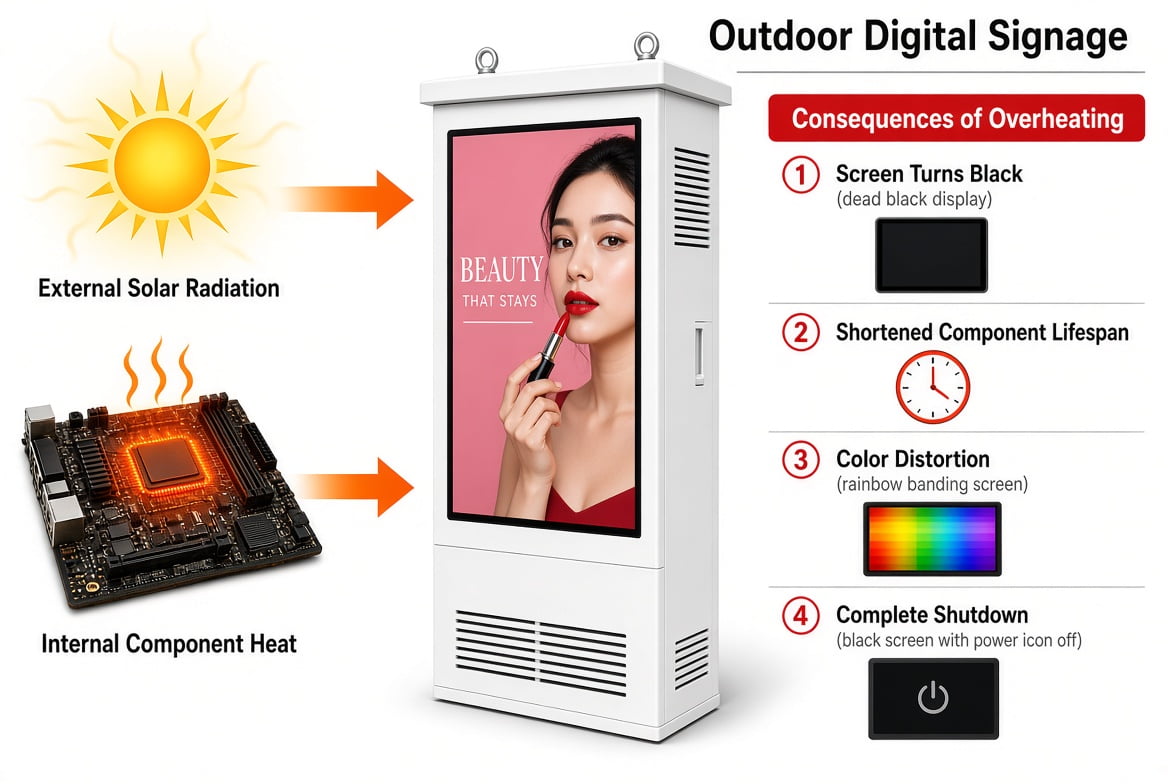
Sunlight heats exposed surfaces and can raise temperatures inside the display. The effect varies with the time of day, shade, screen position and enclosure design. There is no single temperature rise that applies to all outdoor signs.
The display also produces heat while it runs. Its LED backlight, media player and power supply all contribute. A cooling design must account for this internal load as well as the site conditions.
Airflow matters too. A blocked vent, dirty filter or failed fan can reduce heat removal. Nearby walls or a cover may also obstruct the intended air path. Check the installation clearances in the product manual.
Signs of a Possible Heat Problem
Excess heat may affect the picture or cause the display to stop. Possible symptoms include dark areas, colour changes, reduced brightness and shutdowns. These symptoms do not prove that overheating is the cause.
A blank screen can also result from a power, signal, player or software fault. Record when the fault occurs and any temperature warnings. Ask the supplier to review the evidence before replacing parts.
Repeated heat alarms need attention even if the screen later returns to normal. Do not assume that a restart has fixed the cause. Check the cooling system and operating conditions through the approved service process.
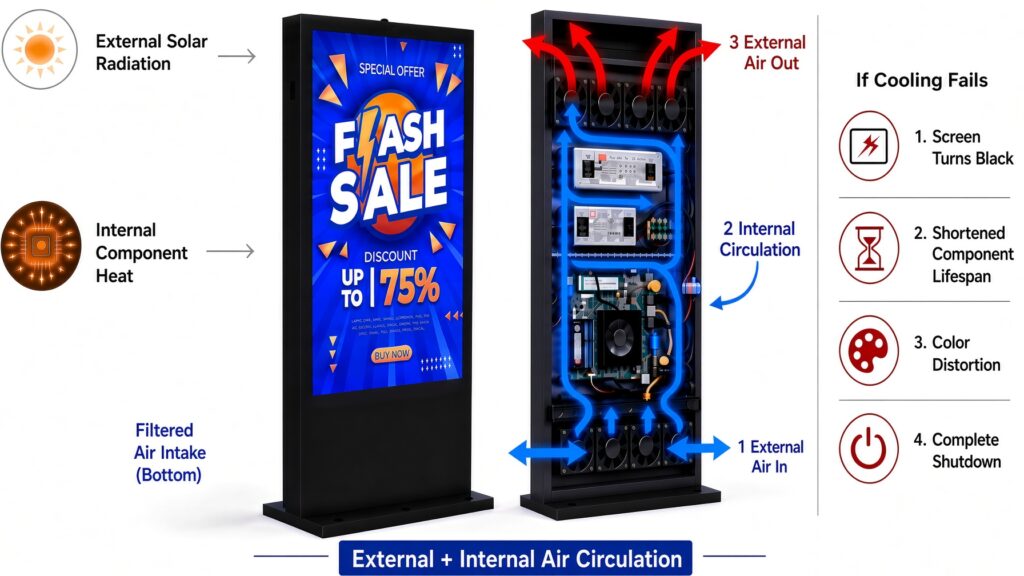
This illustration shows one possible airflow arrangement. Fan counts, vent positions and protection features vary by model. It should not be used as an installation drawing or as proof of a product’s cooling capacity.
Compare the Main Cooling Methods
Start with two questions: how much heat must leave the cabinet, and where can it go? The answers help narrow the choice. The supplier must then check the complete display under its intended operating conditions.
Fan Cooling
Fans move air through a planned path. In a ventilated design, outside air enters the cabinet and carries heat out. Filters may help limit the dust entering through the intake.
Fans can also circulate air inside a closed compartment. For that reason, the words “fan cooling” alone do not tell you whether outside air reaches the electronics. Ask for the airflow layout of the actual product.
A system that uses only ambient air cannot cool the cabinet below that air temperature. Its suitability depends on the available temperature difference, airflow and heat load. Do not use a universal 35°C cut-off to select every fan-cooled display.
Before choosing a ventilated model, ask:
- Where does air enter and leave the enclosure?
- Which filters are fitted, and how are they serviced?
- What clearance is required around each vent?
- What operating temperature range has been specified?
- Does the rating apply at the intended brightness and sun exposure?
Air Conditioning
An enclosure air conditioner uses a refrigerant circuit to remove heat. It can provide cooling when the required internal temperature is below the outdoor air temperature. Capacity and operating limits still matter.
An air-conditioned cabinet normally separates its internal and external air paths. This does not, by itself, establish the complete display’s resistance to rain, dust or salt exposure. Check those specifications separately.
Air conditioning is an option for demanding thermal conditions. It is not automatically required for every hot country or sun-facing installation. The selection should follow the product’s heat load and verified limits.
Ask the supplier about cooling capacity, power needs and service access. Confirm how condensate is handled where applicable. The installation must leave room for the external side of the cooling unit to reject heat.
Air-to-Air Heat Exchangers
An air-to-air heat exchanger transfers heat between separate internal and external air paths. It allows heat to leave without intentionally mixing the two air streams.
This method relies on cooler outside air to take heat from the cabinet. Its output depends on the temperature difference. It cannot provide below-ambient cooling on its own.
The term “heat exchanger” covers more than one design. Here it means an air-to-air system. Do not apply these limits to every liquid-cooled or refrigerant-based system with a heat exchanger.
Ask for the rated heat-transfer performance and required airflow clearances. Confirm the complete enclosure’s environmental protection and service needs. A sealed air path is useful, but it does not remove the need for inspection.
For the basic distinction between ambient-air cooling and refrigeration, see Rittal’s enclosure climate-control overview. This is a general engineering reference, not evidence that a particular YJCEN model includes those components.
Fanless cooling
A fanless design moves heat through the structure and surrounding air without a fan. Its suitability depends on total heat load, solar exposure and installation clearance. A sealed enclosure is not automatically fanless, and removing a fan does not remove the need for a heat path.
Temperature Controls and Protection
Cooling hardware may work with sensors and a control board. Available functions depend on the model. Do not assume that every outdoor screen includes variable fan speed, remote alarms or automatic restart.
Temperature Monitoring
Sensors can measure temperature at selected points inside a display. A reading near the power supply may differ from one near the panel. Ask which readings are available and what each one represents.
Keep the manufacturer’s control settings unless an authorised service procedure says otherwise. Changing a limit to silence an alarm may leave the original fault unresolved.
Dimming and Shutdown
Some displays reduce backlight output or shut down when a temperature limit is reached. These are protective responses, not a substitute for adequate cooling.
Confirm the alarm thresholds, shutdown behaviour and restart procedure for the selected unit. An automatic restart should only be expected if the supplier documents that function. Repeated shutdowns should trigger a service check.
Condensation Management
In cold weather, a heater can bring components into their permitted start-up range before the display switches on. Humidity control also matters: condensation forms when a surface falls below the local dew point. Heater control, drainage and the enclosure air paths therefore need to work as one design.
How to Select Cooling for a Site
Give the supplier a site brief before choosing a display. A country name or average summer temperature is not enough. Include the hottest expected conditions and the way the screen will be installed.
Temperature and Sun Exposure
Record the expected outdoor temperature range and the hours of direct sun. Include photos of the location and nearby structures. Shade can change across the day and through the seasons.
Do not assume that a north-facing position is always shaded. Local geography and the sun’s path matter. Ask the supplier to assess the actual location and mounting angle.
Dust, Rain and Coastal Conditions
Describe dust sources, road spray and possible salt exposure. Ask how the cabinet and cooling system address each condition. A filter needs a service plan suited to the site.
An IP rating describes enclosure protection under defined tests. It does not specify cooling capacity or prove suitability for every coastal environment. Confirm environmental protection and thermal performance as separate requirements.
Brightness and Operating Schedule
State the intended brightness setting and daily operating hours. Ask whether the quoted temperature range applies to those conditions. A rating without its test conditions is difficult to compare.
If the screen will run continuously, confirm that duty rating for the complete product. Do not infer 24/7 suitability from its cooling method alone. Planned maintenance and service access still need to be considered.
Installation Space and Power
Check the clearances around air inlets, outlets and service doors. Avoid adding covers or trim that block them. Any custom surround should be reviewed with the supplier before installation.
Confirm the display’s power requirements, including its cooling equipment. Have qualified personnel carry out electrical work in line with the product instructions and local requirements.
Cooling should be assessed alongside readability and environmental protection. For the wider equipment comparison, use our outdoor digital signage selection guide.
Maintenance and Troubleshooting
Use the maintenance interval in the manual as the starting point. A dusty location may need more frequent inspection. Ask the supplier before changing filters, cleaning methods or service settings.
Keep vents free of leaves and other debris. Arrange inspection of filters, fans and seals as directed. Do not use water or chemicals on cooling parts unless the manual permits that method.
If a heat warning appears, record the time, weather and screen behaviour. Note whether the display was in direct sun and whether the warning repeats. These details help the service team compare the fault with site conditions.
Do not bypass protective controls, repeatedly force a restart or open a live cabinet. Follow the documented shutdown and service procedure. Cooling faults and electrical work should be handled by qualified personnel.
Questions to Ask Before Ordering
Does Every Outdoor Screen Need an Air Conditioner?
No. Fan cooling, air conditioning and heat exchangers serve different needs. Ask the supplier to confirm the selected design against the heat load, operating range and installation conditions.
Does Fan Cooling Mean the Cabinet Is Open to Outside Air?
Not necessarily. Fans may move external air or circulate air within a compartment. Request the actual airflow layout instead of relying on the cooling label alone.
Is a Dark Screen Always Caused by Heat?
No. Power, signal and player faults can also produce a blank screen. Temperature records and fault messages can help the service team identify the cause.
Does an IP Rating Confirm Thermal Performance?
No. Request the operating temperature range and cooling details as well as the enclosure rating. Each addresses a different part of product selection.
Discuss Your Outdoor Display Requirements
Explore IP66 Outdoor Digital Signage when planning an outdoor installation. Share the site temperature range, sun exposure, dust conditions, brightness needs and operating schedule.
Send the installation location, sun exposure and daily operating hours to discuss a cooling configuration for your outdoor display.