Self-service kiosk vs POS — who should use which?
A self-service kiosk is for the customer. A staffed POS is for the employee. Most restaurants keep both: kiosks for self-ordering, the POS for help, cash and exceptions.
- Decide the order routes first — self-order, staffed counter, or both.
- Split supply clearly — kiosk hardware vs ordering/POS/payment software.
- If you keep your payment terminal, send its dimensions for a custom mount bracket.
- Test menu, order and payment status on the live stack before rollout.
The core difference between a self-service kiosk and a Point of Sale (POS) system is who operates the interface. A kiosk lets the customer browse, build and confirm an order. A POS lets an employee take the order, handle exceptions and run the till.
That user split drives hardware layout, UI design and integration work. Queue time, accuracy and staffing results follow the full setup — screen, ordering app, POS, payment and kitchen — not the screen alone. A kiosk does not have to replace the POS. Many sites add self-ordering beside a staffed counter once the applications and payment services are connected and tested.
For buyers and integrators, the practical questions are: which order routes do you need, who supplies each part, and can your existing payment terminal mount on the kiosk?
Quick comparison: kiosk vs POS system
| Feature | Self-service kiosk | Staffed POS |
|---|---|---|
| Primary user | Customer | Employee / cashier |
| Purchase flow | Customer selects, reviews basket and pays on the terminal when payment is configured | Staff takes the order, enters it, confirms and processes payment |
| Hardware focus | Customer-facing touchscreen plus project-selected mount, payment device and receipt printer | Employee screen, cash drawer, scanner, card reader and printer arranged at the counter |
| UI design | Guest-oriented prompts, large controls, assistance when needed | Staff shortcuts for splits, discounts, returns and stock checks |
| Staffing role | Reduces routine order entry; still needs help for exceptions and first-time users | Dedicated staff for every assisted transaction |
| Typical fit | QSR, cinema, airport, hotel check-in, retail lookup | Full-service dining, consultative retail, complex or cash-heavy counters |
When to add a kiosk, keep POS-only, or run both
| Site need | Recommended path | Why |
|---|---|---|
| Customers can finish a clear self-order journey; peak queues form at the counter | Add kiosks + keep POS | Self-order absorbs routine tickets; staff stay for help, cash and exceptions |
| Most orders need consultation, complex modifiers or frequent cash handling | POS-first | Staff UI and drawer workflows stay the primary route |
| You already run a POS and payment stack and want another ordering point | Kiosk hardware + your apps | Reuse the known POS/payment path; mount and OS support still need checking |
| No ordering/POS/payment software owner yet | Hold hardware buy | A screen without a tested order path will not settle the queue problem |
Use this table in RFQ reviews. If the team cannot name the ordering app, POS version and payment provider, stop at software scope before quoting more screens.
User model, hardware and software — what actually differs
User and interaction model
A kiosk UI walks guests through menu, basket review and payment with readable controls. Test it with real menu items and the installed screen height. Keep staff nearby for language help, accessibility needs and failed payments.
A POS UI is built for trained staff who repeat the same tasks all day. Shortcuts, layered menus and exception tools matter more than guest simplicity. That is why replacing the counter with kiosks alone often fails when the site still needs splits, voids or assisted sales.
Hardware configuration
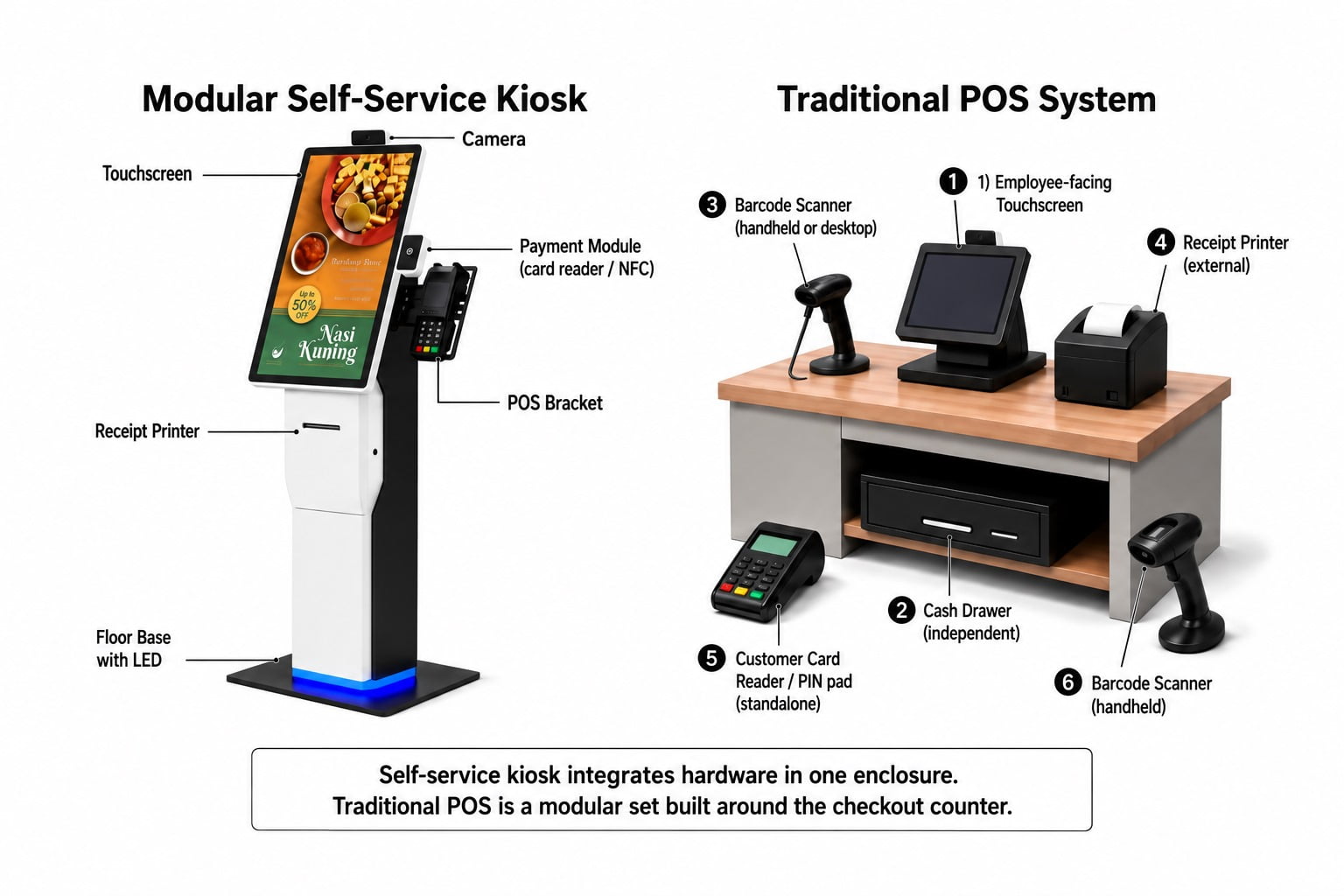
A restaurant self-service kiosk combines a customer-facing touchscreen with the payment and receipt hardware selected for the project. Screen size and mount format vary by model. A complete wall-mounted or floor-standing unit and a modular terminal with detachable parts give different layout options; match the screen, printer, payment device and interfaces to the ordering application.
A staffed POS is usually a modular counter set: employee screen, cash drawer, scanner, receipt printer and customer-facing payment device. Counter layout flexibility is the point — not a single freestanding enclosure.
Software and integration
The kiosk application presents the menu, captures selections and passes the order onward. Add-on prompts, payment steps and receipts follow that application and its integrations. On YJCEN projects, the customer prepares the ordering software, POS and payment services; YJCEN supplies the agreed kiosk hardware.
Physical fit, OS support and software integration are separate checks. A terminal that fits its bracket does not prove that its payment service or POS interface will work with the ordering app. Confirm each link, then test completed orders, cancellations and payment failures.
Can my existing POS / payment terminal fit a YJCEN kiosk?
Yes for the mechanical mount: YJCEN can customize the bracket to the customer’s payment-terminal dimensions. Send the device size so the bracket matches that model. Here “POS/payment terminal” means the physical payment device. The POS system also includes the software that records and manages sales. A custom bracket solves physical fit only; software and payment integration stay with the application owners.
| Part of the setup | Supply responsibility |
|---|---|
| Kiosk hardware | YJCEN supplies the agreed configuration (complete unit or modular hardware) |
| POS / payment terminal and bracket | Customer supplies the terminal and dimensions; YJCEN customizes the mounting bracket |
| Ordering software, POS system and payment services | Customer (or their ISV/integrator) prepares apps, licences and integrations |
Before deployment, confirm OS and interface requirements for the selected software and run the ordering-plus-payment workflow on the chosen hardware.
Running kiosks and POS together
A combined setup keeps a self-ordering route while the counter handles assistance and exceptions. In a QSR example:
- Self-service kiosks — guests who prefer self-order use them when their payment method is supported. Queue impact depends on adoption, kitchen capacity and collection flow.
- Staffed POS — staff handle help requests, cash and POS-supported exceptions, and remain available for kiosk users.
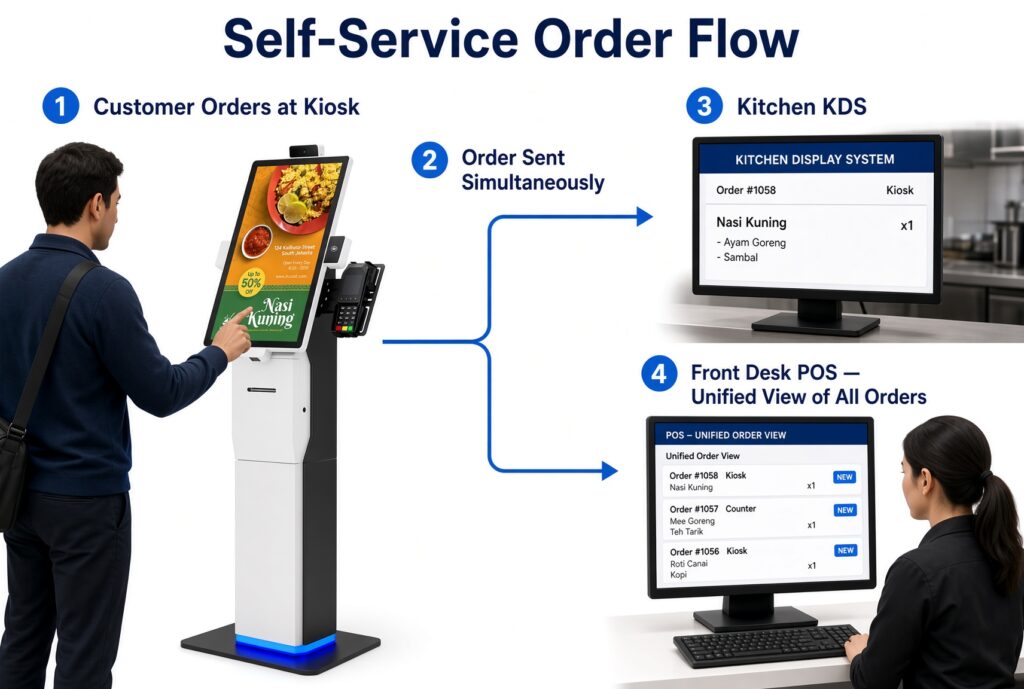
The diagram shows the intended data flow: order entered at the kiosk, then sent to kitchen and POS when the integration is configured. Possible outcomes — choice for guests, redistributed staff time, optional add-on prompts, unified order records — only hold when the connections are tested and the kitchen can absorb the tickets.
A real project using the customer’s POS and payment systems
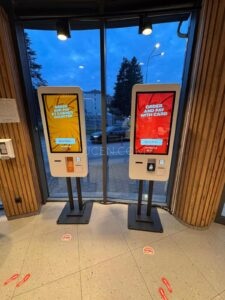
In a YJCEN restaurant kiosk project in Europe, YJCEN supplied two 27-inch floor-standing Windows kiosks with capacitive touchscreens. The customer integrated its own POS and payment systems. That split — hardware from YJCEN, apps and payment from the customer — is the pattern most integrators should plan for.
For a software, peripheral and sample-acceptance checklist, see the self-ordering kiosk software and peripheral checklist.
RFQ checklist before you buy
- Name the order routes: self-order only, staffed only, or both.
- List ordering app, POS product/version and payment provider.
- State wall-mounted or floor-standing preference and target screen size from the product range you are evaluating.
- If reusing a payment terminal, attach length × width × depth (and any cable exit notes) for bracket design.
- Assign owners for menu updates, failed payments, printer jams and remote support.
- Define pilot success checks: completed order, cancelled order, payment failure, and kitchen receipt of the ticket.
Frequently asked questions
Is a self-service kiosk the same as a POS?
No. A kiosk is customer-operated ordering hardware plus an ordering app. A POS is the staff (or backend) system that records sales and often manages inventory and reporting. They can share data when integrated; they are not the same product.
Do I need to replace my POS to add kiosks?
Usually no. Most sites keep the POS for staffed work and add kiosks as another order source. Replacement only makes sense when the current POS cannot accept kiosk tickets or payment status in a tested way.
Who supplies the ordering and payment software on a YJCEN kiosk?
The customer (or their software partner). YJCEN supplies the agreed kiosk hardware and can customize the payment-terminal bracket from your device dimensions. Integration testing remains with the software owners.
What sizes are available on YJCEN restaurant kiosks?
The complete Self-Service Ordering Kiosk line offers 21.5, 27 and 32-inch screens with wall-mounted or floor-standing installation. The modular Self Service POS Kiosk line offers 15.6, 21.5 and 23.8-inch screens with configurable components. Confirm printer and payment modules against your project list — hardware does not include ordering or payment software.
What should I send to get a bracket quote?
Payment-terminal brand/model, outer dimensions, preferred kiosk format (wall or floor), OS preference (Android or Windows) and the ordering/POS stack you will connect. That is enough for YJCEN to discuss the mount and hardware configuration.
Choose the path that matches your order workflow
- Add a kiosk when guests can complete a clear self-order path and the app, payment setup and staff help plan are ready.
- Keep the staffed POS role clear for assisted orders, exceptions and the management functions in your POS software.
- Start mechanical work with dimensions when you already own the payment terminal; start software work with named owners when you do not.
Explore the complete unit on our Self-Service Ordering Kiosk page, or compare detachable components on the Self Service POS Kiosk page. Send terminal dimensions and intended configuration via Contact Us to discuss the mounting bracket and hardware options.