How can digital menu boards support faster ordering?
Digital menu boards can help customers compare categories, prices and available items before they reach the counter. Clear information may reduce avoidable questions, but it does not guarantee faster order fulfilment.
- Keep core menu choices readable from the queue and match prices to the correct items.
- Assign responsibility for daypart changes and sold-out updates.
- Treat POS or inventory integration as a separate requirement to confirm and test.
- Measure ordering time, availability-related corrections and total fulfilment time against a baseline.
This guide explains how menu content, scheduling, placement and system integration affect the result. It also distinguishes display-only menu boards from interactive self-service kiosks.
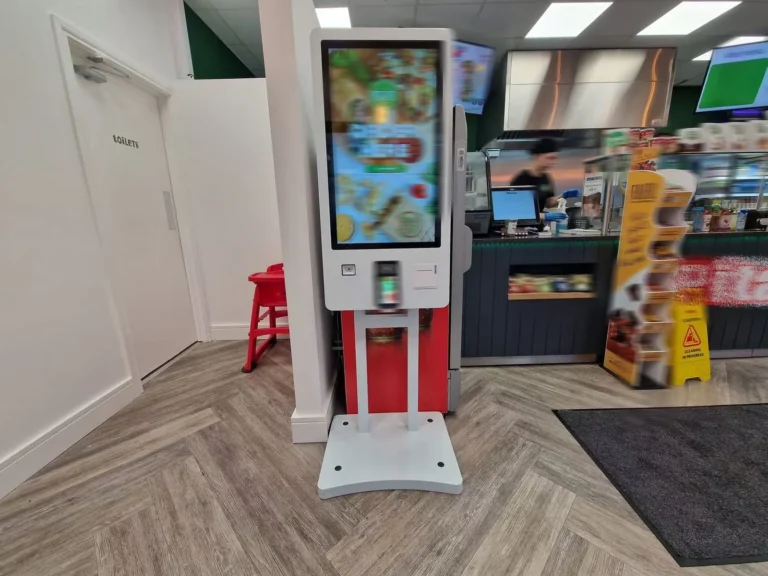
Digital Menu Boards and Ordering Efficiency
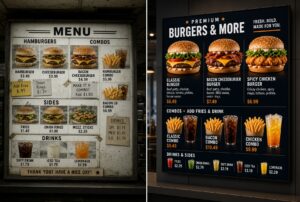
A printed menu remains fixed until staff replace it. A digital menu board can show updated content when the connected content-management workflow supports that change.
Restaurants may use different layouts for breakfast, lunch and evening service. They may also remove unavailable items or replace an expired promotion. Timely information can reduce confusion at the counter.
The screen should make the main choices easy to scan. If customers need to search through crowded layouts, digital technology alone will not improve the process.
Display-Only Boards and Interactive Kiosks
A digital menu board and a self-service kiosk perform different jobs. A display-only board presents menu information to many viewers. It normally does not collect an order directly.
An interactive kiosk uses a touchscreen or other input method. It can guide one customer through item selection and may connect to payment or ordering software.
- Digital menu board: Presents categories, products, prices and promotions.
- Interactive kiosk: Collects selections through an on-screen workflow.
- Payment terminal: Processes a configured payment method.
- Kitchen or POS system: Receives transaction data when an integration is available.
These components may work together, but they should not be treated as the same product. Each connection needs to be confirmed during project planning.
Clear Menu Structure Supports Faster Decisions
Customers usually read a menu in stages. They identify a category, compare a small number of options and then confirm the price or size.
The visual structure should follow that decision sequence. Headings, product names and prices need consistent positions. Promotional content should not hide the information required to place an order.
- Use familiar category names.
- Keep related products together.
- Make prices easy to associate with the correct item.
- Limit the number of competing messages.
- Use readable text at the measured viewing distance.
- Keep essential information visible long enough to read.
Restaurants should test the layout with real customers and staff. A design that looks attractive on a computer may be difficult to scan from the ordering line.
Real-Time Updates Require a Content Workflow
A CMS may allow authorised users to update menu content remotely. The exact functions depend on the selected software and configuration.
Restaurants should decide who can change products, prices, availability and promotions. An approval process can reduce mistakes. Scheduled content should also have a clear start and end time.
Digital publishing is faster than printing only when content is prepared and approved on time. A screen showing an expired offer or unavailable item can create more questions at the counter.
Using Daypart Menus
Daypart scheduling allows a restaurant to show different content during defined service periods. Breakfast items can be replaced by lunch content without changing printed boards.
The schedule should match actual kitchen and ordering availability. If an item disappears from the screen before staff stop selling it, customers may become confused. If it remains visible after stock is unavailable, the queue may slow while alternatives are discussed.
Time zones, special opening hours and holiday schedules should be checked before publication. Multi-location operators may need different schedules for different sites.
Managing Item Availability
Removing an unavailable product can prevent customers from choosing an item that cannot be fulfilled. This can reduce the need for counter staff to explain substitutions.
Availability may be updated manually through a CMS or through a separate system integration. Automatic updates require compatible data and software. They should not be assumed from the presence of a digital screen.
The restaurant should define what happens when availability data is delayed or a connection fails. A safe fallback menu may be required.
Placement and Viewing Distance
Menu boards should appear where customers naturally look before ordering. Screens mounted too high, too far away or outside the queue direction may be difficult to use.
- Measure the distance from the normal decision point.
- Check visibility from different positions in the queue.
- Avoid glare and strong reflections where possible.
- Keep product names and prices readable from the farthest expected position.
- Make sure architectural elements do not block the screen.
- Leave suitable access for installation and maintenance.
The number and orientation of screens should match the amount of essential menu content. Adding more screens can increase the available space, but it can also divide attention.
Content Design for Busy Service Periods
Peak periods require fast recognition. A simple layout can be more useful than frequent animation or complex visual effects.
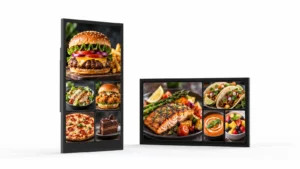
Food photography may help customers identify products, but images should not make prices or names difficult to find. Each screen should have a clear priority.
Transitions should not remove important information while a customer is reading. Core menu items may need to remain visible, while a separate area rotates promotional content.
Connection With POS and Inventory Systems
A digital menu board can operate with scheduled content alone. POS or inventory integration is a separate software project.
When integration is required, the team should define which system owns each field. Product names, prices, tax settings and availability status need consistent data.
Testing should cover normal updates, failed connections and delayed synchronization. An API does not guarantee a complete or maintenance-free integration.
Staff Workflow Still Matters
Employees need to know who updates the menu and how to report a problem. They should also understand the fallback process if a screen or network connection becomes unavailable.
Menu changes should be coordinated with the kitchen and service counter. Digital content that changes before operational teams are ready can cause mistakes rather than improve efficiency.
Training does not need to be complicated. Staff should know the approved update process, basic checks and the correct support contact.
How to Measure Ordering Efficiency
There is no universal improvement percentage. Restaurants should record a baseline before installation and compare equivalent service periods after deployment.
- Average time customers wait before ordering
- Average time spent at the ordering point
- Number of questions about price or availability
- Number of orders changed because an item is unavailable
- Menu update time and publishing errors
- Screen and content uptime
- Total fulfilment time after an order is submitted
The data should be reviewed by location and time of day. A faster menu decision will not necessarily reduce total service time if preparation remains the main bottleneck.
Run a controlled pilot before expanding
Test one clearly defined menu change before rolling it out. Agree on the success criteria and record comparable service periods; a screen upgrade alone does not isolate the cause of a shorter queue.
- Record queue arrival, ordering start, payment completion and order-ready times using a consistent observation method without collecting customer identities.
- Test the clearer layout while keeping prices, promotions, staffing and menu availability comparable. Record exceptions such as sold-out items.
- Compare median waiting, ordering and fulfilment times for similar periods. Separate the ordering step from kitchen preparation.
- Review publishing errors and staff feedback alongside timing data. Expand only after the pilot meets the agreed operational criteria.
Understanding Digital Menu Board Costs
Total cost can include commercial displays, mounts, media players, CMS software, installation, networking, content design and support. Integration work may add separate costs.
Screen size and quantity affect the hardware budget. Brightness, operating schedule and installation environment may also change the required specification.
Buyers should compare complete configurations rather than a screen-only price. A quotation should identify what is included and which services or systems are supplied separately.
Calculating Return on Investment
There is no supported universal 12- or 18-month payback period. Each restaurant has different traffic, labour, menu-update costs and integration requirements.
A useful calculation compares total ownership cost with verified savings or additional contribution. Printing savings, update time and measurable operational changes can be included when reliable data exists.
Forecast benefits should remain separate from measured results. Increased sales, average order value or customer satisfaction should not be assumed without evidence.
Common Implementation Problems
- Too much information appears on one screen.
- Prices are difficult to match with products.
- Promotions hide the core menu.
- Content does not match actual availability.
- Screens are outside the natural viewing direction.
- Daypart schedules use the wrong time or location.
- Staff do not know how to update or report content.
- System integrations are not tested for failure conditions.
A small pilot can reveal these problems before a multi-location rollout. Testing should use the final viewing distance, real content and the intended operating workflow.
Digital Menu Board Planning Checklist
- Define whether the project is display-only or interactive.
- Map the customer decision and ordering process.
- Measure screen position and viewing distance.
- Confirm menu categories and information priorities.
- Define content ownership and approval.
- Confirm daypart and location schedules.
- List required POS, inventory or payment integrations.
- Prepare a fallback for screen or network failure.
- Record baseline performance before installation.
Frequently Asked Questions
Do digital menu boards always reduce ordering time?
No. They can make menu information easier to update and scan, but results depend on content, placement, workflow and other service bottlenecks.
Is a digital menu board the same as a self-service kiosk?
No. A menu board mainly presents information to multiple viewers. A kiosk collects input from an individual customer through an interactive interface.
Can prices and availability update automatically?
They may update through compatible software integration. The data source, connection and fallback process must be confirmed for the project.
Can a menu board connect to a POS system?
It may be possible when the POS and content platform provide compatible integration methods. This capability is not guaranteed by the display alone.
How quickly will the project pay for itself?
There is no universal period. Payback should be calculated from the restaurant’s total project cost and verified operational or financial results.
What information is needed for a quotation?
Provide the number of screens, sizes, mounting locations, viewing distances, operating hours, content workflow, CMS needs and required system integrations.
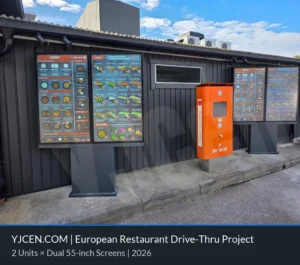
For a real outdoor menu-board installation, review the project below. Use its hardware and installation context as a reference; it is not evidence of a universal reduction in ordering time.
Explore the drive-thru digital menu board project
Plan a Digital Menu Board Project
Explore YJCEN commercial digital signage displays or contact the project team with your restaurant layout and content requirements.