What makes a good advertising display location?
A good location lets the intended audience see, understand and act on the message safely. The busiest spot is not automatically the best choice.
- Check audience fit, approach direction, sight lines, viewing distance and available reading time.
- Inspect sunlight, reflections and environmental exposure during operating hours.
- Confirm power, connectivity, mounting, access and required permissions.
- Test a mock-up or sample content from the viewer's position before committing to the site.
How outdoor displays attract attention in high-traffic areas
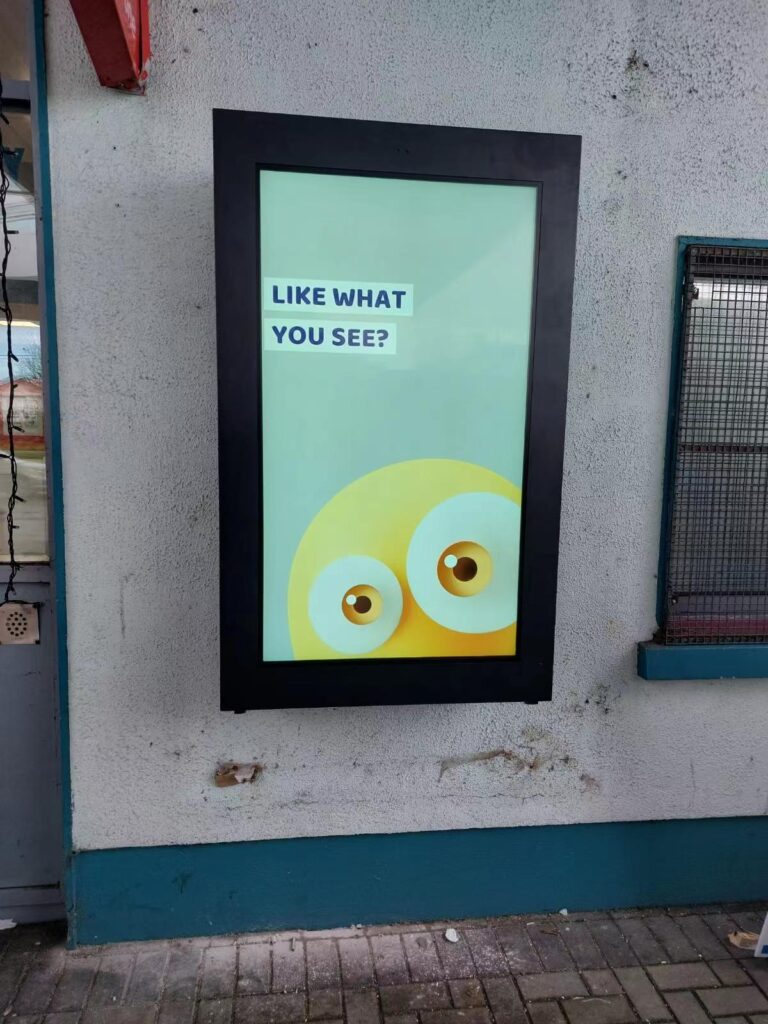
Outdoor displays can make a message easier to notice when they combine a clear viewing position with readable content that fits the audience’s available time. More people passing a screen creates more potential viewing opportunities, but it does not prove that they noticed the message. Plan the position and the artwork together, then check the result from the actual approach.
Use the approach path to decide what appears first
At a busy retail entrance, show the store or destination and the main offer before secondary details. At a pedestrian junction, a short direction may be more useful than a long promotional film. Observe which side people approach from and whether signs, parked vehicles, queues or landscaping hide the display at the moment it would be useful.
Place essential information where it can be understood without waiting for a playlist to restart. A pedestrian who joins halfway through a sequence should still be able to identify the message. Use one main point per layout, leave space around important text and check the design at the normal viewing distance.
Match content to walking, waiting and vehicle contexts
People walking through an area generally have less opportunity to read than people waiting in a queue. Give moving pedestrians a short headline and a clear destination or action. A waiting area can support more detail, provided the screen remains visible and does not obstruct circulation. Keep frequently needed information on screen instead of burying it late in a long rotation.
For a vehicle-facing installation, road safety and local sign restrictions come first. Do not ask drivers to scan a QR code or interact with a screen. Review the permitted content, approach conditions and brightness with the responsible site team. An approach suitable for a pedestrian plaza should not be copied directly to a roadside location.
Manage contrast, reflections and brightness through the day
Strong sunlight can make a design that looked clear indoors difficult to read outside. Test text against the actual background and reflections, and inspect the screen after dark as well. Avoid treating maximum brightness as a permanent operating setting. Where supported, configure the appropriate dimming schedule or ambient-light control for the location.
Keep content contrast clear and use motion selectively. Multiple moving elements can make the message harder to follow. Check that a still frame remains understandable, and avoid relying only on color to distinguish important information. Review the selected model’s operating limits, ventilation and enclosure requirements alongside these content checks.
Connect the message to the next useful step
A display outside a shopping area can point to an entrance, show today’s opening times or announce a relevant offer. Make the next step obvious and achievable from that position. If a QR code is intended for pedestrians, provide a safe place to pause and test scanning from the expected distance. The destination should explain the same offer shown on the screen.
For hardware planning, compare the mounting and service needs of outdoor wall-mounted displays and IP66 outdoor display options. Select the unit for the site conditions, not just the promotional image used in a brochure.
Measure a defined result before expanding the installation
Choose a measure that matches the purpose: people following a direction, a pedestrian campaign response, or staff confirming that visitors can find current information. Define how the result will be collected and respect applicable privacy requirements. Screen playback logs confirm that content ran; they do not by themselves establish that people saw it.
Compare similar operating periods and record changes in weather, foot traffic, prices or other campaigns. Use those observations to adjust placement, text size, content order and timing. A useful trial produces a better display brief and an honest basis for the next investment rather than an unsupported promise of higher sales.
1. Define What the Display Must Achieve
A good site supports a specific communication task. That task may be wayfinding, menu presentation, product promotion, queue information, public notices or brand communication.
Write the objective before comparing locations. A clear objective prevents the team from choosing a busy location that does not support the required action.
- Who is the intended viewer?
- What information should the viewer notice first?
- How long will the viewer normally have to read it?
- What action should follow, such as entering a store or following directions?
- Will the content be informational, promotional or interactive?
The answer also helps define the display type. A short promotional message beside a moving walkway has different requirements from a detailed directory in a lobby.
2. Match the Location to the Intended Audience
More traffic is not always better. A smaller group of relevant viewers may be more useful than a large group moving in the wrong direction.
Observe who uses the area, why they are there and where their attention is naturally directed. Compare weekday, weekend and seasonal patterns when those changes affect the business.
Check pedestrian behaviour
For pedestrian locations, record walking direction, queue positions, stopping points and common obstructions. Notice whether people can pause without blocking circulation.
Entrances, reception areas and checkout zones can provide useful viewing opportunities, but only when the screen does not compete with signs that carry more urgent information.
Check vehicle viewing conditions
For vehicle-facing screens, assess approach direction, speed, stopping time and driver sight lines. Safety and local sign rules take priority over promotional visibility.
Do not assume a large audience can read detailed content. Messages for moving viewers normally need a simpler layout than messages for people waiting nearby.
3. Inspect Sight Lines, Distance and Viewing Angle
Stand where the intended viewer will actually be. Check the screen position from the beginning, middle and end of the viewing path.
Columns, shelving, parked vehicles, doors, landscaping and temporary displays can block the line of sight. Future layout changes should also be considered.
- Measure the expected viewing distance.
- Check whether viewers approach from the front or from an angle.
- Confirm that doors and people will not regularly cover the screen.
- Keep essential safety and wayfinding signs visible.
- Test sample content at its intended text size.
There is no single screen size or mounting height for every site. Content density, viewing distance, orientation and local accessibility requirements must be assessed together.
4. Measure Lighting and Reflections
Lighting changes throughout the day. Inspect the candidate location in the morning, around midday and after dark when the display will operate during those periods.
Direct sunlight, bright windows, glossy surfaces and strong ceiling lights can reduce contrast or create reflections. Outdoor exposure can also change with the season.
Use the site survey to determine the required display brightness and screen treatment. Do not select brightness from a general rule without checking the actual environment.
- Note when sunlight reaches the screen or viewing area.
- Check reflections from glass, polished walls and floors.
- Review nearby light sources at night.
- Test both light and dark content backgrounds.
- Confirm whether automatic brightness control is required and available.
A screen that is too dim may be difficult to read. Excessive brightness can be uncomfortable and may conflict with local restrictions, especially at night.
5. Match the Display to the Environment
Indoor, window-facing and outdoor sites create different equipment requirements. The location survey must record the exposure before the display specification is finalized.
For outdoor locations, consider rain, dust, humidity, temperature range, wind, direct sun and possible corrosion. A sheltered position can reduce exposure but does not automatically make indoor equipment suitable for outdoor use.
Confirm the required enclosure and thermal-management configuration with the supplier. Use the verified rating of the selected model instead of assuming that every outdoor screen has the same protection level.
Window-facing installations need a separate review of solar heat, reflections and ventilation. The glass, orientation and space around the display can affect operating conditions.
6. Confirm Power and Content Connectivity
Reliable power is a basic site requirement. A qualified person should confirm supply capacity, cable routing, isolation, grounding and any local electrical protection requirements.
Plan where cables and equipment will sit before installation. Exposed cables can create safety, appearance and maintenance problems.
Connectivity depends on the content workflow:
- USB playback may suit simple local updates.
- Wi-Fi or wired networking may support remote content management.
- Cellular connectivity may be considered where fixed networking is unavailable.
- Interactive systems may need connections to approved business software or peripherals.
Test signal quality at the exact installation position. Do not assume that a network working elsewhere in the building will be reliable at the screen.
7. Check Mounting, Safety and Accessibility
The mounting method must match the building structure, display weight and maintenance plan. Wall-mounted, floor-standing and other configurations have different space and engineering needs.
Confirm wall strength, floor condition, anchoring points and cable routes before ordering mounting hardware. Outdoor structures may require an engineering review for site-specific loads.
The installation must not narrow an escape route, create a trip hazard or block required signs. Interactive screens also need an approach area that users can reach safely.
Accessibility rules differ by market and application. Check the applicable local standard for mounting height, reach range, controls, clear floor space and readable content.
8. Verify Permissions Before Committing to the Site
Permission requirements vary by jurisdiction, property and installation type. Check them before signing a location agreement or beginning structural work.
- Property-owner or landlord approval
- Local sign or planning permission
- Electrical or building approval where applicable
- Restrictions on brightness, animation or operating hours
- Rules for protected, residential or historic areas
- Privacy requirements for cameras, sensors or audience measurement
The authority having jurisdiction should confirm the final requirements. A permit used for one city or building should not be assumed to apply elsewhere.
9. Plan Maintenance and Physical Security
A screen needs safe access for inspection, cleaning and service. Leave enough clearance for doors, filters, connectors and removable components where the product design requires it.
Check whether technicians can reach the unit without closing a busy walkway or disturbing customers. Record any access-hour restrictions imposed by the site.
Security planning may include suitable fasteners, restricted access and existing site surveillance. The appropriate measures depend on the location and risk assessment.
Do not position the unit where routine impact from carts, doors or vehicles is likely. Physical protection must not block ventilation or the viewer’s sight line.
10. Compare Locations with One Scorecard
Use the same criteria for every candidate location. This makes trade-offs visible and prevents rent or traffic volume from dominating the decision.
- Audience fit: Are the intended viewers present?
- Viewing opportunity: Can they see and read the message?
- Lighting: Is the screen readable throughout operating hours?
- Environment: Can an appropriate display configuration handle the exposure?
- Infrastructure: Are power, connectivity and cable routes practical?
- Installation: Is the structure suitable and safe?
- Compliance: Can the required approvals be obtained?
- Service access: Can the unit be maintained without unreasonable disruption?
- Total cost: What are the site, equipment, installation and operating costs?
Record evidence beside each score. Photographs, measurements, observations and written approvals are more useful than a rating without explanation.
11. Test the Location Before Full Deployment
A temporary mock-up can reveal problems that drawings miss. Mark the proposed screen outline or place a sample display at the intended position when the site permits it.
Show realistic content and observe it from normal approach paths. Check legibility, glare, congestion and whether viewers have enough time to understand the message.
After installation, compare performance with the stated objective. Suitable measures may include content completion, directions followed, enquiries, interactions or attributable responses.
Use measurement methods that respect privacy and local law. Treat impressions and conversion estimates as evidence only when the collection method is defined and reliable.
12. Common Location-Selection Mistakes
- Choosing the highest traffic count without checking audience relevance
- Inspecting the site at only one time of day
- Ignoring reflections, seasonal sun or night-time brightness
- Selecting equipment before recording environmental exposure
- Assuming power and network service are available at the mounting point
- Blocking circulation, accessibility space or required safety signs
- Leaving no practical route for maintenance
- Committing to rent or construction before checking permissions
- Using projected ROI as a guarantee rather than a testable assumption
Advertising Display Location Checklist
Before approving a site, collect the following information:
- Communication objective and intended audience
- Traffic direction, peak periods and typical dwell time
- Viewing distance, angle and possible obstructions
- Lighting conditions during all operating periods
- Indoor, window-facing or outdoor environmental exposure
- Required screen orientation and content density
- Power supply, cable route and connectivity options
- Mounting surface, floor space and structural review
- Accessibility, circulation and emergency-route checks
- Owner approvals and local permit requirements
- Cleaning, service access and physical security
- Installation, operation and location costs
- Measurement method and review schedule
Frequently Asked Questions
Is the busiest location always the best place for a display?
No. Traffic must include the intended audience, and viewers need a realistic opportunity to see and understand the content. Relevance and viewing conditions should be assessed with volume.
How should lighting be checked before installation?
Inspect the exact screen and viewing positions at different operating times. Record sunlight, reflections, nearby lights and night conditions, then match the display specification to that evidence.
Does every digital signage installation need an internet connection?
No. Some systems can use local playback, including USB updates. Remote management and connected functions normally require an appropriate network, depending on the selected configuration.
Which permits are required for an advertising display?
Requirements depend on the jurisdiction, property and installation. Confirm sign, planning, electrical, building, accessibility and content restrictions with the relevant owner and authority.
How can two candidate locations be compared fairly?
Apply one scorecard to both sites and attach evidence to every rating. Include audience fit, visibility, environment, infrastructure, installation, compliance, service access and total cost.
Related YJCEN Display Options
The site survey should be completed before the final hardware configuration is selected. YJCEN provides outdoor wall-mounted displays, outdoor IP66 display options and indoor digital signage for different installation conditions.
Send the planned location, viewing distance, orientation, operating hours, environmental exposure, mounting method and content workflow with your enquiry. These details allow the display configuration to be checked against the actual application.