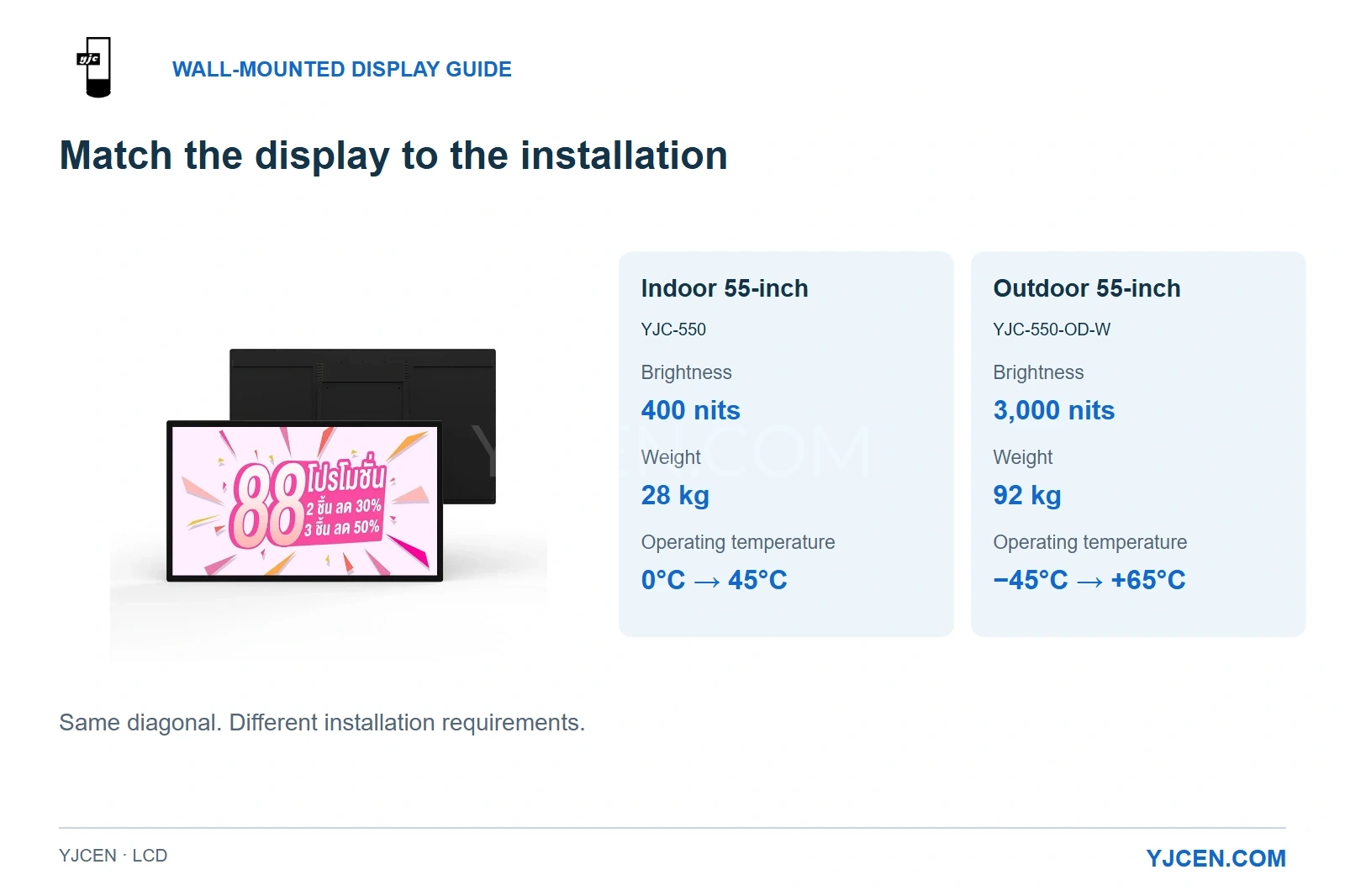
The indoor 55-inch model provides 400 nits, weighs 28 kg and operates at 0°C to 45°C. The outdoor 55-inch model provides 3,000 nits, weighs 92 kg and operates at −45°C to +65°C.
The right wall mounted digital signage fits both the viewing task and the space around it. YJCEN’s Indoor Digital Signage suits interior advertising and information walls, while an exposed exterior calls for outdoor brightness and weather protection. Choose the environment and touch requirement first, then size the complete installation—including the rear housing, connections and access needed to remove the screen.
A slim screen can look ideal on a wall and still be awkward to connect or maintain. The most useful comparison is between complete configurations in their intended positions: what people will see, how they will use the display, and how it fits the building.
1. Which display belongs in this location?
Start with where the screen will operate. An interior information wall, a street-facing shop window and an exposed façade place different demands on the display.
| Location | Recommended starting point | Main reason |
|---|---|---|
| Interior lobby, shop or office wall | Indoor commercial LCD signage | Designed for indoor lighting and operating conditions |
| Inside a shop window, facing the street | High-brightness window display | Daylight and reflections remain important even with the screen behind glass |
| Exterior wall exposed to weather | Outdoor wall-mounted display | Combines outdoor brightness with ingress protection and a suitable temperature range |
For example, YJCEN’s 55-inch indoor YJC-550 provides 400-nit brightness and a 0°C to 45°C operating range. The 55-inch outdoor YJC-550-OD-W combines 3,000 nits, IP65 and a −45°C to +65°C operating range, with temperature and fan controls.
For an exposed exterior position, choose the outdoor configuration. A canopy can reduce direct exposure, but the location’s daylight, moisture and temperature conditions still govern the choice.
Screen direction matters too. NIST’s discussion of sunlight readability explains the role of ambient contrast and reflections. In practice, pair suitable brightness with a screen position that reduces distracting reflections.
If you are still deciding where the display should stand, our wall-mounted versus freestanding outdoor display guide covers that earlier choice.
2. Will people read the screen or touch it?
Choose non-touch signage for advertisements, menus, notices and directions that people simply read. A touch configuration makes sense when visitors need to select a destination, browse information or interact with an application.
Make that choice before designing a close-fitting surround. Two displays with the same diagonal can have different external dimensions, even within the same product family.
YJCEN’s 55-inch indoor models illustrate the difference:
| Configuration | Front outline in landscape: width × height | Brightness | Native resolution |
|---|---|---|---|
| Non-touch YJC-550 | 1275.51 × 747.12 mm | 400 nits | 3840 × 2160 |
| PCAP-touch YJC-550 | 1294.6 × 765.5 mm | 400 nits | 3840 × 2160 |
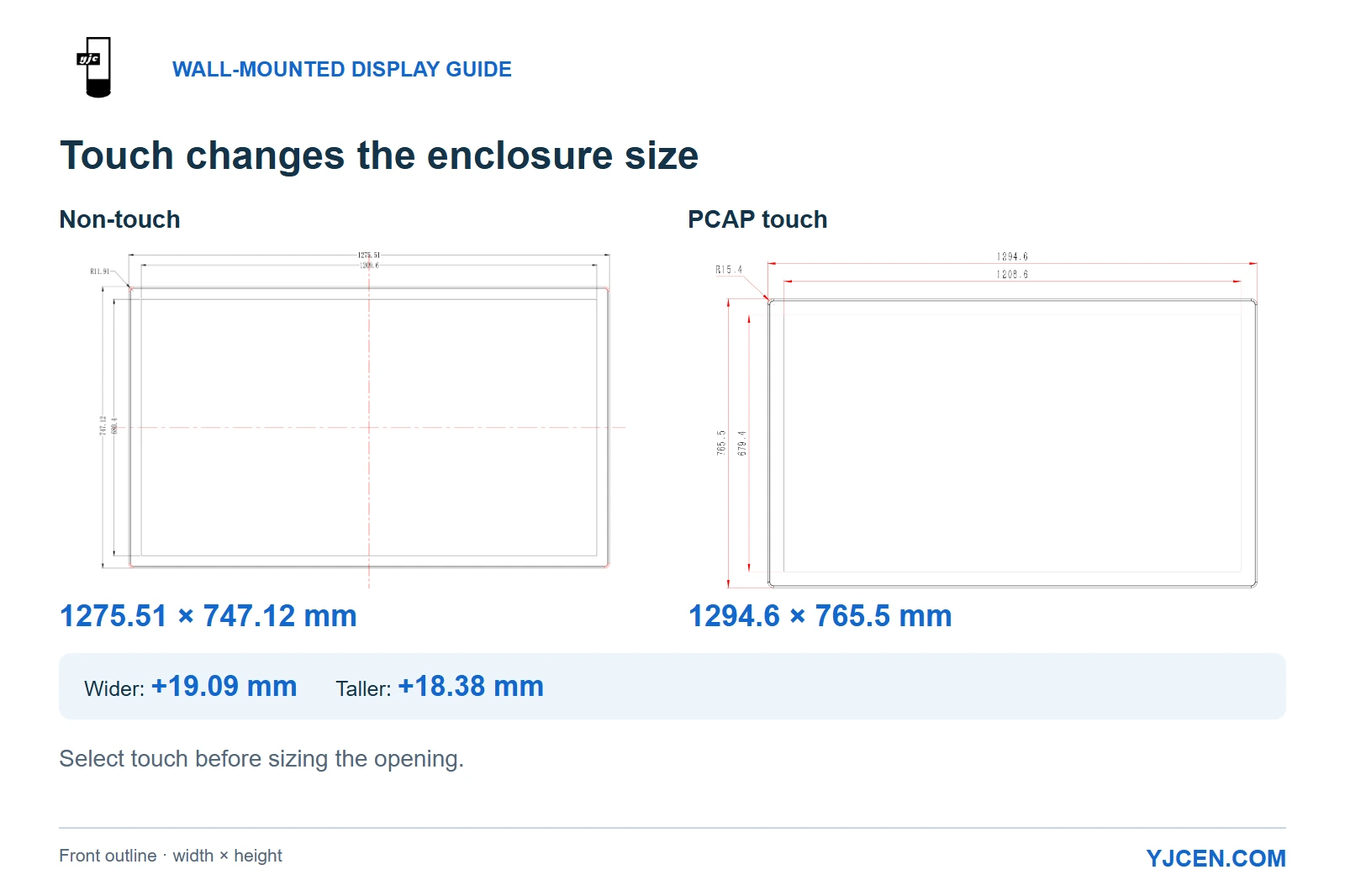
Calculated from these drawings, the PCAP enclosure is 19.09 mm wider and 18.38 mm taller. An opening sized exactly to the non-touch outline would be too small for the PCAP version; selecting touch after the joinery is built can therefore change the installation work as well as the screen order.
The viewing position also changes. A wall mounted touch screen kiosk needs approachable controls within the intended users’ reach, whereas a non-touch information screen can be positioned for visibility from farther away.
Choose the application and operating system around the task people will perform. The touch display provides the input surface; the application determines the menus, navigation and actions available to the user.
3. How much space does a “slim” display really need?
For a surface-mounted display, the full rear profile determines how it sits against the wall. For a recessed display, that profile also determines how much depth the surround must accommodate.
The 55-inch indoor non-touch specification lists a depth of 21.28 mm, while its drawing shows a 66.28 mm overall side profile including the rear structure. The PCAP drawing similarly shows a 24.4 mm front-section depth and a 68.4 mm overall profile.
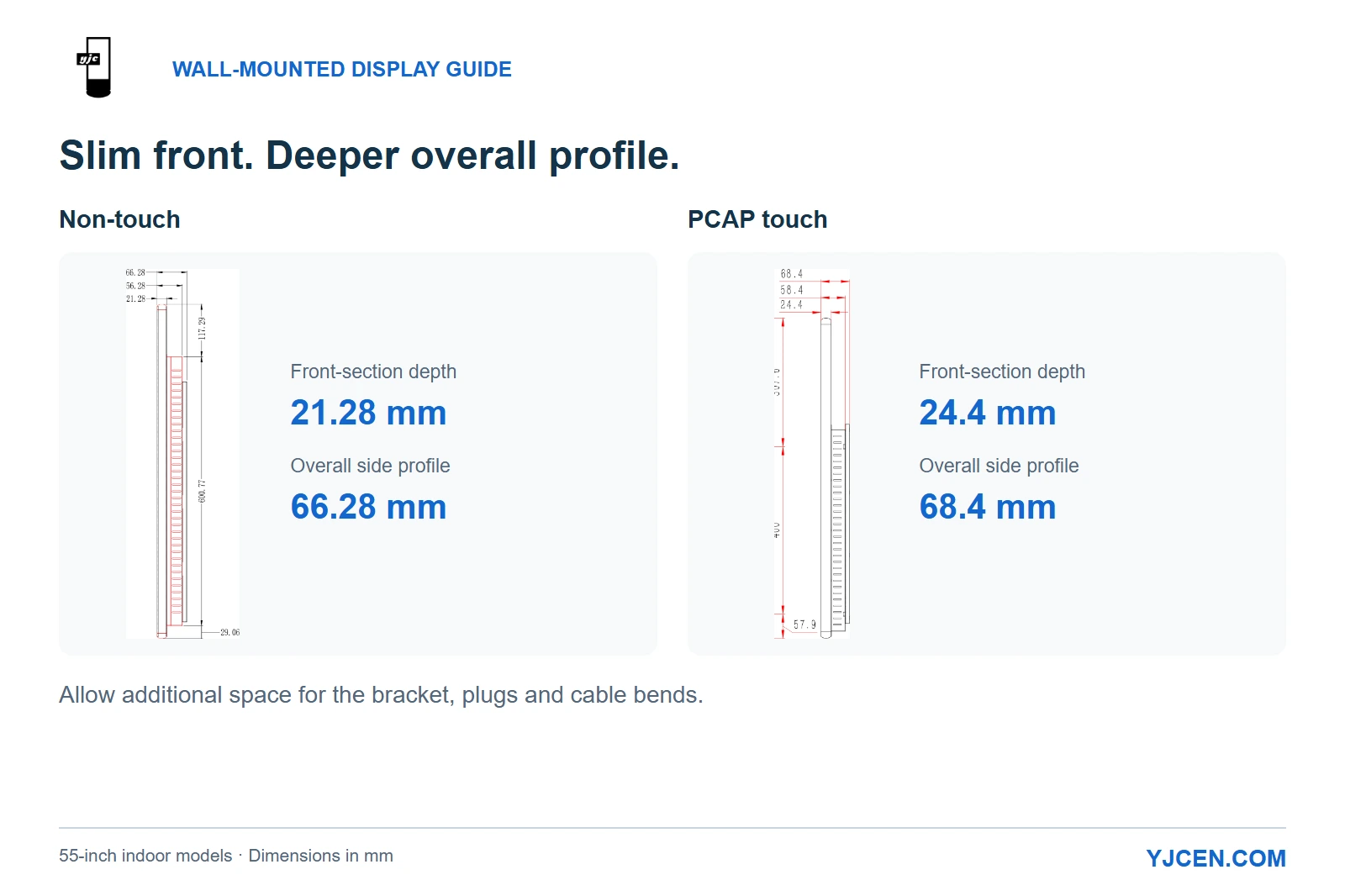
That distinction changes the buying decision for shallow cabinetry: the thin front section is only part of the installation. Start with the complete drawn profile, then add the space required by the chosen mounting arrangement, connected plugs and cable bends.
A close-fitting surround also needs a way to release and remove the display. Removable trim and accessible connections make that possible without dismantling the surrounding wall finish whenever the screen needs attention.
Outdoors, enclosure size and weight have a larger effect on the installation. The 55-inch landscape YJC-550-OD-W measures 1420 × 930 × 198 mm and weighs 92 kg, compared with 28 kg for the 55-inch indoor non-touch unit.
These are different handling and wall-support requirements for the same screen diagonal. The outdoor model’s dimensions and weight belong in the wall layout from the beginning, alongside the proposed fixing positions and cable route.
4. What does the supplied bracket solve?
YJCEN supplies a standard bracket for its indoor wall-mounted range and a reinforced bracket for its outdoor wall-mounted range. This gives the installation team the corresponding display-mounting hardware; the wall material and site loads determine the anchoring arrangement.
There are two connections to consider: the display to its bracket, and the bracket to the building. VESA’s Flat Display Mounting Interface overview addresses standardized display mounting interfaces, while the wall-side fixing design deals with the supporting structure.
The mounting method also affects the space around the screen. YJCEN’s indoor installation guide shows the display engaging a mount plate; the outdoor guide shows a hooked device secured to the wall bracket with mounting screws.
For a decorative surround, leave access for that engagement and securing sequence. A layout that accommodates the installed screen but prevents the installer from reaching its mounting screws will make both installation and removal unnecessarily difficult.
For the 92 kg outdoor model, give the installer the selected drawing and the wall construction details early. That allows the anchoring and lifting arrangement to be planned around the actual unit rather than a generic “55-inch display.”
5. Where will the player, cables and cooling air go?
Decide how content reaches the screen before positioning power and network outlets. Built-in playback keeps the system in the display, while an external player needs its own space, power and signal connection.
| Your playback plan | What the wall layout needs to accommodate |
|---|---|
| Built-in Android or Windows system | Power, the chosen network connection and access for the planned update method |
| External HDMI player | An HDMI-equipped display configuration, a location for the player, its power supply and the signal cable |
| Local USB updates | A USB connection the site team can reach after installation |
The indoor Android configuration provides two USB ports and one Ethernet RJ45 port. The outdoor YJC-550-OD-W additionally lists HDMI IN × 1; for an indoor project using an external HDMI player, include that input in the requested configuration.
Power requirements also change with the hardware. The 55-inch indoor model has a maximum power rating of 75 W, while the outdoor landscape model is rated at 290 W maximum—useful figures for planning the connected equipment load, rather than estimating average electricity consumption.
The rear space serves cooling as well as cables. The outdoor landscape drawing identifies an air inlet, a rear air outlet and a rear power-cable entry, so a surround should keep those routes open instead of covering them with trim.
For a recessed installation, a wall cross-section is especially useful: it shows the screen’s rear profile, the route for connections and the available air space in one view. This helps coordinate the display and the surrounding construction before fabrication.
6. Which size and resolution suit the content?
Choose the physical size around the smallest information people need to read and where they will stand. A full-size example of the proposed menu or directory makes this easier to judge than a screen diagonal by itself.
For a dense directory, a larger screen or fewer items per view can improve readability more than keeping small text and simply increasing resolution. Portrait or landscape orientation should follow the layout of that content and the available wall area.
YJCEN’s indoor non-touch range includes a 43-inch Full HD model and a 55-inch 4K UHD model. The 55-inch outdoor wall-mounted example is Full HD, illustrating why resolution should be selected alongside the content task and environmental configuration.
For a broader comparison of resolution, operating hours and playback options, see our commercial LCD signage buying guide.
Ready to choose a configuration for your wall?
Start with a photograph or sketch of the location and an example of the content. Add the preferred size, quantity and destination country, then describe these four choices:
- Indoor, window-facing or exposed outdoor use, including sunlight exposure and operating hours.
- Portrait or landscape, with touch or non-touch operation.
- Surface mounting or a recessed surround, with wall material and available space.
- Built-in Android or Windows playback, or an external player and its required connections.
Send these details to YJCEN for a configuration recommendation and quotation. We can provide the corresponding product drawings and installation documents so your team can coordinate the selected display with the wall layout.