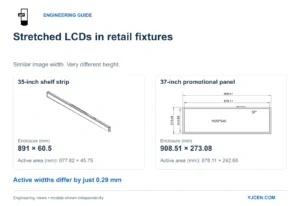
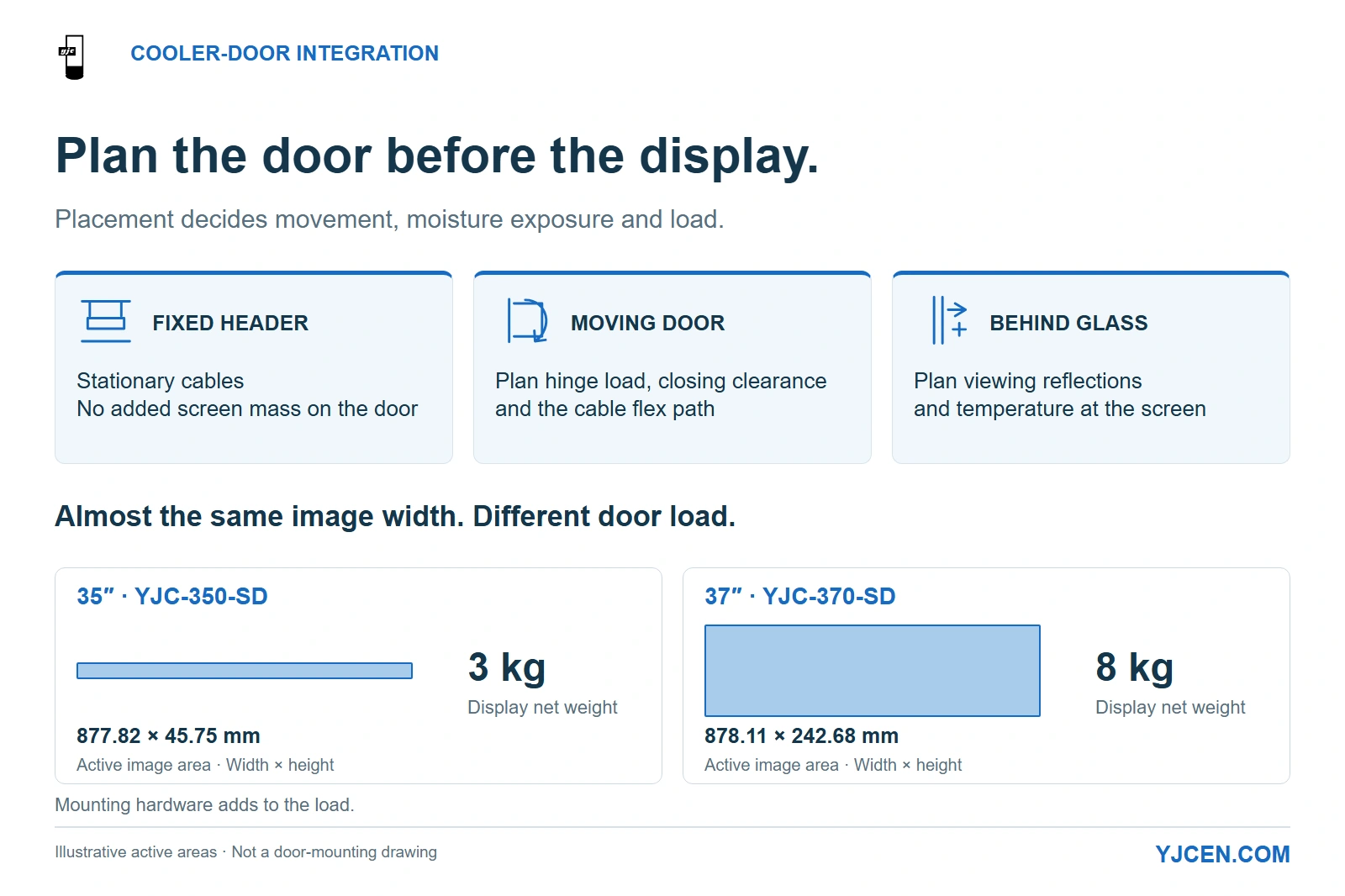
The 35-inch YJC-350-SD has an active image area of 877.82 × 45.75 mm and weighs 3 kg; the 37-inch YJC-370-SD has 878.11 × 242.68 mm and weighs 8 kg. These are display weights; mounting hardware adds to the installed load.
Choose the mounting position before the screen size: a fixed aisle-side header avoids adding display weight and moving cables to a cooler door, while a door-mounted screen needs a load path, closing clearance and condensation plan. For retail OEMs integrating YJCEN Stretched Bar LCD Displays, the useful starting point is a door cross-section and its operating conditions, followed by the message shoppers must read.
A cooler-door display is not a shelf-edge assembly with a longer cable. Its mounting position decides which parts move, which surfaces get cold and how much merchandise remains visible.
1. Should the screen move with the door?
For an existing refrigerated cabinet, start with a fixed header or another structural position on the aisle side when the message can remain above the merchandise. This keeps the screen in a stable reading position and avoids routing its supply through a moving hinge. The cabinet still needs space for the display, its support and heat removal.
Choose a moving-door arrangement when the message must travel with one specific door or the fixed header cannot provide the required viewing position. That choice adds screen and bracket mass to the door assembly and makes the cable route part of the opening mechanism. Design these items together rather than ordering a screen first and adding clamps on site.
| Proposed position | When it is useful | What changes in the integration |
|---|---|---|
| Fixed aisle-side header or structural frame | Category names, promotions or prices serving one door or a group of doors | Static cable routing; keep the support clear of opening doors and cabinet ventilation |
| Aisle-facing surface of a moving door | Information must stay aligned with that individual door | Added moving mass, handle clearance, hinge-side cable flex and a door-specific fixing arrangement |
| Behind the glass, toward the refrigerated space | A flush external appearance is required | Glass reflections and the temperature at the screen become part of the selection; allocate thermal and moisture control before selecting hardware |
Keep product-specific prices aligned with the correct door, especially if the screen is on a fixed header spanning several doors. A narrow strip can preserve more of the merchandise view; a taller panel gives the designer more vertical space but covers more of the door front.
For a display that stays on a stationary shelf, select the shelf-edge message and screen position around the products below it. Move to a door-specific design when the display or its cables must move, or when cold glass becomes part of the viewing arrangement.
2. Which condensation conditions belong in the specification?
Record temperatures where the display will actually sit, alongside aisle temperature and humidity. The refrigerated cabinet’s setpoint describes the storage compartment; it does not establish the temperature of the aisle-side display housing, glass or cable connectors.
The National Weather Service’s explanation of dew point identifies the temperature at which air reaches saturation. Applied to a cooler-door assembly, a surface cooled below the adjacent air’s dew point can collect condensation, even while the surrounding store feels comfortable.
Separate two problems: moisture obscuring the viewing surface, and moisture reaching the display assembly. A brighter backlight addresses neither cause. Choose the screen position and the door’s thermal arrangement first, then assess readability through the finished glass.
| Condition during use | Selection consequence |
|---|---|
| Moisture appears on the glass between the shopper and the image | Resolve the viewing-path condensation through the door design or change the display position |
| The display or connector area becomes cold and wet after opening or defrost | Move electronics to a controlled aisle-side location or specify a configuration qualified for those conditions |
| A cover keeps cleaning liquid away but traps heat behind the screen | Provide a heat-removal route as part of the cover and mounting design |
| The door is held open during replenishment | Include that open period in the operating profile, alongside normal shopper use |
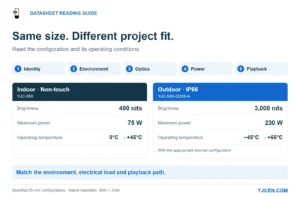
The standard YJCEN YJC-350-SD and YJC-370-SD configurations are specified for indoor operation at 0–45°C. Use them as candidates for an aisle-side installation that maintains those operating conditions; a position exposed to sub-zero refrigerated air calls for a different thermal configuration before hardware selection.
Build the operating profile around door-closed cooling, repeated customer openings, replenishment, defrost and cleaning. Record where moisture forms and whether it persists after the door closes. Those observations tell the OEM whether to change placement, revise the door assembly or develop an environmental option, rather than treating every problem as insufficient brightness.
3. Which dimensions and loads decide the mounting arrangement?
Measure the usable door width, the permitted screen height and the available depth with the door both open and closed. Include the handle, adjacent door, frame, gasket and shelf pull-out path. The display’s front outline is only one part of that occupied space.
Two YJCEN configurations illustrate why choosing by diagonal size is misleading:
| Mechanical or display characteristic | 35-inch YJC-350-SD | 37-inch YJC-370-SD |
|---|---|---|
| Format | Narrow shelf-edge strip | Taller regular bar display |
| Enclosure front, width × height | 891 × 60.5 mm | 908.51 × 273.08 mm |
| Active image area, width × height | 877.82 × 45.75 mm | 878.11 × 242.68 mm |
| Native resolution | 3840 × 200 pixels | 1920 × 540 pixels |
| Display net weight, excluding project mounting hardware | 3 kg | 8 kg |
The active image widths differ by 0.29 mm, calculated from the two specifications. Yet the taller model adds 212.58 mm of enclosure height and 5 kg of display mass. On a moving door, those differences change the blocked merchandise area and the load the door assembly must carry, even though the visible image is almost the same width.
Choose the narrow format when the available band is shallow and the message is a short price or promotion. Choose the taller format when product imagery or multiple lines justify the extra height and the support can accommodate the complete assembly. A fixed header can be the better place for that larger message when adding mass to the door is undesirable.
Define the fixing surface, not just the glass thickness
For a clamp proposal, provide the complete door cross-section: glass build-up, frame profile, proposed contact area and the door manufacturer’s permitted fixing locations. A clamp that opens wide enough can still conflict with a seal or place the load on an unsuitable part of the door. Use structural frame attachment where the door design provides for it; treat glass attachment as a door-OEM detail with defined contact pads and load limits.
Put the screen, carrier, fasteners and cable support into the moving assembly mass. Give the door OEM the mounting position as well as that mass, because the distance from the hinge also affects the hinge load. Retain reliable closing, sealing and handle access with the complete assembly installed.
Reserve depth for the rear housing and removal movement
Use the complete side view when allocating the cavity. The YJCEN 37-inch drawing shows a rear electronics housing projecting behind the slim display section, so the front-panel thickness alone does not describe the space occupied by the assembly.
Add the carrier, plugs and cable turns to that outline, then show how the screen comes out for service. Keep rear ventilation openings clear and preserve the movement needed to engage and release the selected mounting parts. Set the fixture opening and removal route before the door trim is manufactured.
4. How much brightness does the finished door actually need?
Select brightness against the installed viewing arrangement: ordinary aisle lighting, strong reflected luminaires or daylight reaching the cabinet. A screen behind glass and a screen directly facing the aisle can need different solutions even within the same store.
YJCEN’s current standard bar-display specification is 400 cd/m², equivalent to 400 nits. Use that as the candidate hardware specification for a representative installation, rather than treating it as a universal cooler-door requirement. Run the intended price and promotional content with the store lights and cabinet lighting on.
Readability also depends on reflected light and contrast. NIST’s discussion of ambient contrast and display reflections explains why brightness alone is an incomplete readability measure; for this installation, the practical comparison is the complete screen-and-glass arrangement seen from the shopper’s position.
If a ceiling light masks the price, first change the screen angle or location, or the lighting arrangement. If the message remains too faint after reflections are addressed, include a brightness requirement based on that sample in the quotation. If fog obscures it, return to the moisture design rather than raising the backlight setting.
Match the artwork to the chosen format. The 35-inch strip has only 45.75 mm of active image height, so several stacked lines quickly compete for space. Keep the main price and qualifying text readable together; use the physical letter-height and layout method to translate the pixel design into the actual size shoppers see, without importing wayfinding-specific sign requirements into a retail promotion.
5. How should power, cable movement and cleaning be handled?
A fixed header lets power and data remain on the stationary structure. For a moving-door display, route the cable through a defined flexing path near the hinge, clear of the gasket, closing edge and shopper’s hand. Select the moving cable arrangement for the actual opening angle and duty, with the connectors held outside the repeated flexing section.
The two configurations above use AC 100–240 V, 50/60 Hz with an internal power supply. Include the actual supply route in the door design instead of assuming the screen can run from an existing low-voltage lighting feed. Wireless content updates can remove a moving network cable, but the display still needs power.
Use strain relief on the fixed and moving sides so the cable motion does not pull directly on the screen connection. Provide an accessible service disconnect and a removal sequence that does not require pulling a plug through a narrow hinge gap. Build the wiring to the door assembly design and applicable local electrical requirements.
The standard configurations carry IP5X: the water-protection position is unspecified. STMicroelectronics’ explanation of the IEC 60529 code distinguishes the solids and water positions and explains the use of “X” when a protection rating is unspecified.
For an aisle-side screen, keep cleaning spray and runoff away from the housing, ports and cable entry. Where direct wet cleaning is part of the store procedure, specify the cleaning method and required protection for the complete installed assembly as quotation inputs. Choose the enclosure, cable entries and connector protection together, while retaining the heat-removal route.
Before batch release, use one representative door assembly to establish three practical outcomes:
- It opens and closes correctly. The screen, bracket and leads clear the frame and adjacent door, while the latch and gasket retain their intended function.
- Its information stays usable. Prices remain readable under the planned lighting and the agreed door-opening and defrost conditions.
- It can be serviced. Staff can access the intended content-update connection, and a technician can disconnect and remove the screen without dismantling the insulated glass unit.
Set the opening-cycle duty and acceptable visibility recovery with the door OEM and operator. The sample should reproduce that use profile; an arbitrary cycle count would give a less useful answer than the actual store operation.
6. Cooler and Freezer Door LCD RFQ: Copy into Your Enquiry
Attach a door cross-section, an open-door view and one sample of the intended content. Use the fields below to separate fixed-header and moving-door proposals so their mounting and wiring costs can be compared on the same basis.
7. Frequently Asked Questions
Can a standard stretched LCD be installed inside the freezer compartment?
No, the standard models discussed here are rated for indoor operation at 0–45°C. Use an aisle-side location within those conditions or develop a suitable thermal configuration for the refrigerated position.
Is a fixed header simpler than a moving-door installation?
Yes, it avoids adding display mass and a flexing supply cable to the door. It is a useful starting point when the message can remain above the merchandise.
Does IP5X specify water protection?
No, the “X” leaves the water-protection rating unspecified. Match the enclosure and cable-entry arrangement to the proposed cleaning and moisture exposure.
Can higher brightness solve condensation on the glass?
No, increasing brightness does not remove condensation. Resolve the affected surface and thermal conditions before judging the finished image.
Are the 35-inch and 37-inch models similar in mounting load?
No, their specified display weights are 3 kg and 8 kg respectively. Include the selected carrier and cable support when establishing the load on the door assembly.
Can Wi-Fi eliminate every cable crossing the hinge?
No, the display still needs a power connection. A fixed-header position keeps that supply off the moving door, while a door-mounted screen needs a defined flex path.
Is glass thickness enough to select a clamp?
No, the door construction and permitted load path also determine the fixing. Include frame geometry, contact areas and operating clearances in the clamp proposal.
Send the Door Drawing for a Mechanical-Fit Proposal
Send the door cross-section, proposed screen position, operating conditions and sample artwork with your RFQ. For custom display integration, those inputs let YJCEN discuss the screen format and mounting space with your fixture or door team before a sample is built.