Search for “android kiosk” and the SERP fills with lockdown and MDM tools. The integrator already has—or is about to pick—a query, wayfinding, or ordering app. The buy that actually freezes is narrower: does that app’s dependency list fit the documented Android 11 + RK3568 (2 GB / 32 GB) preload on these kiosk models, or must the RFQ escalate for an OS option that is not listed on P08 / P09 / P10?
Android kiosk SERP vs a hardware dependency check
An android kiosk RFQ is not a lockdown-software shootout. Software vendors sell kiosk mode, remote wipe, and managed profiles. Hardware buyers need a different gate: line up the real app’s OS, memory, storage, port, and peripheral needs against what the candidate chassis documents—and stop inventing options the SKU does not list.
If the wayfinding or ordering build is an Android 11 APK that fits RK3568 with 2 GB RAM, 32 GB eMMC, and dual USB, the documented preload on YJC-215-IK / YJC-215-K is the candidate to trial. If the dependency sheet says Windows only, escalate the RFQ—do not invent a windows kiosk SKU on these codes.
Build the application dependency table
Before any BOM freeze, put the app’s requirements in one table. Required rows: OS / version, package type (APK vs browser), any browser or WebView need the vendor states, drivers or native libs, peripherals (printer, scanner, card, camera), and how the unit is managed (MDM, local only). Leave no blank cells: write what the app requires, what the candidate documents, and pass / fail / escalate.
| Dependency item | App requires | Documented on candidate | Pass / fail / escalate |
|---|---|---|---|
| OS / version | Android 11 APK (or state exact need) | Android 11 on P10-003 / P08-001 / P09-005 | Pass if app targets Android 11; escalate if Windows-only |
| CPU / SoC | Fits RK3568 class (or state need) | RK3568, quad-core 2.0 GHz | Pass if vendor accepts RK3568; escalate if x86-only |
| RAM | ≤ 2 GB usable for app + OS (or state need) | 2 GB | Pass if app runs in 2 GB; escalate if sheet needs more |
| Storage | ≤ 32 GB eMMC after OS + app (or state need) | 32 GB eMMC | Pass if install fits; escalate if sheet needs larger disk |
| USB / Ethernet | Ports for named peripherals + LAN | USB × 2 · RJ45 × 1 · Wi-Fi / LAN | Pass if peripherals fit dual USB + RJ45; escalate if more ports required |
| Browser / WebView | Vendor-stated browser or WebView (if any) | 未提供 beyond Android 11 | Escalate if app needs a pinned browser/WebView version |
| API level / GMS | Vendor-stated API or GMS need (if any) | 未提供 beyond Android 11 | Escalate if app needs a named API level or GMS pack |
| Windows OS image | Windows-only dependency sheet | 未提供 on P08 / P09 / P10 | Escalate RFQ — do not invent a Windows SKU |
| Software license with hardware | License expected to ship in box | 未提供 | Escalate — do not assume license ships with hardware |
What these three models document today
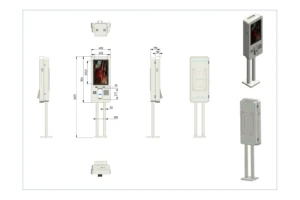
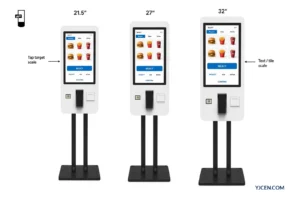
Three 21.5-inch kiosk codes share the same compute preload. The 21.5-inch Android 11 interactive kiosk (YJC-215-IK, P10-003), the 21.5-inch Android 11 self-service kiosk (YJC-215-K, P08-001), and the 21.5-inch Android 11 modular self-service kiosk (YJC-215-K, P09-005) all document Android 11, RK3568 (quad-core 2.0 GHz), 2 GB RAM, 32 GB eMMC, USB × 2, RJ45 × 1, and Wi-Fi / LAN. Optional OS on these three codes is 未单列 / 未提供.
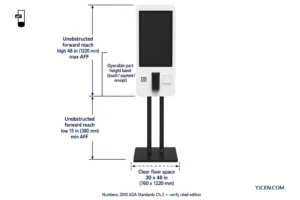
Form deltas still matter for the site, not for inventing a different OS: P10-003 is the capacitive interactive path at 400 nit (PCAP / 10-point); P08-001 is the floor self-service chassis at 1675 × 400 × 190 mm, 28 W, 300 nit; P09-005 is the modular floor path at overall height 1570.8 mm, 28 W, 300 nit (net weight 未提供). Printer USB to the motherboard and scanner / camera / card via TP-C when configured are mount and wiring facts—not a certified Windows driver matrix.
| Model | OS | CPU | RAM | Storage | Ports |
|---|---|---|---|---|---|
| YJC-215-IK (P10-003) | Android 11 | RK3568 2.0 GHz | 2 GB | 32 GB eMMC | USB × 2 · RJ45 × 1 |
| YJC-215-K floor (P08-001) | Android 11 | RK3568 2.0 GHz | 2 GB | 32 GB eMMC | USB × 2 · RJ45 × 1 |
| YJC-215-K modular (P09-005) | Android 11 | RK3568 2.0 GHz | 2 GB | 32 GB eMMC | USB × 2 · RJ45 × 1 |
When Windows appears in the brief but not on these codes
Some project briefs still say “Windows preferred” because an existing PC app or POS stack is Windows-only. On P08 / P09 / P10, optional Windows is 未提供. Do not write a Windows image, driver matrix, or Windows license into the hardware quote for these kiosk codes.
Other product lines can list Windows as an option—for example an indoor wall display line may show “Android or Windows” optional—but that contrast is not a kiosk SKU and does not transfer to P08 / P09 / P10. When the dependency sheet is Windows-only, escalate the RFQ for an OS path that is actually documented; do not relabel these three Android 11 models as Windows kiosks.
Acceptance: install the app on the candidate image
Pass means the APK (or browser URL the vendor accepts) installs on the stated Android 11 image, starts, and drives the named peripherals over the documented USB / network ports before the BOM freezes. Fail means crash, missing native libs, or peripherals that need ports or drivers the candidate does not document—then change the app target or escalate the RFQ.
Do not treat a paper OS comparison as acceptance. Do not claim Google Mobile Services, a pinned WebView, or a certified printer/scanner brand matrix when those rows are 未提供 beyond “Android 11.” If the vendor will not trial on RK3568 with 2 GB / 32 GB, escalate before sheet-metal and image freeze.
What to send in the RFQ (and what we return)
Send the app dependency list (OS / API / browser / drivers / peripherals), the APK or browser URL, the target peripheral list, and whether Windows is mandatory.
We return a pass/fail note against the three Android 11 models above, or an escalate path when the dependency list needs an OS option not documented on P08 / P09 / P10—not a software license.
Related reading on neighboring decisions: digital signage media player setup, digital wayfinding kiosk map and deployment, and how to choose a self-service kiosk.
FAQ
Is “android kiosk” search mainly about hardware preload fit?
No. Much of the SERP is lockdown/MDM software.
Do YJC-215-IK / YJC-215-K document Android 11?
Yes. Android 11 on P10-003 / P08-001 / P09-005.
How much RAM and storage do these three share?
2 GB RAM and 32 GB eMMC.
Is Windows listed on these kiosk codes?
No. Windows on P08 / P09 / P10 is 未提供.
Does a software license ship with the hardware?
No. License-with-hardware is 未提供—do not assume it.