What should a food truck digital menu board plan cover?
Place the menu where customers choose before ordering, then plan power, content and setup for the full service period.
- Test the menu from the actual queue approach in representative daylight.
- Confirm whether the selected model uses mains power or a battery; movable does not mean battery-powered.
- For a battery model, plan charging and storage around the complete day.
- Test local playback, opening and closing routines, and a current fallback menu before the first busy service.
Plan the display around that operating routine. Decide where people read the menu, how the equipment receives power and how staff update sold-out items. Then compare a suitable fixed display with a separate battery-powered unit. Neither arrangement is right for every truck.
Put the menu before the ordering decision
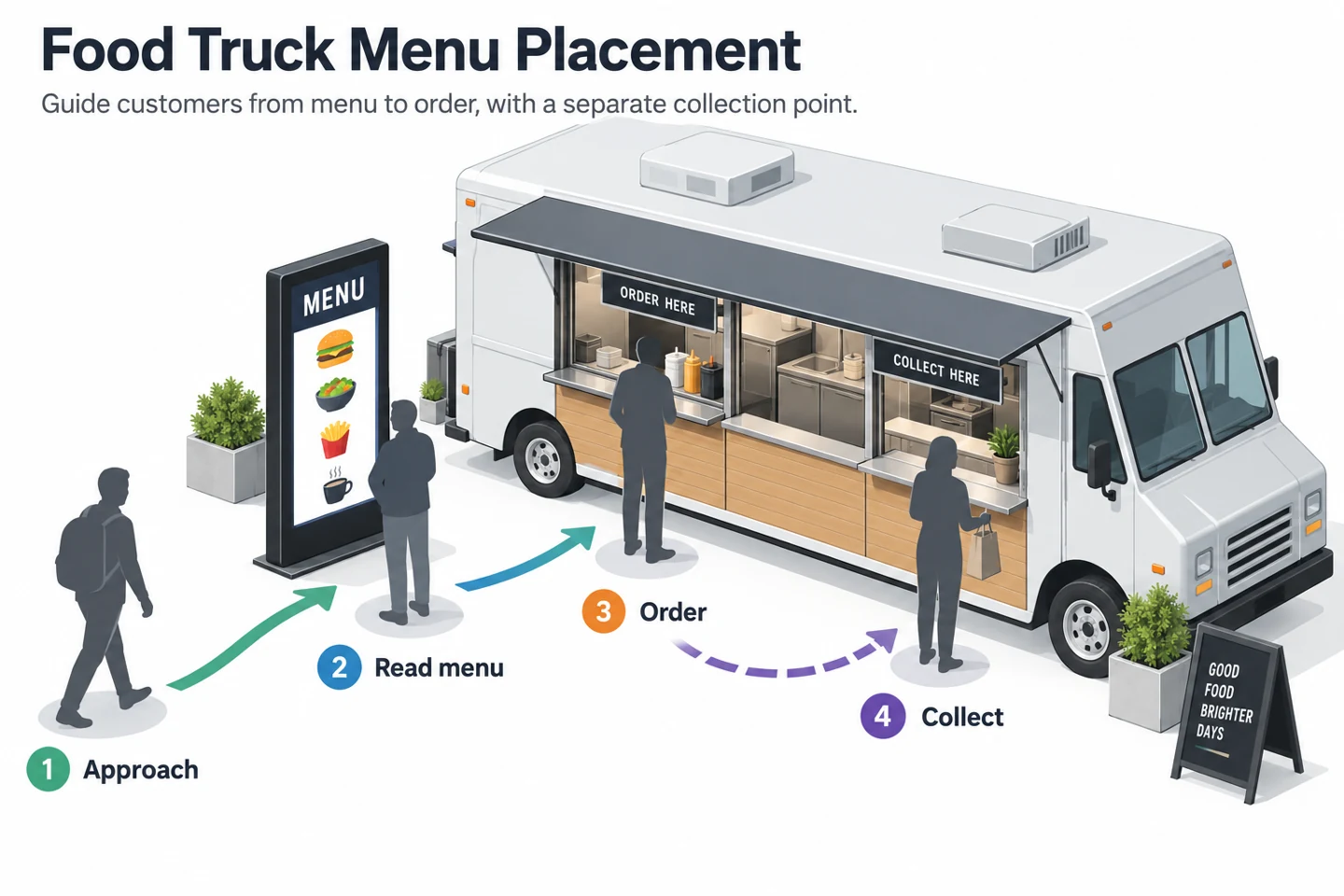
Sketch the customer route from approach to collection. Mark where a person can stop to read without blocking the service window. A screen beside the queue may serve a different purpose from a smaller display next to the cashier.
Use the approach display for the information people need before reaching the window: main choices, prices and the offer currently available. Keep collection instructions separate when they would distract from ordering. Test the arrangement from the customer’s position rather than from inside the truck.
Check the view at the times you expect to trade. An awning, open hatch or parked vehicle can change what is visible. A screen behind glass also needs a reflection check; its published brightness alone does not establish readability through the installed window.
Choose between a fixed screen and a separate display
| Arrangement | Useful when | Confirm before choosing |
|---|---|---|
| Fixed display | The menu position and installed power arrangement are consistent. | Mounting design, service access, protection requirements and suitability for the actual installation. |
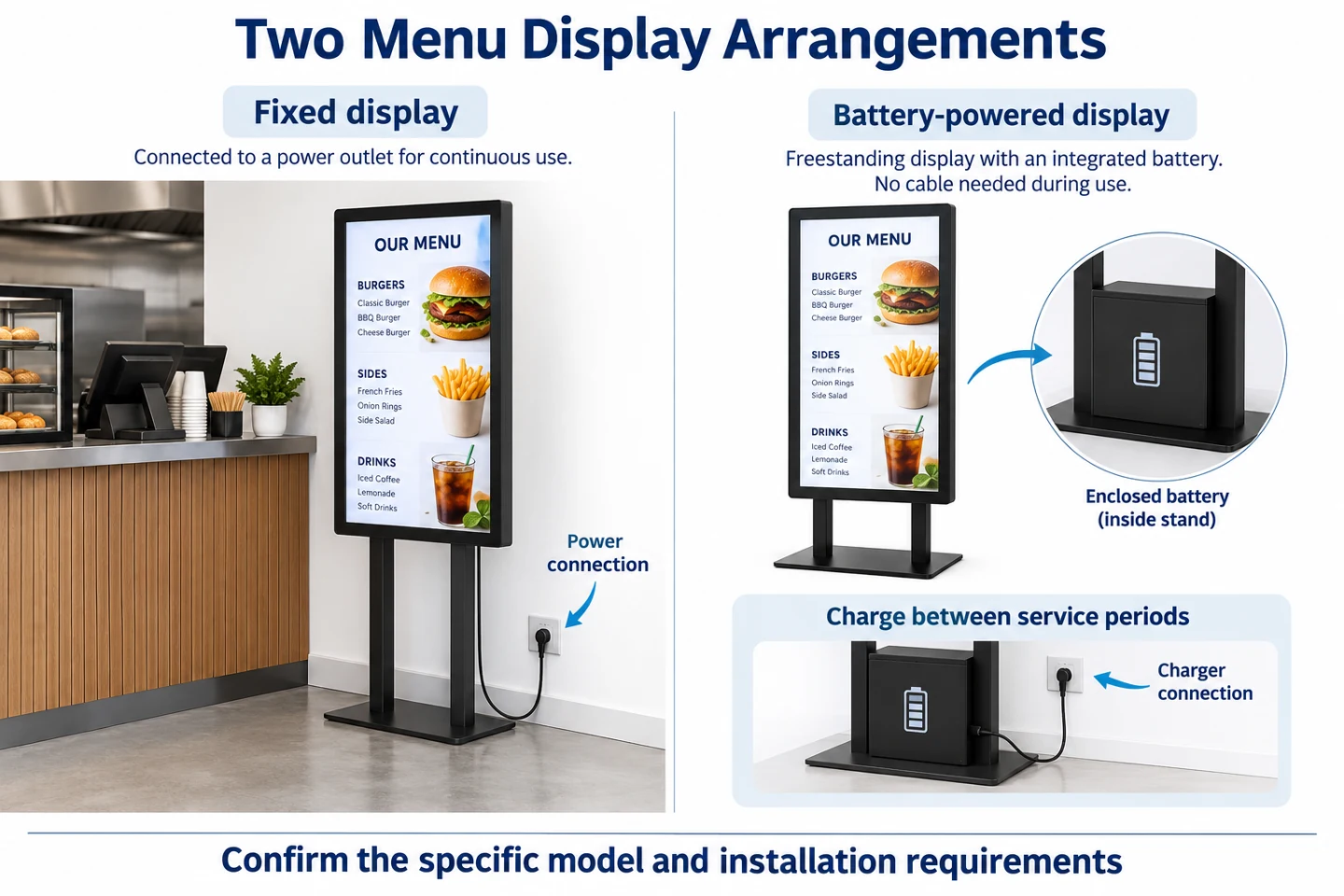
| Battery-powered display | The menu needs a separate position away from a power socket during service. | Runtime at the required brightness, charging routine, placement and transport arrangements. |
A movable screen is not necessarily battery-powered. YJCEN’s portable indoor display range, for example, uses mains power during operation. Match the power requirement to the offered model instead of relying on the word portable.
For exposed locations, discuss the actual conditions with the supplier. An outdoor enclosure does not automatically establish suitability for permanent attachment to a moving vehicle. Vehicle mounting, transport vibration and the proposed electrical arrangement require separate confirmation.
Match battery planning to service hours
Count the full period between charging opportunities, including setup before the first order and any later service session. Decide where the display will be charged and stored after trading. A battery arrangement is practical only when the daily routine includes enough charging time.
Use runtime figures that identify brightness and test conditions. A figure measured at minimum brightness is not the expected duration of a bright outdoor menu. Ask which operating profile best matches your content, settings and trading environment, then test a representative service period.
The current YJCEN high-brightness battery display lists different runtime figures for its brightness versions and operating conditions. Read those distinctions when comparing it with the standard battery-powered range. Their specifications should not be combined into one assumed product.
Design for a short reading window
Start with a small number of clearly grouped choices and visible prices. Test the text at the expected viewing distance using the actual screen. If customers must move closer to read essential information, simplify the layout before adding more decorative content.
Keep the main menu available long enough to read. A fast sequence of promotional slides can hide the information needed at the front of the queue. Use changing content for a purpose, such as different service periods, rather than animating every part of the menu.
Make product photographs match the items actually offered. Give staff a clear way to remove or mark unavailable choices. The display should reflect the current menu and any required customer information; it should not make an offer that the team cannot fulfill.
Prepare content for a weak or unavailable connection
Venue connectivity may differ from the connection used while preparing the menu. Confirm whether the selected player and application can run the needed content locally. Battery power and offline playback are separate capabilities; one does not establish the other.
Test the actual playlist without the expected network before departure. Include the normal restart procedure, since a screen that continues playing after disconnection may behave differently when started without a connection. Keep the approved update method and current menu files available to staff.
Our online and offline signage guide explains that distinction in more detail. Avoid assuming that all cloud-managed applications offer the same offline behavior.
Rehearse setup as part of the service routine
Run through unloading, positioning, startup and menu updates with the people who will operate the truck. Check the space needed by a freestanding base or support. Follow the equipment instructions and venue requirements for placement, keeping service and pedestrian routes usable.
Agree who checks the displayed prices and availability before opening. At the end of service, record battery status or faults, stop the equipment as instructed and prepare it for transport. Do not move a freestanding unit with the truck unless its transport arrangement has been approved for that purpose.
Run a short rehearsal before the first service
Set up the display with the current menu before using it at a busy venue. Ask someone unfamiliar with the layout to approach from the expected direction and find a main item, its price and the order point. Watch where they stop and what blocks their view.
Use that observation to adjust the position or content. If the reader stands in the collection route, move the reading point or simplify the information they need there. If several slides must pass before the main menu returns, reconsider the playlist rather than assuming customers will wait.
Repeat the check with the service hatch and awning in their normal positions. Include any queue barriers or furniture that will be present. A clear view in an empty setup may become obstructed once the service area is ready for customers.
Create separate opening and closing checks
Before opening, confirm the correct menu, current prices and available items. Check the display from the queue, not just at arm’s length. Confirm that the intended power arrangement is ready and that cables, supports and the display position follow the equipment instructions and venue requirements.
During service, give one team member responsibility for updating unavailable choices. Agree whether a change applies to one screen or several, and check the result after saving. Keeping an old menu on a second display can create conflicting information even when the main screen has been updated correctly.
At closing, follow the specified shutdown and charging routine. Record any problem while the details are fresh, including when it occurred and what the screen showed. Keep the current menu files and the approved setup record available for the next service team.
Prepare a fallback for display or power problems
Decide how customers will read the essential menu if the screen is unavailable. A current printed menu or another suitable method can keep ordering clear while staff investigate. Check that the fallback uses the same items and prices as the display instead of an old version left in storage.
If a battery-powered unit stops earlier than expected, record its starting charge, brightness setting and actual service duration. Compare those observations with the selected model’s documented operating conditions. Do not transfer a runtime figure from another brightness version or assume that lowering one setting guarantees a particular duration.
If the menu fails to update, distinguish a network problem from a content or player problem. Check which version is on the screen and whether the approved local update method is available. Staff should use the documented process instead of changing unfamiliar settings during a queue.
Keep the display plan useful across venues
Prepare a simple site note for each regular venue: approach direction, order and collection points, proposed screen position and available power. Include a photograph once the arrangement has been checked. Treat this as a setup reference, not proof that every future layout will have the same conditions.
When the venue changes, review the assumptions that changed with it. A different queue direction may require repositioning the menu. A different service period may require another charging plan. A screen that worked under an awning should not be assumed suitable for a more exposed position without checking its requirements.
Keep product selection and operating practice connected. The useful question is whether the chosen display can show the intended menu, in the intended position, for the planned service routine. That is more specific than asking for the brightest or most portable screen without describing how it will be used.
What to send with your display enquiry
Provide photographs of the service side, proposed display position, service hours and available power. Explain whether the screen will stay at one site or travel between venues. Include the menu layout and viewing distance so the supplier can assess the intended use.
For YJCEN options, send those details with the quantity you need. Ask for a configuration matched to the location and operating routine. Treat any drawings in this guide as planning illustrations, not evidence of a completed food truck installation or a guarantee of vehicle compatibility.