Do you need an HDMI splitter or an HDMI switch?
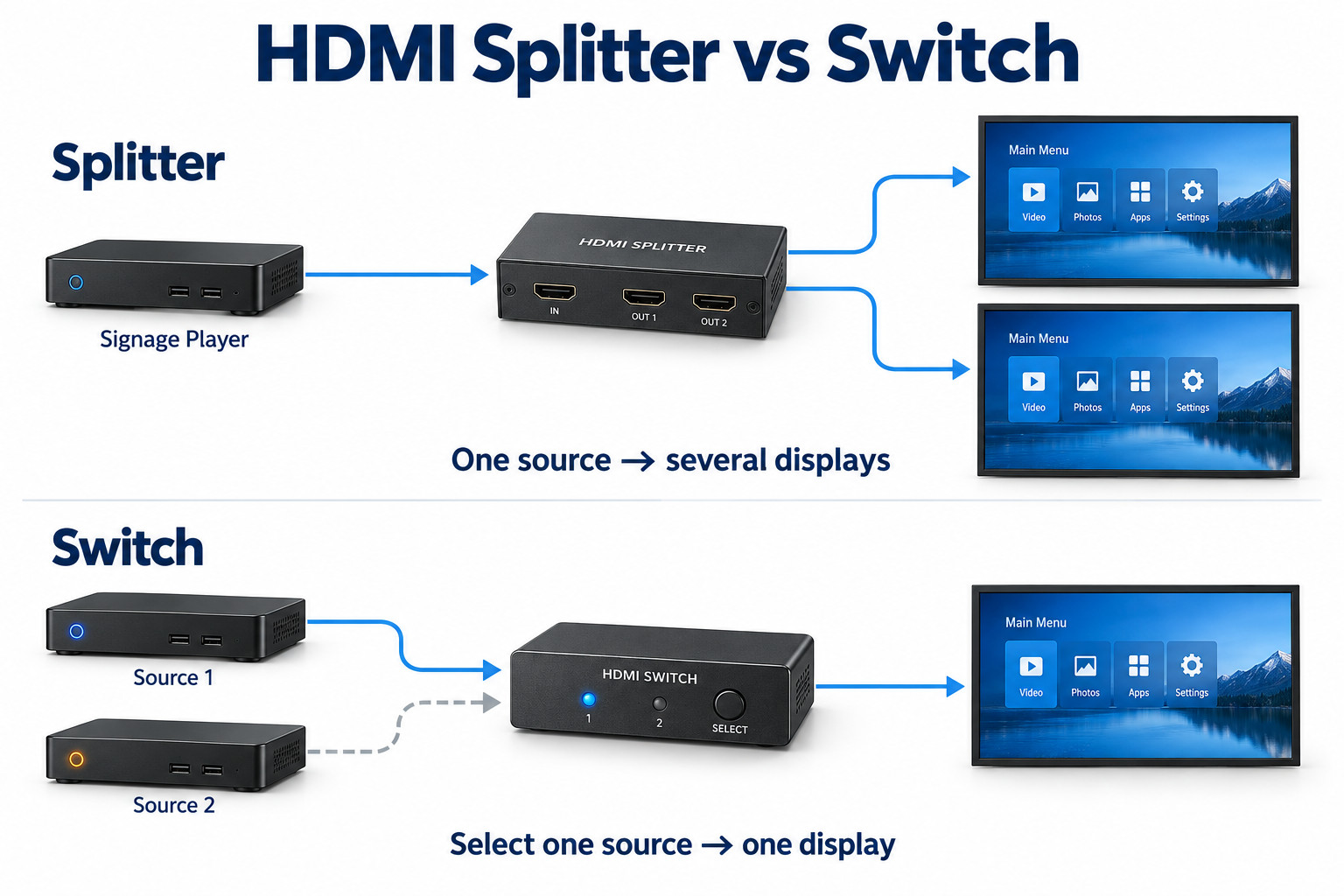
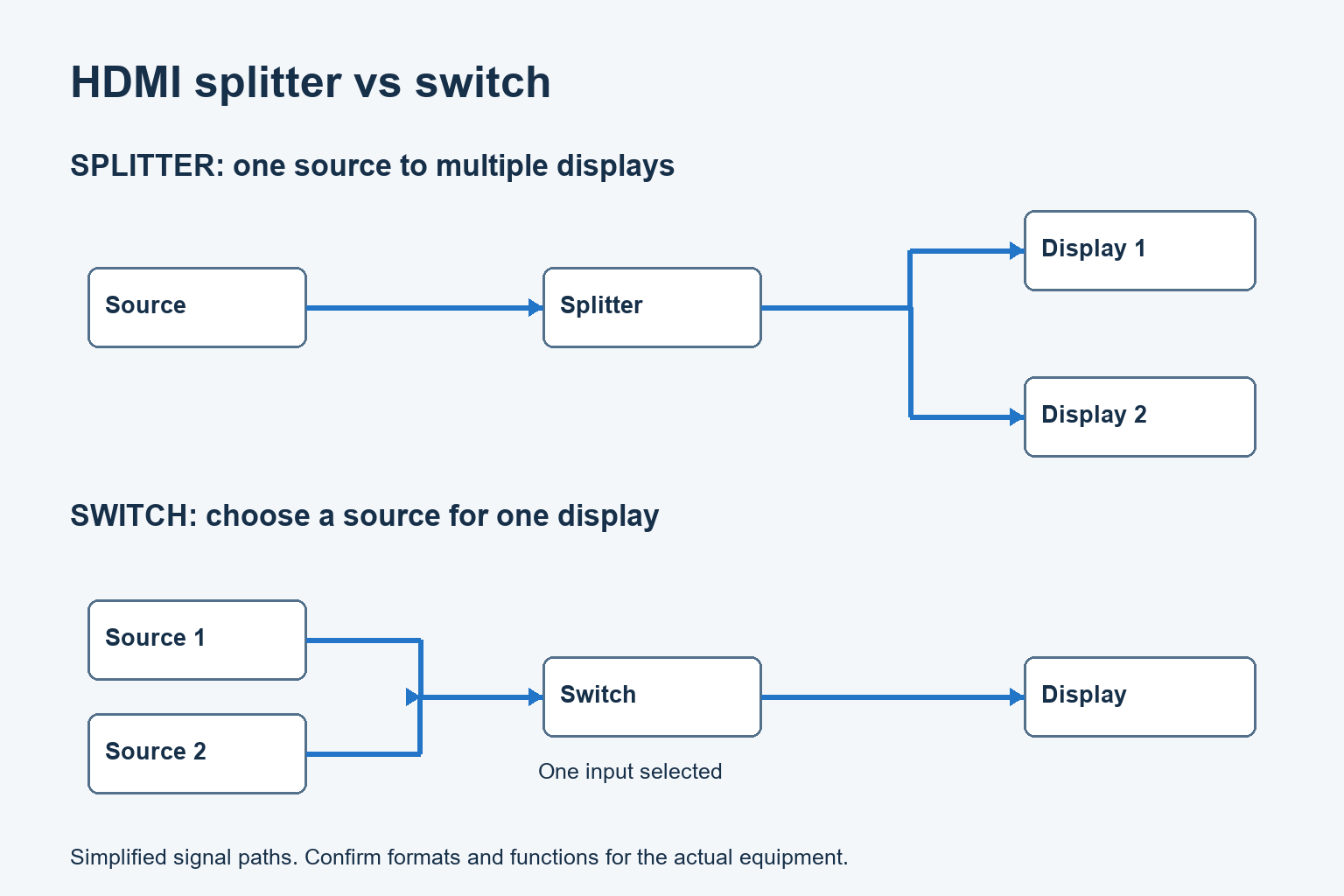
A splitter distributes one source to multiple displays. A switch selects among several sources for a display. Start by drawing what each screen must show.
- Use signal direction and required content routing to define the task.
- Do not confuse identical content, independent messages and a tiled video wall.
- Confirm resolution, refresh rate, colour format and any protected-content requirements together.
- Test sources, outputs and startup behaviour on the complete proposed setup.
A cafe repeating the same menu on two screens needs a different signal arrangement from a reception screen that alternates between a signage player and an event source. This guide explains the distinction, when a matrix or video wall processor is needed, and what to verify before ordering equipment.
Start with the direction of the signals
Splitter: one source, several destinations
A splitter, often called a distribution amplifier in professional AV, distributes one source signal to multiple outputs. In a basic signage arrangement, the connected screens receive the same source content. It does not create a separate playlist for each screen or turn one ordinary player output into independent content channels.
Write the intended source beside the input and each display beside an output. If every display should show the same campaign, this drawing may match the requirement. If the entrance screen needs different content from the checkout screen, a simple splitter does not answer that content requirement.
Switch: several sources, one selected output
A switcher chooses which source feeds its output. For example, a reception display might normally show a signage player and occasionally use a separate presentation source. Specify how the selection is made: a local control, remote command or documented automatic behavior.
Decide what should happen when a new source connects or an active source stops. Automatic switching can be useful in one application and disruptive in another. Test the normal operating sequence, including which source should return after an event and what staff do if the wrong content appears.
Matrix: multiple sources and destinations
A matrix routes sources to multiple outputs. It can suit a project that needs different source selections at different screens. Confirm the routing combinations required and how operators will choose them. A box with many connectors is not enough evidence that it provides the routing behavior you need.
Extron’s product categories distinguish distribution amplifiers, switchers and matrix switchers.
Decide whether screens share content or only a schedule
Two displays can follow the same opening hours while needing different messages. Keep content distribution separate from power scheduling. Ask whether the project needs an identical image, individual playlists, synchronized playback or a single image spread across several panels. Those are different requirements.
For independent playlists, evaluate separate players or a documented multi-output playback system. For a tiled image, confirm the cropping, layout and processing capability of the displays or controller. Do not order a basic splitter expecting it to create the separate portions of a video wall.
Use the video wall controller guide when one image must be arranged across multiple panels.
Check more than the input and output count
The complete signal format
Record the required resolution, refresh rate and color format for the source and every output. Confirm these together in the equipment documentation. A headline “4K” label does not describe all combinations. Check audio requirements as well if the display system actually uses sound.
List the cable lengths and any extenders on each branch. A successful test on the nearest screen does not approve the farthest one. Test the selected device with the proposed power supply and installed link components, keeping the final display configuration in the record.
Different screens on the same source
Mixed display capabilities require an explicit plan. Ask how the device selects or manages the information presented to the source and whether any output scaling is available. Do not assume every splitter adjusts each output independently. If scaling is required, specify it and verify it in the chosen model.
Define the acceptable picture on every screen before commissioning. Changing the source to suit one older display may change the result across the system. Record the agreed format and test all destinations together, including the connection and disconnection sequence expected during service.
Our EDID guide explains why a source’s output choice depends on the connected signal path.
Protected content and control
Check content protection support across the source, distribution equipment and displays when the planned content requires it. A working desktop or unprotected test image does not establish that protected playback will work. Use the actual permitted content and documented equipment configuration during acceptance.
Similarly, confirm any power or input-control functions separately. Video distribution does not automatically establish a reliable control path. If a remote command is part of the operating plan, test which displays respond and what happens after standby or a player restart.
Review HDMI CEC checks if the installation uses HDMI-based control.
A useful commissioning sequence
Test one source and one display directly first. Then add the proposed distribution or switching device, followed by the remaining outputs. Keep the same approved settings while adding components so a new failure has a clear point of introduction.
- Confirm the normal content on every required display.
- Test each source selection or routing preset used by staff.
- Check the expected startup and shutdown sequence.
- Disconnect and restore a branch only as allowed by the equipment procedure.
- Verify that service on one branch has the expected effect on the others.
- Record recovery steps, device settings and unresolved behavior.
Include the person who will operate the system. A technically valid routing setup can still be inconvenient if staff cannot return to the normal playlist. Label the approved controls and keep the daily instructions separate from engineering settings that should not be changed casually.
What to put in the purchase brief
Provide a source list, a display list and a simple routing table. For each display, state what it shows during normal operation and any special events. Include the required signal format, connection distance, control method and any need for independent content or image tiling.
Keep optional future routes separate from the current acceptance requirement. This lets the integrator explain which capacity is included and which would require different hardware. Avoid paying for a larger box without knowing whether its additional connectors solve the actual expansion plan.
Explore commercial indoor signage displays for repeated menu or information content.
Review LCD video wall displays when the project needs a tiled display surface.