Choose outdoor wall-mounted when a load-bearing wall exists and the walkway must stay clear; choose a freestanding outdoor totem when there is no usable wall, or the message must sit in a plaza/entrance path — both YJCEN OD-W and OD-F lines are IP65 and 3000 nits on their product pages; quote IP only from the selected page.
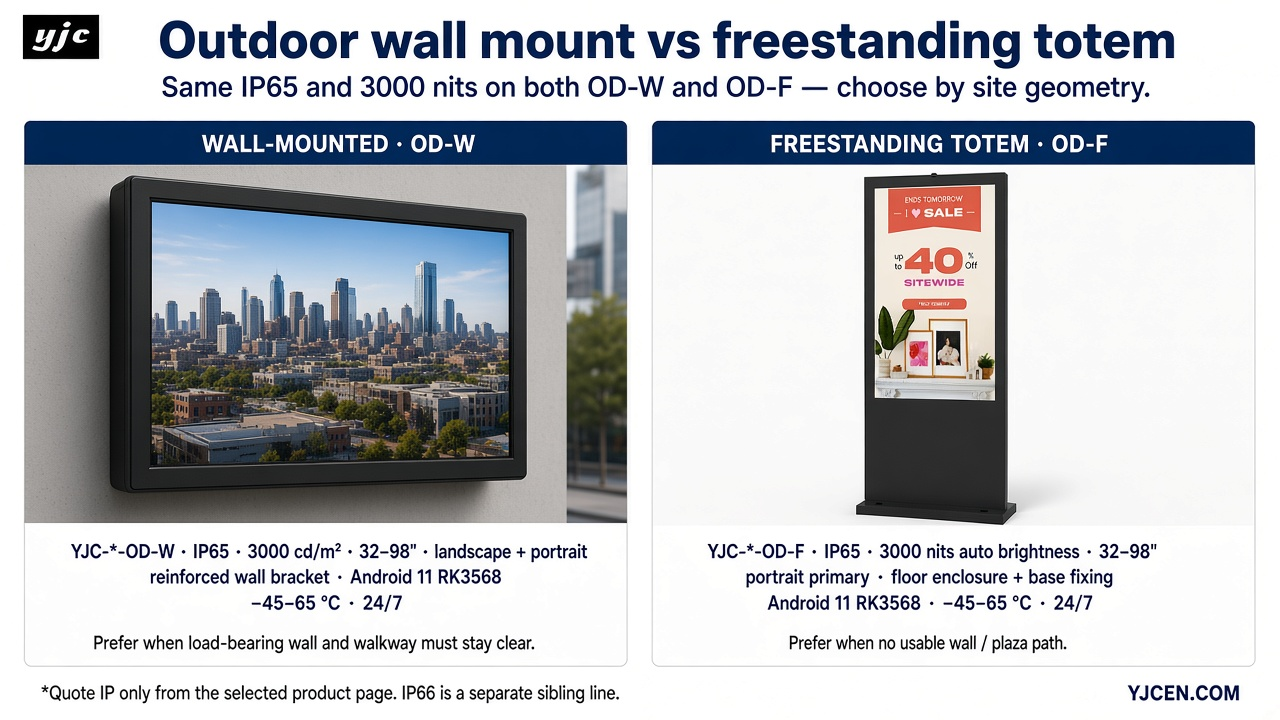
Outdoor wall mount vs freestanding totem: the difference in one minute
An outdoor wall-mounted unit (YJC-*-OD-W) hangs on a building face. The outdoor wall-mounted display product page lists a reinforced wall bracket with the enclosure. The installer matches wall structure, weight, fixings, and cable route to the size drawing for that model.
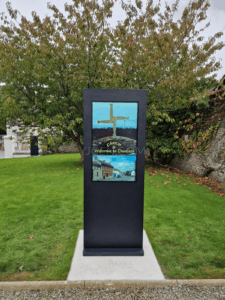
A freestanding outdoor totem (YJC-*-OD-F) carries its own floor enclosure and base fixing. The outdoor floor-standing display line places the message where no usable wall face exists — plaza, station approach, parking information point — with footprint and foundation taken from the selected model drawing.
Decision table: which mount type to specify
| Question | Prefer wall-mounted (OD-W) | Prefer freestanding totem (OD-F) |
|---|---|---|
| Wall structure available and load-checked? | Yes — select OD-W and confirm weight + fixings on the size drawing | No usable / wrong-facing wall → OD-F |
| Floor cutout / base plate / foundation allowed? | Not required for the display enclosure (wall carries the load) | Required — use base fixing from the selected OD-F drawing |
| Plaza or open entrance with no usable wall face? | Use only if a checked wall face exists at the message point | Primary path — totem sits in the path of travel |
| Must keep pedestrian walkway clear? | Yes — wall mount keeps the floor clear | Only if the planned footprint still leaves the required clear width |
| Double-sided message needed? | Single face on the wall; confirm orientation tables on the wall page | Confirm single- vs double-sided on OD-F downloads / drawings (75/86 double-sided rows exist) |
| Service access (front/side vs enclosure doors)? | Plan front/side access at the wall face per the wall drawing | Plan enclosure-door access per the floor totem drawing |
| RFQ must include: size + orientation + IP from datasheet + mounting drawing | Size 32–98″, landscape and/or portrait, IP65 from wall datasheet, wall dimension PDF | Size 32–98″, portrait primary (confirm drawing), single/double-sided, IP65 from floor datasheet, totem dimension PDF |
Product-page facts used in this guide:
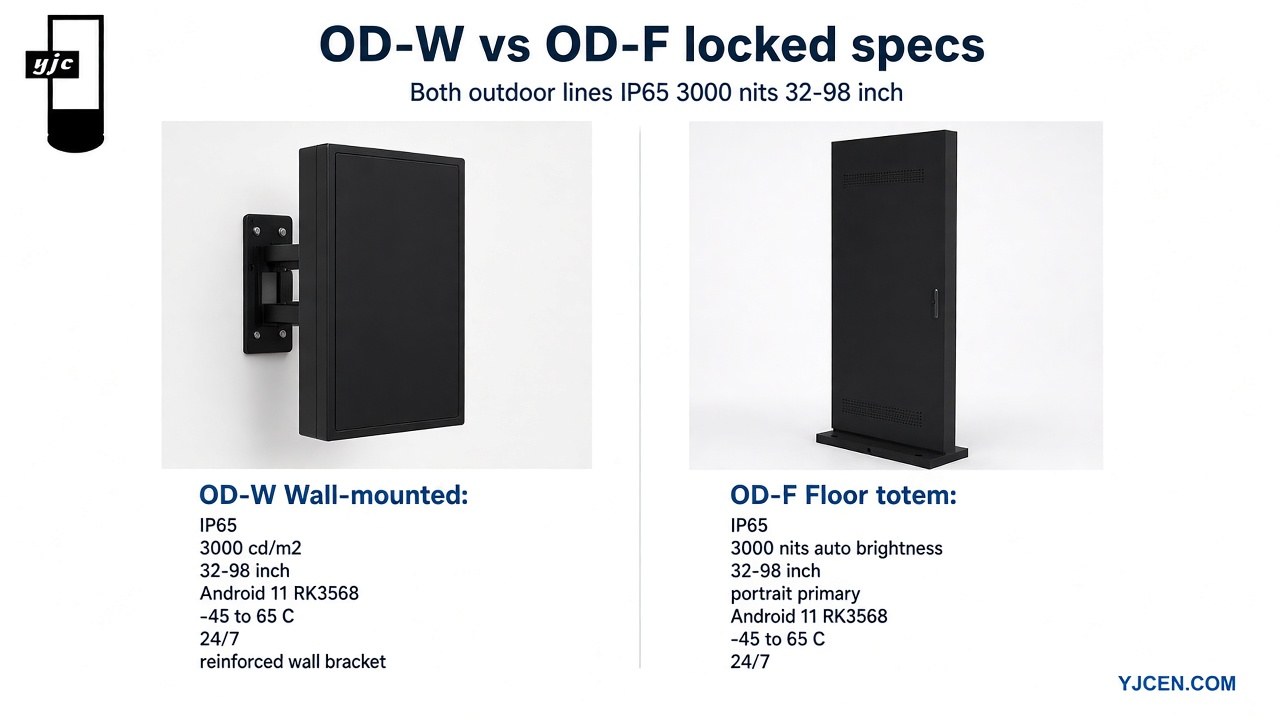
- Wall: IP65, 3000 cd/m², 32–98″, YJC-*-OD-W, landscape + portrait tables, reinforced wall bracket, Android 11 RK3568, operating temperature −45–65 °C, 24/7 — outdoor wall-mounted display
- Floor totem: IP65, 3000 nits with auto brightness, 32–98″, YJC-*-OD-F, portrait primary, single/double-sided on drawings, Android 11 RK3568, −45–65 °C, 24/7 — outdoor floor-standing display
When wall-mounted is the right call
- Building façade, shop wall, mall exterior, or residential entrance info point where a load-checked wall face exists at the message location.
- Pedestrian walkway must stay clear — the enclosure hangs on the wall, so the floor footprint of the display itself is removed from the path.
- Reinforced wall bracket is included on the wall product page; installer still verifies structure, weight, fixings, and cable route against the size drawing.
- Orientation: landscape and portrait tables are published on the wall page (example 55″ landscape: 1420 × 930 × 198 mm, 92 kg; 55″ portrait: 891 × 1459 × 148 mm).
- Route hardware from the outdoor wall-mounted display page; pull the matching dimension PDF from Downloads or the product Manuals section. Wind-load and structural figures belong in the site engineer’s pack, not as generic article numbers.
When freestanding totem is the right call
- No usable wall, wall faces the wrong direction, or the message must sit in a plaza path, station approach, or parking information point.
- Footprint and foundation come from the selected model drawing — not from a generic rule in this article.
- Single- vs double-sided options are confirmed on the floor product downloads / drawings (double-sided rows exist for 75″ and 86″).
- Portrait is the primary orientation on the floor line; confirm the selected size on the drawing before RFQ lock.
- Hardware path: outdoor floor-standing display plus the outdoor digital totem installation guide. For advertising-totem vs interactive-kiosk role split, see outdoor advertising totem vs interactive kiosk.
IP rating: quote the product page you are selling
- The OD-W and OD-F product pages state IP65. When you recommend YJC--OD-W or YJC--OD-F, quote IP65 from that selected datasheet.
- A separate IP66 product line exists as a sibling SKU family — not the same as OD-W / OD-F: outdoor IP66 display.
- A published install that used the IP66 sibling line (OD-W/OD-F stay IP65): 75-inch IP66 display at a music venue.
- Enclosure IP guide: Decoding IP65 / IP67 — outdoor digital signage protection.
- Enclosure IP does not replace structural or foundation assessment for totems, or wall-fixing assessment for wall units.
RFQ checklist before you quote (paste into email)
- Size from the 32–98″ range on the selected product page
- Orientation: landscape and/or portrait (wall has both tables; totem portrait primary — confirm on drawing)
- Single- vs double-sided (totem; confirm on downloads)
- IP rating copied from the selected product datasheet (IP65 for OD-W / OD-F)
- Mounting drawing / dimension PDF from Downloads or the product Manuals section
- Site: wall structure check or base / foundation plan
- Power: AC 100–240 V; destination country; quantity
- Leave wind-load figures and installation fees to the site engineer and local installer quote
Related buying discipline: outdoor LCD display buying checklist and how to choose outdoor digital signage display. For portrait vs landscape framing across a network, align templates with display aspect ratio for digital signage.
Related selection guides
- Outdoor advertising totem vs interactive kiosk — role split between advertising totem and interactive kiosk.
- Outdoor digital totem installation guide — install sequence and site checks for floor totems.
- Outdoor LCD display buying checklist — pre-order field list for outdoor LCD.
- How to choose outdoor digital signage display — outdoor line selection overview.
- Display aspect ratio for digital signage — landscape vs portrait template lock.
- Pixel density for commercial digital signage readability — PPI vs size vs distance (separate from mount type).
- Color gamut for commercial display specifications — colour-range claims (separate from mount type).
FAQ
When should I choose outdoor wall-mounted over a freestanding totem?
Choose wall-mounted when a load-bearing wall exists at the message point and the walkway must stay clear. Choose a freestanding totem when there is no usable wall, or the message must sit in a plaza or entrance path. Quote IP65 from the selected OD-W or OD-F product page.
Are YJCEN outdoor wall and floor totem models IP65 or IP66?
YJC--OD-W (wall) and YJC--OD-F (floor totem) product pages state IP65. IP66 is a separate sibling line — see outdoor IP66 display. Keep OD-W / OD-F quoted as IP65; use the IP66 page only when that sibling line is specified.
Do outdoor wall displays include a mounting bracket?
Yes. The outdoor wall-mounted display page lists a reinforced wall bracket with the enclosure. The installer still checks wall structure, weight, fixings, and cable route against the size drawing for the selected model.
Does a freestanding totem need a wall?
No. An OD-F totem uses its own floor enclosure and base fixing from the selected model drawing. Use it where no usable wall face exists, or where the message must sit in a plaza or entrance path. Confirm footprint on the drawing.
What do I send to get a mounting drawing and quote?
Send size (32–98″), orientation, wall vs floor, single/double-sided for totems, site photos or drawing, quantity, and destination country. Pull dimension PDFs from Downloads. Submit the pack via Contact.
When do I look at the separate IP66 outdoor display line?
When the project requires the IP66 sibling product — not OD-W / OD-F. Start at outdoor IP66 display. For an install that used IP66, see the 75-inch IP66 music venue case. Still quote IP only from the selected datasheet.
Next step
Select mount type from the table above, open the matching product page — outdoor wall-mounted display or outdoor floor-standing display — pull drawings from Downloads, and send size, orientation, wall vs floor, single/double-sided, site photos or drawing, quantity, and country to YJCEN via Contact. Quote IP65 for OD-W / OD-F from the selected datasheet. Leave wind-load figures and installation fees to the site engineer and local installer.