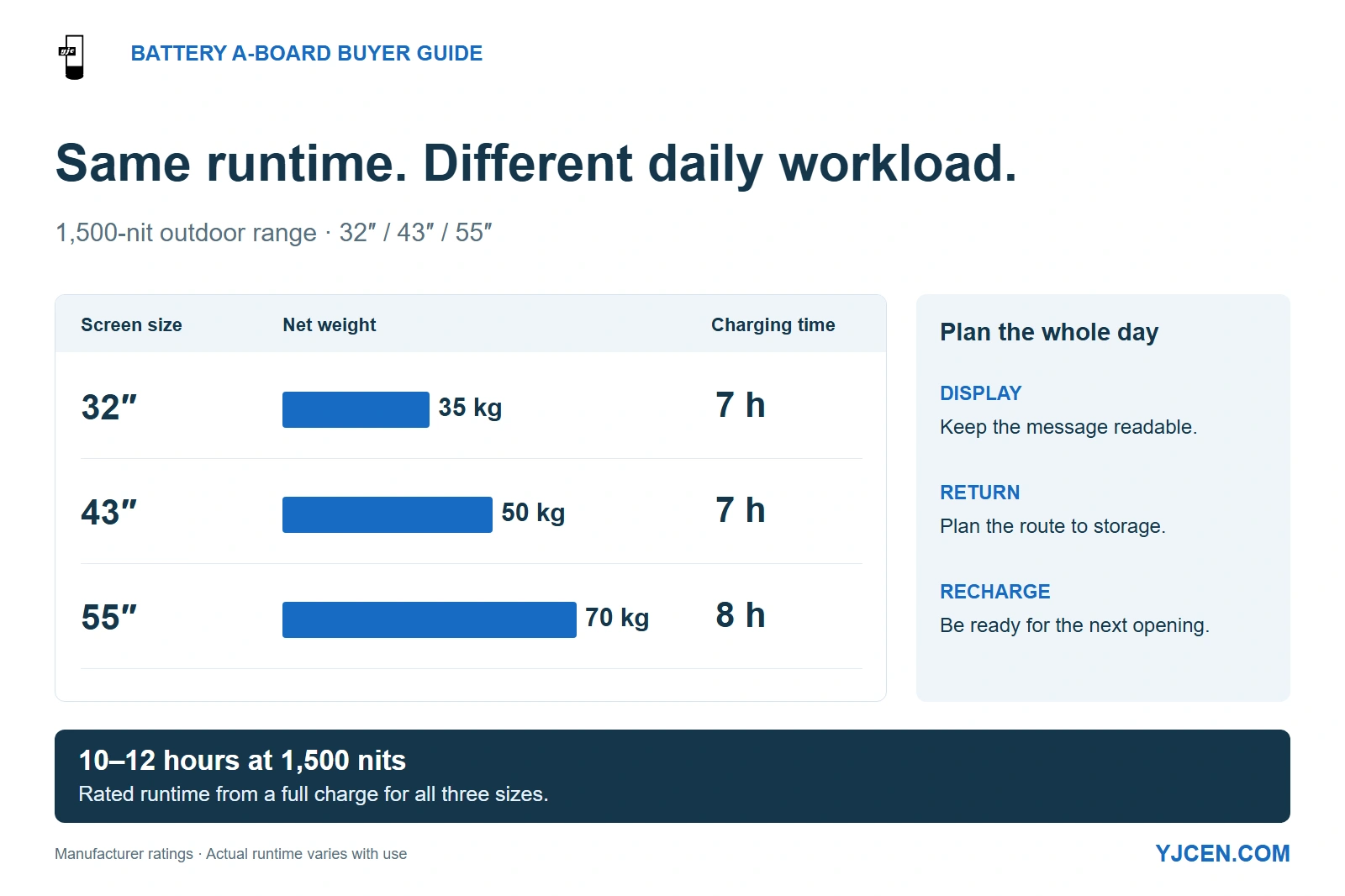
At 1,500 nits, the 32-, 43- and 55-inch battery A-boards have the same rated runtime of 10–12 hours from a full charge. Their net weights are 35, 50 and 70 kg, and listed charging times are 7, 7 and 8 hours respectively.
Choose battery-powered outdoor digital signage when the message needs to move and a power cable would restrict its position. Match readable brightness to the required display hours, then plan the route back to charging before choosing a screen size. When specifying YJCEN’s Outdoor Battery-Powered Digital A-Board, plan the hardware and staff routine together: display, move, recharge and be ready for opening again.
A larger battery screen is useful only if staff can position it, keep its message readable and recharge it within the available downtime. Put brightness, runtime, weather exposure and charging arrangements on separate RFQ lines so one attractive headline cannot hide a poor fit elsewhere.
1. When does a battery A-board make more sense than a fixed display?
Start with the job the position performs. A menu that moves with an outdoor queue, a temporary event entrance and a promotion brought inside each evening are good reasons to specify a mobile battery screen. The benefit is freedom from a power lead during display operation.
A permanent outdoor message with long operating hours is a different purchase. Where mains power can reach a suitable fixed position, a fixed outdoor display removes the daily battery-return task and avoids making next-day availability depend on staff charging the unit.
For a movable screen that remains indoors beside an outlet, choose Portable Digital Signage. YJCEN’s range uses mains power during operation, so moving the screen does not create a battery-charging requirement.
| Your operating pattern | Starting choice | What changes operationally |
|---|---|---|
| Outdoor promotion moves during the day and returns to storage each evening | Outdoor battery A-board | Staff own positioning, return and charging. |
| Outdoor screen stays in one position for long hours, with mains available | Fixed outdoor display | Power reaches the installed screen; daily movement is unnecessary. |
| Indoor promotion moves between powered positions | Mains-powered portable display | Manage the cable at each position instead of charging a battery. |
| Outdoor site has no practical return route or charging window | Resolve power and storage before selecting a battery unit | A larger battery alone does not create a sustainable daily routine. |
For a multi-site rollout, group stores by these operating patterns. Ordering the same screen for every branch can leave some sites paying for battery capability they do not use while others need a different charging or handling arrangement.
2. Which brightness and runtime combination covers the display period?
Describe the light exposure before selecting the brightness version: shaded frontage, canopy with changing daylight, or an exposed position facing direct sun. Include the customer’s approach direction and the hours when the message must remain readable.
Screen brightness and reflected light act together. NIST’s discussion of daylight readability explains why ambient contrast and display reflections matter, so a nit value alone cannot settle readability at a particular entrance.
Use the actual offer, price or direction at the intended viewing distance. If reflections obscure it, adjust the position and angle as well as the brightness; then select the configuration that can sustain the required presentation for the display period.
Compare runtime at the brightness you intend to use
YJCEN’s 1,500-nit battery A-boards cover 32, 43 and 55 inches. The separate 43-inch 2500 Nits Outdoor Battery A-Board offers 2,000- and 2,500-nit versions with different maximum-brightness runtimes.
| Configuration | Brightness | Rated runtime at that maximum brightness | Listed charging time |
|---|---|---|---|
| 32-inch battery A-board | 1,500 nits | 10–12 hours from a full charge | 7 hours |
| 43-inch battery A-board | 1,500 nits | 10–12 hours from a full charge | 7 hours |
| 55-inch battery A-board | 1,500 nits | 10–12 hours from a full charge | 8 hours |
| 43-inch high-brightness version | 2,000 nits | Up to 14 hours | Approximately 7 hours from empty |
| 43-inch high-brightness version | 2,500 nits | Up to 11 hours | Approximately 7 hours from empty |
These are manufacturer-rated figures for the stated configurations. Actual runtime changes with settings, content, temperature and battery condition; use the table to shortlist a configuration, then run the intended playlist through the required operating period.
The 43-inch high-brightness range also lists up to 42 hours at minimum brightness. That is a different operating condition from a bright outdoor day, so keep it out of the comparison when the position requires high output.
Choose more light only when it solves the viewing problem
The 2,500-nit version offers higher output, while the 2,000-nit version has the longer rated maximum-brightness runtime. If both present the essential message clearly, the longer-runtime option gives the operating schedule more room; if only the higher-output version works at that position, plan around its shorter runtime or change the power arrangement.
Automatic brightness control follows changing ambient conditions, so assess its runtime against the expected daylight and evening schedule. Keep that schedule and the brightness mode together in the quotation so the proposed configuration answers the same requirement at every site.
3. Can staff move and position the screen every day?
Choose the smallest screen that presents the required message clearly from the customer position, then assess its daily handling route. A screen that looks right outside the store can still be the wrong purchase if it must be lifted over steps every evening.
Within YJCEN’s 1,500-nit range, the 32-, 43- and 55-inch models weigh 35, 50 and 70 kg respectively. All three have the same listed 10–12-hour runtime, so moving from 43 to 55 inches adds 20 kg without extending the rated display period.
That makes the 55-inch choice a decision about readable image size and handling, rather than a route to longer battery life. If a simpler layout remains readable on 43 inches, it avoids that additional mass on the daily return journey.
Reserve space for the deployed support
For the 43-inch high-brightness model, allow a deployed footprint 584 mm wide and 485 mm deep. The foldable rear support occupies floor space behind the screen, and staff need additional room to approach the handle and move the unit.
Its 6-inch lockable casters support movement and positioning. The handling arrangement uses the rear handle to tilt the screen onto its wheels, so assess turning space and thresholds along the complete route between the display position and charging area.
Draw both positions on the site plan: where the sign works and where it spends the night. Include door clearances, slopes, steps and any lift journey; a route problem is easier to resolve before selecting the larger cabinet.
Treat wheel locking and wind restraint as different jobs
Engage the wheel locks at the display position to control rolling. Address the wind’s overturning force through the stand and restraint arrangement as a separate installation decision.
For an exposed entrance, resolve the restraint or ballast arrangement as part of the selected stand configuration, including how staff remove or handle it. If a site requires a permanent restraint or heavy ballast that defeats daily movement, a fixed outdoor display is usually the more practical starting point.
For exposed positions, obtain the selected assembly’s stability limit and agree a retrieval trigger before deployment. Put that trigger, the return location and the responsible staff member in the deployment plan so the team knows when and where to move the screen.
4. What weather protection belongs in the specification?
Both YJCEN outdoor battery ranges discussed here have IP65-rated enclosures: the 1,500-nit models in 32, 43 and 55 inches, and the 43-inch 2,000/2,500-nit range. These are the outdoor candidates for a movable display exposed to dust and rain.
Use the placement photo to show the complete exposure, including nearby cleaning activity and water running across the ground. Position the unit on a stable, drained surface and keep access to its controls and charging connection practical.
Separate three conditions in the RFQ: displaying outdoors, returning to storage and charging. The battery’s charging-temperature limits and connector arrangement belong to the charging condition; the display’s operating-temperature range answers a different question.
For a sheltered position, record whether rain can still reach the screen from the side. A canopy changes the exposure but does not turn an indoor mains-powered portable display into an outdoor model.
5. Does the charging routine make the screen ready for the next shift?
Plan the next opening time backwards from a fully charged, ready-to-move unit. Include the time staff actually connect the charger, not simply the time the store closes.
The 32- and 43-inch 1,500-nit models list 7-hour charging, while the 55-inch model lists 8 hours. An overnight interval of exactly eight hours leaves no scheduling margin against the 55-inch figure if charging begins late or equipment is returned after closing.
The high-brightness 43-inch range lists approximately seven hours from empty and uses a 24 V, 78 Ah LiFePO4 battery. Increasing brightness within that range changes the runtime, but it does not create a longer overnight charging window.
| Daily stage | Decide before ordering | Consequence if omitted |
|---|---|---|
| Before opening | Who checks charge, the current message and the route to the display position? | A charged screen can still open with yesterday’s offer or remain in storage. |
| During operation | Who responds to a low-battery indication or a weather-related return? | The screen may stop before the required message period ends. |
| At closing | Who returns each unit and connects its assigned charger? | Charging starts later than the schedule assumes. |
| Before the next shift | How many units can charge at the same time in the allocated space? | A fleet can have enough chargers but too few usable charging positions. |
For several screens, plan a labelled parking and charging position for each unit that must be ready together. Have the site electrical provision sized around the chargers’ input ratings and concurrent use, rather than using the display’s operating wattage as the charger load.
Decide what a spare is meant to solve
A service replacement battery addresses a worn or failed pack; a swap system is intended to extend operation between charges. Treat these as separate procurement requirements, because the access method, changeover procedure and charging arrangement determine whether staff can use a spare during the day.
If uninterrupted operation requires a mid-shift exchange, put the approved replacement method and any playback interruption in the proposal before making it part of the schedule. Otherwise, price a second complete unit for rotation or use mains power, rather than basing availability on an assumed hot-swap feature.
6. When should you choose e-paper or a printed A-board instead?
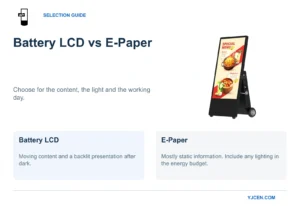
Choose LCD when video, animated offers or a self-lit presentation after dark contributes to the task. For mostly static information with infrequent updates, battery LCD versus e-paper becomes a decision about content, illumination and the interval between charges.
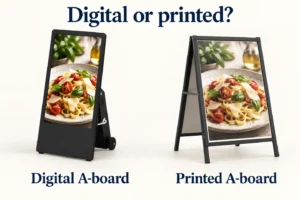
Choose a printed board when the message stays useful for long periods and a static layout is sufficient. In a digital A-board versus printed A-board decision, frequent offer changes can favor digital delivery, but the update workflow and daily equipment handling still need an owner.
For a retail fleet, different positions can justify different formats. An unchanging entrance direction can remain printed while a battery LCD carries the promotions that change during the trading day.
7. RFQ: specify the operating day and the return route
Attach a site photo, a marked placement plan and a sample of the intended content. Fill the following fields for each group of sites with the same operating pattern, so suppliers can quote a configuration and charging arrangement against a consistent task.
8. Frequently asked questions
Does portable digital signage always have a battery?
No. YJCEN’s indoor portable range uses mains power during operation, while its outdoor battery ranges recharge between uses.
How long do the 1,500-nit battery A-boards run?
10–12 hours at 1,500 nits from a full charge is the rated range. The 32-, 43- and 55-inch models share that rating; validate the required operating period with your content and conditions.
Does buying the 55-inch version give a longer rated runtime?
No. Within the 1,500-nit range, the 55-inch model increases screen size and weight, while rated runtime remains 10–12 hours.
Can the high-brightness model run for 42 hours at maximum brightness?
No. Its up-to-42-hour figure applies at minimum brightness; maximum-brightness ratings are up to 14 hours at 2,000 nits or 11 hours at 2,500 nits.
Do the outdoor battery ranges have IP65 protection?
Yes. The 32/43/55-inch 1,500-nit range and the 43-inch 2,000/2,500-nit range have IP65-rated enclosures.
Do locked wheels establish the screen’s wind resistance?
No. Wind stability needs the selected stand and restraint arrangement assessed for the deployment position, separately from preventing the wheels from rolling.
Can I plan a spare battery as a hot-swap feature?
No—not without an approved swap configuration and procedure. Specify the required changeover and charging method, or plan continuity around a second complete unit or mains power.
Send the site plan and operating schedule for a configuration proposal
Send YJCEN your marked placement and return-route drawings, intended content, display hours, charging window and quantity. Include the brightness versions or screen sizes you want to compare so the proposal can address visibility, daily handling and next-shift readiness together.
For custom display configurations, include enclosure, color or branding requirements alongside the mechanical-fit information.