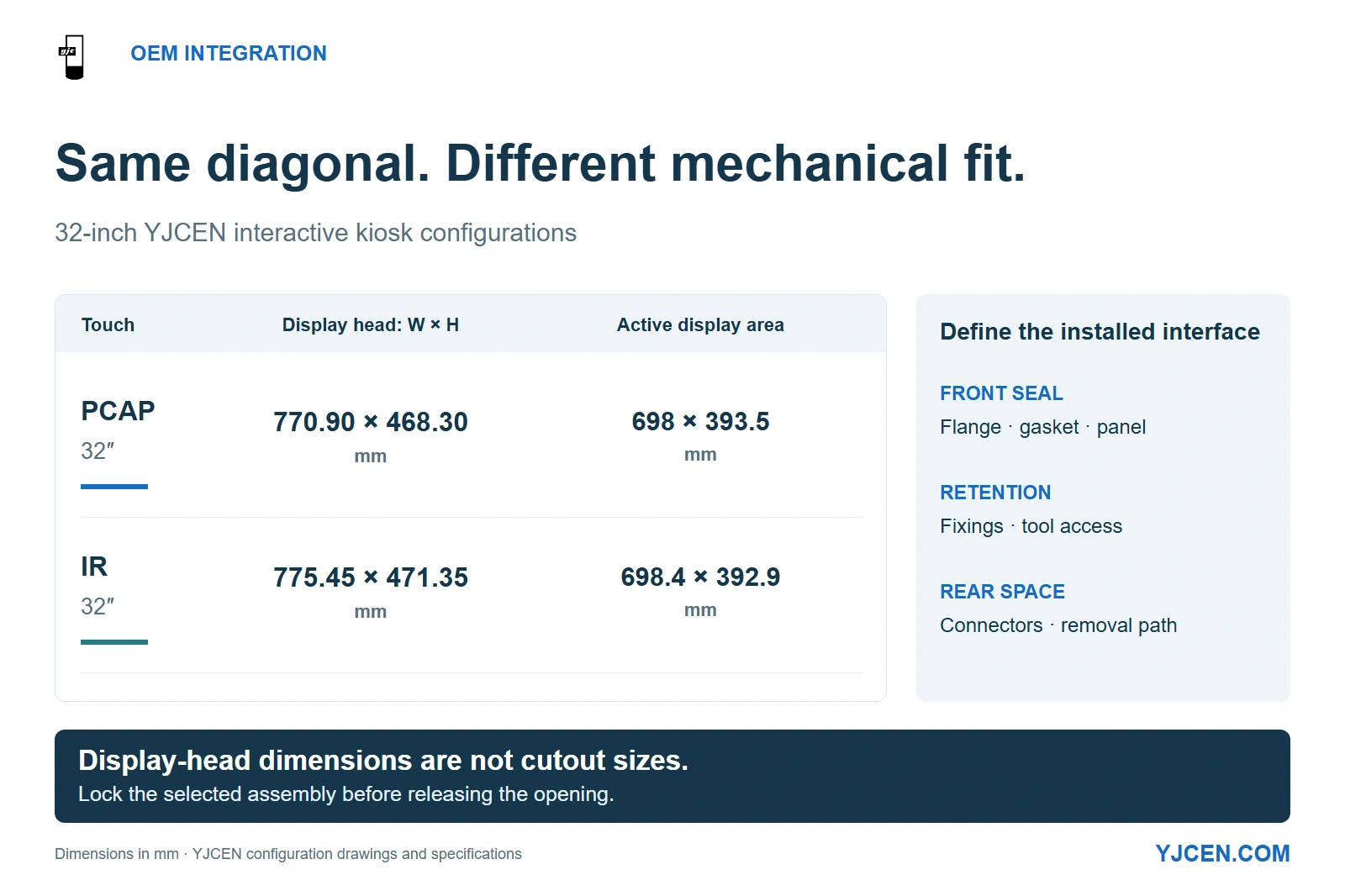
The 32-inch PCAP display head measures 770.90 × 468.30 mm externally, versus 775.45 × 471.35 mm for the IR version; their active areas are 698 × 393.5 mm and 698.4 × 392.9 mm respectively. These dimensions describe the display heads, not cabinet cutouts.
Choose an industrial panel-mount touch monitor around the machine enclosure, not screen diagonal alone. Use a panel-mount assembly when its front flange and seal form part of the cabinet face; choose open-frame when your team designs that interface. For a separate indoor operator or information station, a finished Interactive Kiosk can remove the need to build a display into the machine cabinet.
Freeze the mounting method, touch assembly and protection boundary before releasing the cutout. A display that fits the opening can still leave no room for its retaining hardware, connectors or removal path.
1. Should you buy open-frame, panel-mount or a complete kiosk?
Start by deciding which assembly the supplier will deliver and which structure your team will build. “Industrial touch monitor” describes the intended application broadly; the mounting drawing establishes how the hardware actually joins your machine.
An open-frame touch monitor is a display assembly intended for integration into another enclosure. A panel-mount monitor is arranged to attach through a panel opening, commonly using a front flange and rear retaining hardware. These descriptions can overlap: an open-frame assembly may gain a panel-mount arrangement through a project-specific bezel and mounting kit.
| What your project needs | Preferred starting route | What the integrator must resolve |
|---|---|---|
| A screen incorporated into a machine face with a defined front seal | Panel-mount assembly | Panel thickness, cutout, seal contact, retaining hardware and access behind the face |
| A custom front glass, flush appearance or enclosure shared with other devices | Open-frame integration | The complete front interface, structural support, heat removal and service route |
| A separate indoor touchscreen beside the equipment | Complete kiosk | Floor position, operator reach, power, network and application integration |
Choose open-frame kiosk integration when your team already owns the chassis and needs control over the front face. Choose the complete-kiosk route when the touchscreen can stand beside the equipment; that avoids adding a display opening, retaining system and service door to the machine itself.
For YJCEN, the complete kiosk is the existing product route; embedded display assemblies are scoped through OEM engineering around your enclosure. Send the machine-face drawing first so the proposal can distinguish a display module, a panel-mount assembly and finished kiosk hardware before pricing them as alternatives.
2. Which dimensions and sealing details must be fixed before cutting the panel?
Use a front view and a section view from the same drawing revision. Dimension the visible display area, display-head outline and cabinet cutout separately, then show the flange overlap, seal location, panel thickness and retaining hardware in section.
The active area tells the software team where the image appears. The cutout tells the fabricator what material to remove; the outline and rear assembly tell the mechanical designer what must fit around and behind it.
The same screen size can require different surrounding geometry
YJCEN’s 32-inch PCAP and IR interactive kiosks illustrate why touch selection belongs before mechanical release. Their display-head drawings show different external dimensions, even though both use a 32-inch screen.
| 32-inch configuration | Display-head external width × height | Active display area | Mechanical implication |
|---|---|---|---|
| PCAP touch configuration | 770.90 × 468.30 mm | 698 × 393.5 mm | Build the surrounding face and clearances around this PCAP assembly. |
| IR touch configuration | 775.45 × 471.35 mm | 698.4 × 392.9 mm | Rework the mechanical interface if changing to this IR assembly. |
These are complete-kiosk display-head dimensions, not panel-mount cutout dimensions. Select the touch construction before machining: exchanging one 32-inch configuration for another can change the surrounding metalwork even when the application keeps the same screen diagonal.
For an OEM panel-mount build, put the required cutout and corner radii on its own agreed drawing. Include a common datum, dimensional tolerances, allowable panel thickness, flange overlap and the rear space needed to fit the retaining hardware; a front elevation alone cannot establish those relationships.
Specify where the front IP requirement applies
If the operator side faces dust or splashes while the rear sits inside a protected cabinet, define the front protection requirement at the installed display-to-panel joint. If both sides face exposure, select an enclosure arrangement that protects the rear connections as well.
IEC 60529 classifies the protection provided by electrical enclosures. Apply the required IP designation to a clearly identified assembly and boundary, then include the bezel, gasket and mounting arrangement in that assembly’s evaluation.
Put the gasket contact land, surface finish, panel flatness and permitted compression into the mechanical agreement. A flange that bridges a distorted panel can leave an uneven seal, so the mounting design must distribute the clamping load rather than rely on tightening harder at one corner.
The standard YJCEN interactive kiosk is an indoor IP5X configuration. A machine-face project requiring a water-protected front therefore needs its own sealing specification through the OEM route, rather than a cabinet opening copied from the finished kiosk.
3. How should the touch stack affect the bezel design?
Choose the touch arrangement around the operator’s real input: bare fingers, specified gloves, short taps, dragging or repeated use of edge controls. YJCEN’s interactive range offers PCAP from 15.6 to 65 inches and IR from 32 to 65 inches, so a compact format below 32 inches follows the PCAP route within that range.
PCAP senses touch through the cover assembly, making glass construction and added layers part of the electrical design. In its discussion of mutual-capacitance sensors, Microchip explains how thicker touch covers change capacitive coupling; this is a reason to select the cover and sensor together, not add a protective sheet after approving the sample.
Specify the cover material, thickness, bonding arrangement, printed border and any protective film as one stack. Pair PCAP touch integration with the final application: the smallest required buttons and edge controls should work through that exact stack with the intended input method.
An IR touch frame needs an unobstructed sensing path across the screen. Design the bezel and any adjacent lip around that path, rather than covering it to achieve a flush appearance.
For a glove-operated machine, send the actual glove specification and representative operating screens with the RFQ. That lets the OEM select and evaluate a workable touch configuration before the front glass and bezel become production parts.
4. What does 24/7 operation need to mean in the assembled machine?
Specify three items separately: operating schedule, operating temperature and heat removal inside the finished enclosure. Continuous operation is a schedule; it does not describe the temperature surrounding a display behind a closed machine door.
YJCEN’s indoor interactive kiosk range is specified for 24/7 operation at 0–45°C, with a listed backlight life of 50,000 hours. The schedule supports an always-on indoor station, while the backlight figure describes a component-life specification rather than the warranty duration or a guaranteed service life for the entire machine.
Moving a display assembly into a sealed cabinet changes its thermal surroundings. Power supplies, computers and other equipment share that space, so select the display and cooling arrangement around the expected temperature at the installed unit, rather than the room-temperature reading outside the cabinet.
For an operator station in a normal indoor environment, an existing complete kiosk may satisfy the mechanical and duty needs with less enclosure work. For a machine with a closed face, restricted rear space or a hotter internal environment, make thermal design part of the embedded-display proposal before fixing the enclosure depth.
Put commercial-display duty requirements into the bill of materials alongside orientation and the actual operating schedule. Keep the screen-on period separate from the time the host remains powered, especially when the application has an idle or sleep mode.
Before releasing a repeated machine build, run the intended application with the selected orientation and the enclosure closed. Record the operating conditions and recovery after power cycling so later units reproduce the agreed configuration instead of inheriting a bench-only demonstration.
5. Do you need a monitor, an integrated computer or a panel-level interface?
Choose the host architecture before specifying connectors. A machine with an existing computer usually needs a display and touch-data connection; a standalone station may be better served by an integrated Android or Windows system.
| Architecture | Put on the RFQ | Effect on integration and maintenance |
|---|---|---|
| External host plus touch monitor | Video input, native resolution, touch-data interface, host OS and power arrangement | The computer can be serviced separately; video and touch paths both need a cable route. |
| Integrated Android or Windows terminal | Processor, OS version, memory, storage, peripheral ports and application requirements | Less external host cabling, with computer access planned inside the unit. |
| Panel-level OEM integration | Exact LCD interface, mating connectors, controller board, backlight drive and touch controller | The electronics and panel are matched as an assembly; a bare-panel interface is not a finished monitor input. |
YJCEN’s standard interactive configuration lists two USB ports and one RJ45 Ethernet connection, with Android or Windows selected for the project. That suits an integrated application path, but an existing machine computer calls for a different RFQ: specify the incoming video signal and the return path for touch data explicitly.
The kiosk manual identifies HDMI-In as an additional-cost option. Budget that input as a selected configuration, and define the touch connection to the external host at the same time; a visible picture is only half of an interactive monitor connection.
For a bare-panel build, resolve LVDS or eDP at the panel-and-controller level rather than treating either as an interchangeable external HDMI input. For a completed touch monitor, specify the finished unit’s connectors and supported host arrangement instead of making the machine builder design the internal panel link.
YJCEN can pre-install and test a customer’s application on the selected hardware. Use that step to exercise the actual operator workflow, peripheral connections and restart behaviour before repeating the configuration across machines.
6. What should the RFQ drawing pack contain?
Send the machine-front drawing, a section through the proposed display position and the available rear-service space. Add the application’s host requirements and representative screens so mechanical fit and operator input can be discussed together.
For a retrofit, mark the existing opening and the features that cannot move. For a new machine, agree the display assembly first and release the corresponding cutout revision afterward; this avoids treating an early placeholder opening as a finished production constraint.
Copy the following fields into the quotation request. Where the assembly has not yet been selected, use “Confirm on selected model” rather than substituting the dimensions of a similar screen.
Keep the accepted drawing revision, touch-stack definition and controller configuration with the production order. A later change to the glass, touch technology or retaining hardware should trigger review of the affected interface before replacement units are ordered.
7. Frequently asked questions
Are open-frame and panel-mount monitors the same thing?
No. Open-frame describes an integration assembly, while panel-mount describes its attachment to a panel opening.
Can I use the active display area as the cutout size?
No. Use the selected assembly’s cutout drawing, including corner radii, tolerances and mounting details.
Does a front IP requirement also protect the rear connectors?
No. Specify rear exposure separately and place the connections within the intended protected enclosure.
Does a 24/7 rating establish the acceptable cabinet temperature?
No. Match the assembly’s temperature limits and cooling arrangement to its installed operating conditions.
Can I switch between PCAP and IR after releasing the metalwork?
No—not without reviewing the mechanical interface. The YJCEN 32-inch examples have different display-head dimensions despite sharing a screen diagonal.
Does HDMI alone provide a complete touch connection?
No. Specify the touch-data path to the host as well as the video input.
Can YJCEN test my application before the production order?
Yes. YJCEN can pre-install and test your application on the selected hardware configuration.
Send the cabinet drawing before committing to the cutout
Send your front-panel drawing and section view, required protection boundary, operating schedule and host architecture for custom display integration. Include the existing cutout for a retrofit, or the available space for a new machine, so YJCEN can discuss the mechanical fit and hardware configuration with your integration team.