How should you compare digital signage manufacturers?
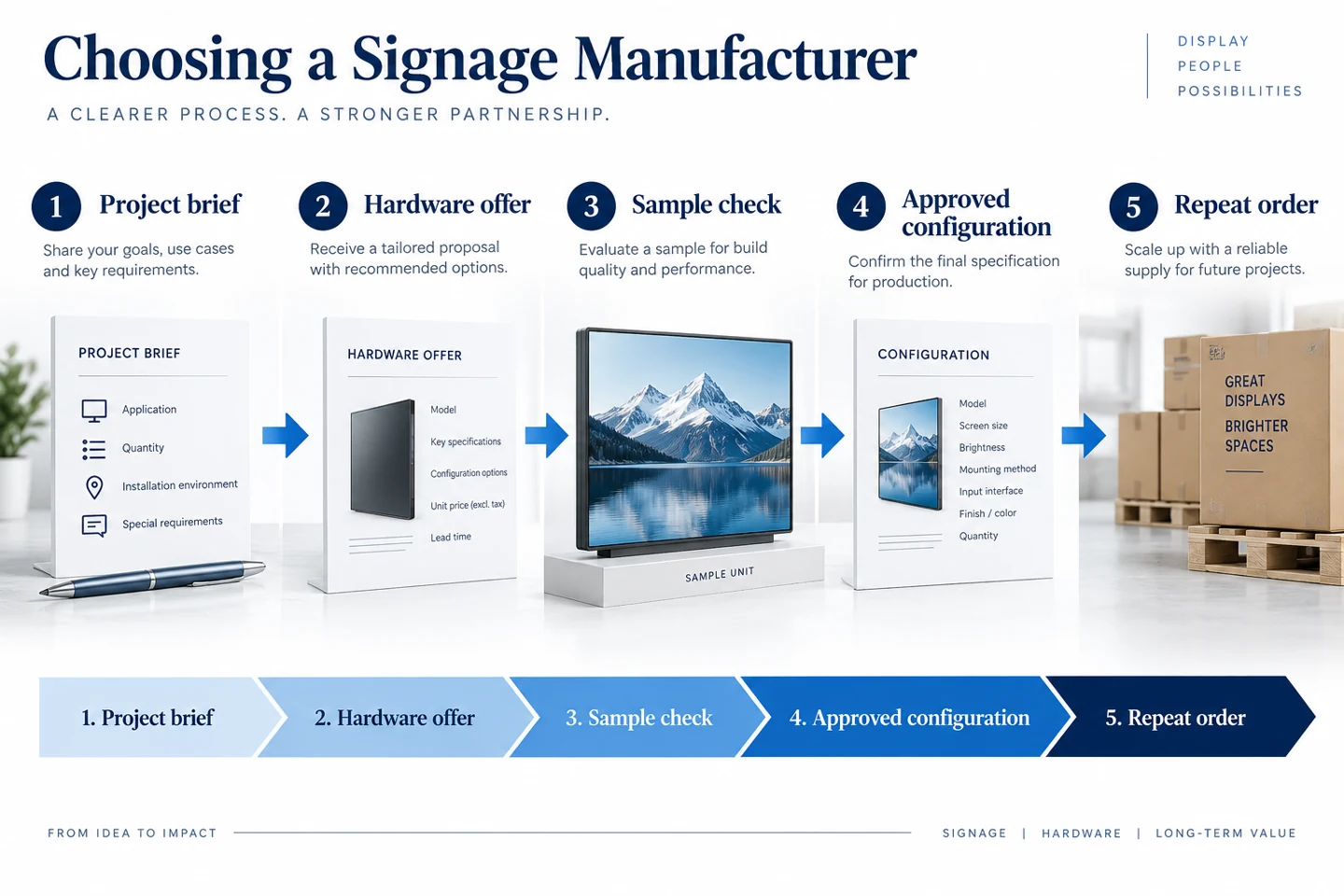
Give each supplier the same project brief, compare the exact offered configurations and agree how the sample will be accepted.
- Request matching model references, drawings, accessories and explicit exclusions.
- Test real content, required connections, startup and service access on the proposed sample.
- Make appearance and functional customisation separately measurable.
- Assign approval owners and keep revision records from sample to production, including the repair and support route.
A useful supplier review follows the order of the project: define the installation, compare the proposed hardware, evaluate a sample and agree how the approved configuration will be supplied again. The questions below help turn a product enquiry into a quotation your team can assess.
Send the same project brief to each supplier
Describe where the screen will operate, who will read it and how long it will run each day. Include indoor or outdoor placement, the viewing distance, nearby windows and the available mounting area. Add photographs or a site drawing when written dimensions alone would leave the position unclear.
State whether you need a complete signage unit, a display for an external player or custom kiosk hardware. These are different supply requests. If another company provides the application, identify who is responsible for checking the player, operating system and any connected devices.
Include the initial quantity and the expected rollout pattern without presenting an estimate as a firm commitment. A supplier can then distinguish a sample request from a repeat-order programme. Ask which details must be settled before the quotation and delivery estimate become final.
Compare what the quoted configuration includes
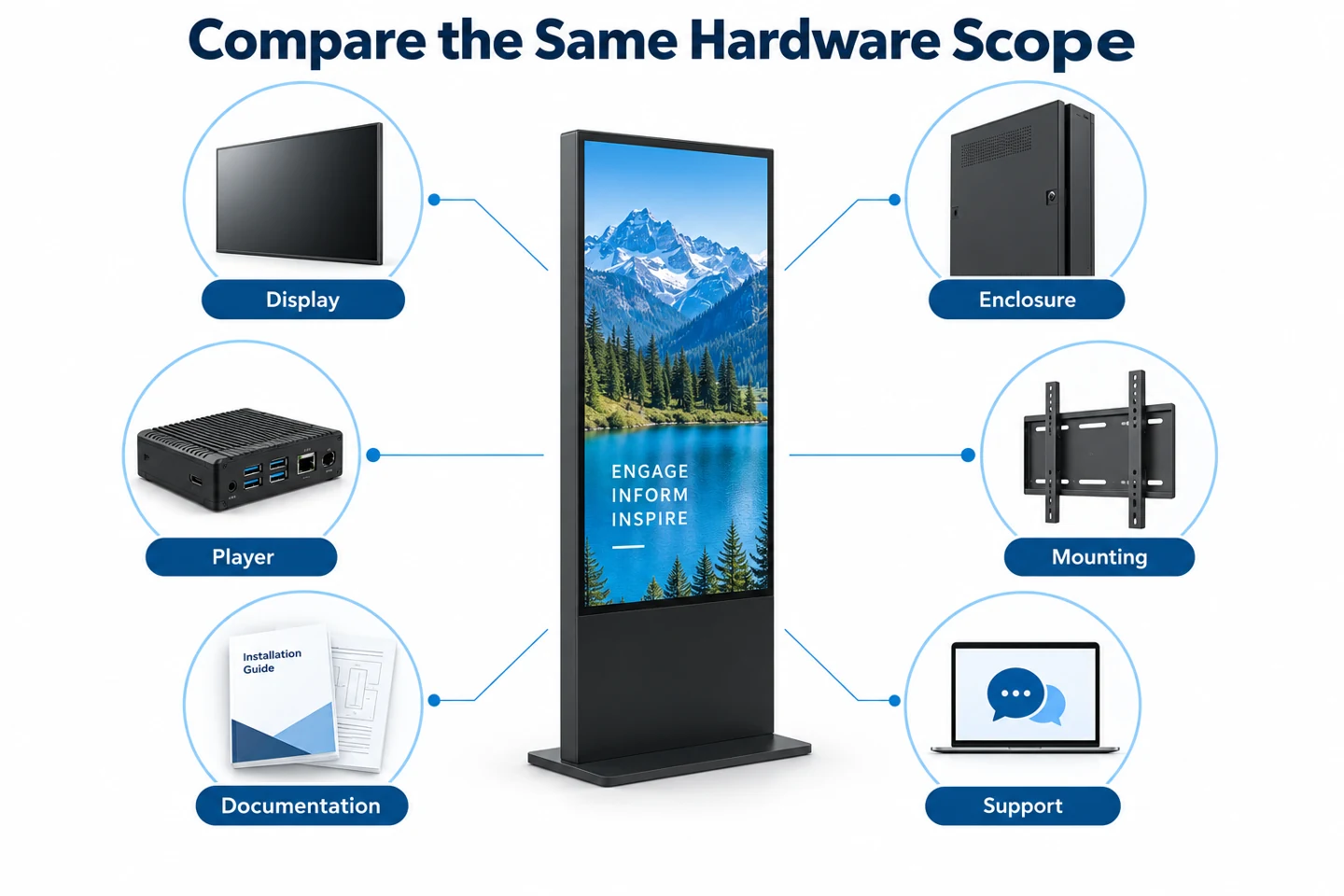
Ask each supplier to identify the offered model and configuration in writing. Connectors, player options, mounting parts and enclosure details should be traceable to that offer. A general catalogue is useful for selecting a family, but it does not replace the specification attached to an order.
| Area | What to request |
|---|---|
| Display | Size, resolution, brightness conditions and permitted operating orientation. |
| Enclosure | Overall dimensions, installation requirements and the protection specification where needed. |
| Player and connections | Included hardware, operating system, inputs and any optional modules. |
| Installation items | Mounts, base, fixings and cable arrangements included or supplied separately. |
| Documentation | Applicable drawings, operating instructions and model-specific supporting records. |
| After-sales support | Contact route, fault information required and the proposed repair process. |
Keep software and service scope separate from the hardware price. If an application is supplied by someone else, identify that dependency rather than treating it as included. For a broader equipment budget, our digital signage cost guide provides a related planning framework.
Use documents that match the offered product
Ask for drawings and instructions that correspond to the actual enclosure and configuration. A dimension drawing helps the installation team check the footprint and access space. A port list helps the integration team verify the proposed connections before a sample arrives.
Where supporting test or certification documents are required for the project, check which model and configuration they cover. A logo in a brochure does not by itself answer that question. Obtain the relevant documents and have the responsible project team confirm their applicability.
Keep technical questions specific. Instead of asking whether a screen is suitable for every outdoor location, describe the planned installation and request the applicable limits. Do not treat a protection rating as a substitute for mounting, temperature or site requirements.
Agree the sample acceptance plan before shipment
The sample should answer the questions that could change the order. Prepare representative content, identify the intended player and list the operating routines to test. Include the actual portrait or landscape arrangement and the smallest text customers must read.
Separate checks your team can perform from evidence the supplier must provide. Your staff can inspect the delivered configuration and playback behavior. They should not describe an informal sample check as a laboratory certification or a guarantee of lifetime performance.
- Match the delivered model and accessories to the written sample offer.
- Test the intended content and any required external connections.
- Check normal startup, shutdown and recovery after the planned power sequence.
- Review access for cables, content updates and routine maintenance.
- Record any difference and agree its resolution before approving the production specification.
Save the accepted settings, photographs and configuration record. A signed-off sample should provide a clear reference for the next order, including any agreed changes. Avoid relying on a memory of how the sample looked during a short demonstration.
Make customization requests measurable
Separate appearance changes from functional changes. A finish or logo request needs an agreed visual reference. A different player, connector arrangement or peripheral can affect integration and should have its own confirmation and acceptance check.
For a custom kiosk, identify the intended devices and their responsibilities. A space for a payment terminal does not establish software integration or payment compatibility. The supplier, application provider and device provider should agree who verifies each connection.
Ask which drawings need approval, which parts are fixed and how a change after approval will be handled. Request current lead-time information for the specific configuration. Do not assume that a catalogue model and a custom version share the same production schedule.
Plan support for the second year of use
Discuss the practical repair route before the order. Who receives a fault report? Which photographs, labels and settings should the customer supply? Is the proposed remedy an on-site part replacement or a returned unit? Record responsibilities and shipping arrangements in the agreed terms.
Ask how replacement components are identified and how proposed substitutions are communicated. The aim is to make future service traceable to the approved configuration. A similar-looking replacement should not silently change the integration requirements.
Turn quotation differences into clear questions
Put the offers into a comparison sheet with one row for each agreed requirement. Keep an unanswered field visibly open rather than treating it as included. If one offer includes a base and another excludes it, record that difference before comparing the two totals.
Ask suppliers to clarify ambiguous descriptions using the same wording from your brief. For example, specify whether a quoted player is built into the enclosure or supplied separately. Ask whether the price applies to the tested configuration, a different option or a minimum order quantity.
Do not force different products into a single ranking before resolving those differences. A lower-cost configuration may suit the project, but the team should understand what it changes. Write the decision in terms of the requirement it meets and any accepted limitation.
Give each approval a named owner
A sample can reach several teams without anyone knowing who can approve it. Name the person responsible for content playback, the person reviewing installation access and the person accepting the commercial scope. Keep their comments in the same record so one team’s approval does not conceal another team’s open issue.
The approval record should identify the sample, the documents reviewed and any remaining conditions. If the enclosure passes inspection but the chosen application still needs testing, record that partial result. Avoid a general approved label that makes an unresolved integration question look complete.
Agree how the supplier will confirm that the production configuration matches the accepted sample. Request a clear record of the selected options and accessories. When a component change is proposed later, ask what it affects and which checks need to be repeated.
Keep a change record between sample and production
Number the approved drawing and configuration revisions. When a change is requested, identify the previous version, the proposed version and the reason. A revised connector position may affect access even when the screen size and product name stay the same.
Confirm which team must approve a change before it is built. Appearance, installation and application changes can have different reviewers. Keep accepted alternatives separate from unresolved suggestions, so a conversation about an option is not mistaken for permission to substitute it.
For repeat orders, refer to the approved configuration instead of simply asking for the same screen again. Include the earlier order or sample reference and request confirmation of any differences. This gives both parties a shared basis for discussing parts, documentation and delivery scope.
Check what the receiving team will need
Plan the handover before the shipment arrives. The receiving team needs to know how the equipment is identified, which accessories should be present and where the installation instructions are stored. Give them a simple way to report visible damage or a mismatch without guessing which part of the order it concerns.
Keep the packing and installation information linked to the relevant product. Do not assume that instructions for a smaller display apply to a larger enclosure. Ask the supplier about handling and access requirements for the actual configuration, and pass those documents to the people doing the work.
Agree which records should accompany a service request after deployment. A model label, order reference, clear symptom and photographs of the connections are usually more useful starting points than an unexplained request for a replacement. The agreed service terms should determine the response, rather than assumptions made during the sales discussion.
Prepare a quotation request that can be answered
Send the supplier a concise brief, the required quantity, installation drawings and the questions still open. Ask for an itemized configuration and clearly identified exclusions. This makes it easier to compare offers without assuming that the lowest headline price includes the same equipment.
YJCEN’s product range includes commercial signage displays and kiosk hardware. Start with the relevant product family, then send your project requirements for a configuration review. The quotation should confirm the actual scope, options and terms for your order.