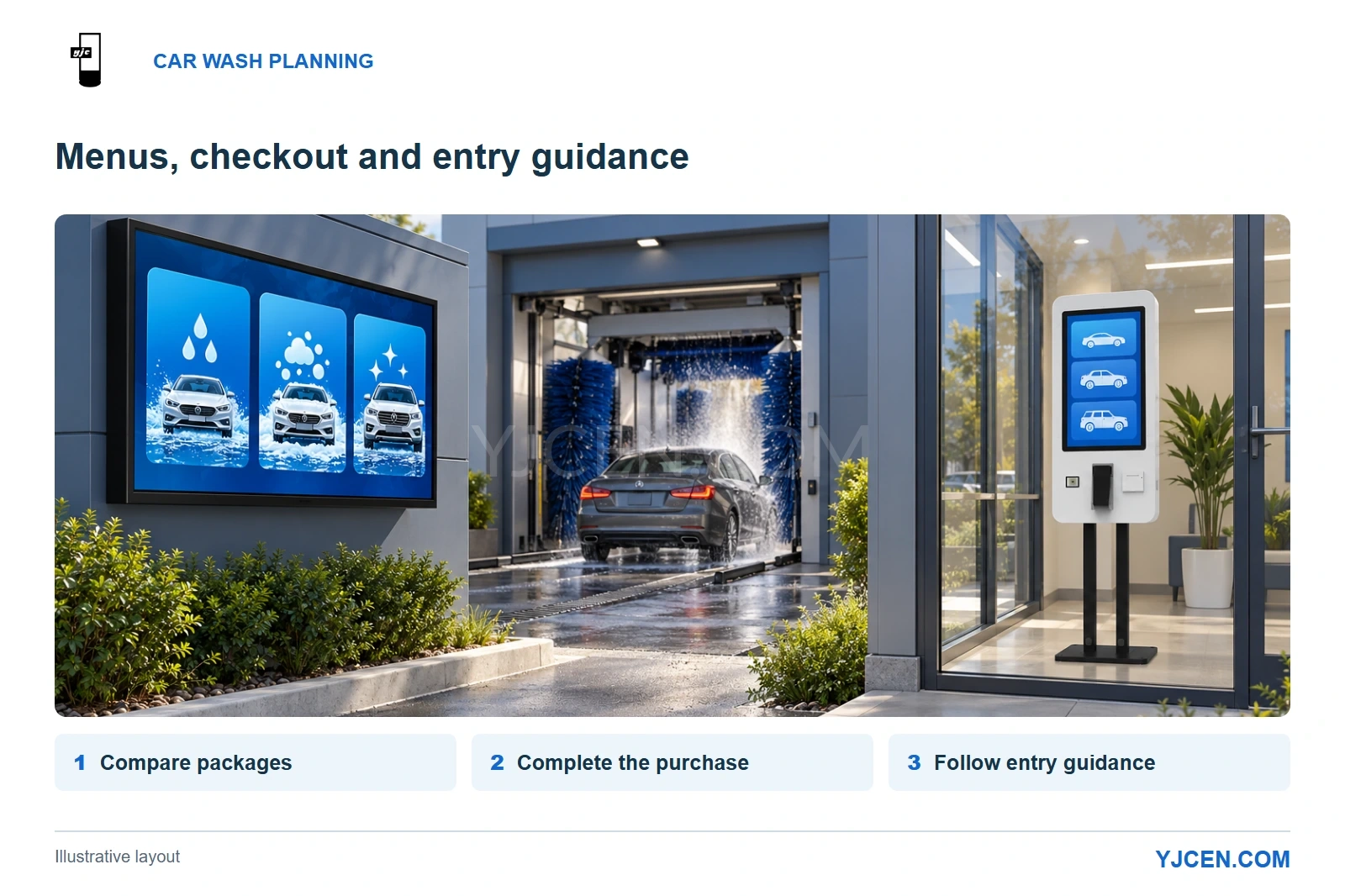
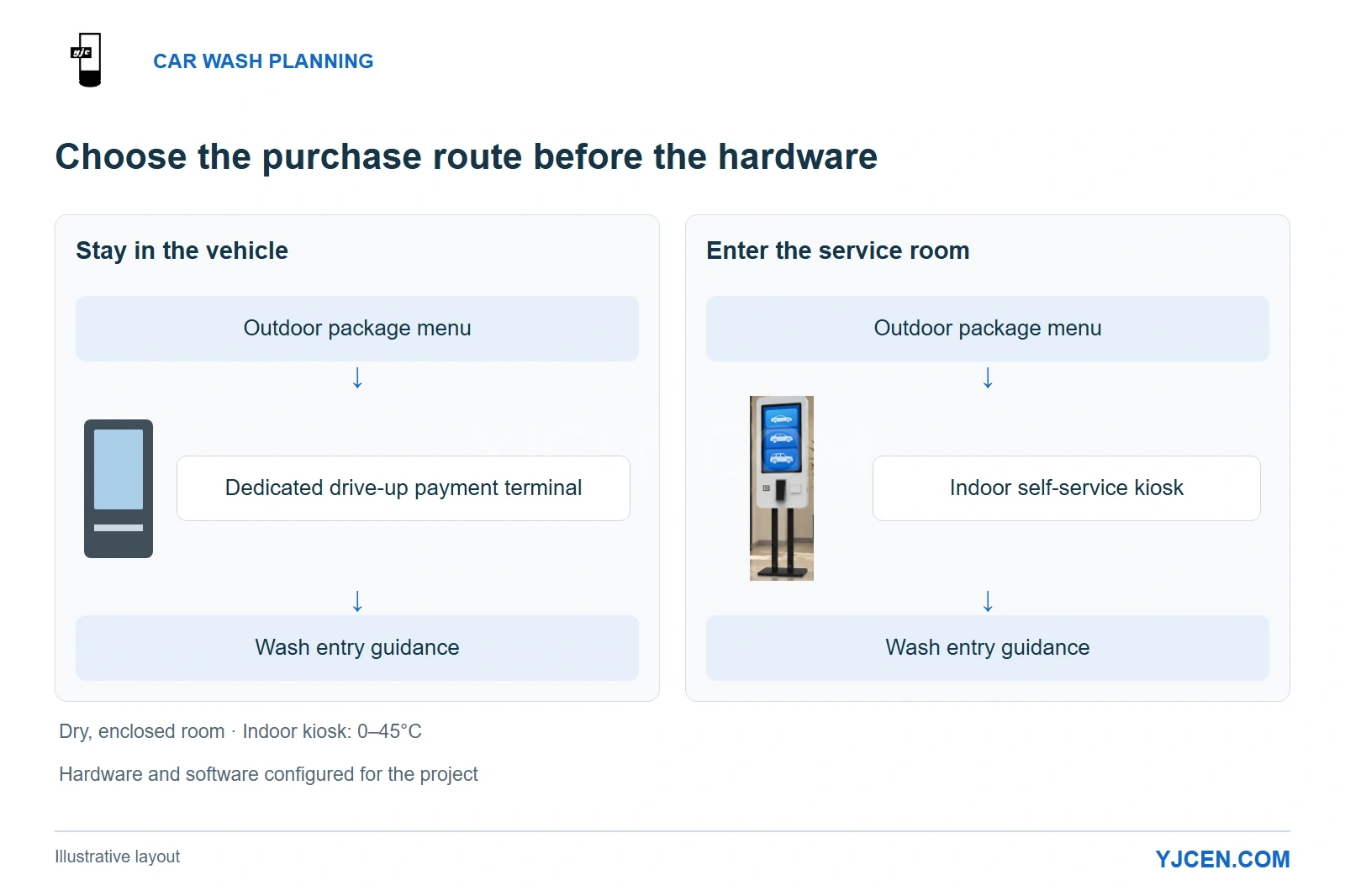
Planning illustration: the outdoor screen introduces wash packages, while the indoor kiosk provides a separate purchasing point in the enclosed service room.
At an unattended automatic car wash, organize screens around three tasks: compare packages before payment, complete the purchase at a dedicated checkout point, and follow equipment instructions at the entrance. YJCEN’s IP66 Outdoor Digital Signage serves the outdoor menu role; an indoor self-service kiosk can provide the checkout interface where customers park and enter an enclosed service room. Choose that purchase route before choosing screen sizes.
Our recommendation is to separate information by the action it supports: read from the queue, interact at checkout, and follow instructions at the wash entrance. This gives each display a clear job and makes it easier to decide where another screen is worth installing.
1. Which screen belongs at each stage?
The first decision is whether customers buy from their vehicles or walk into a service room. A drive-up route needs a payment terminal positioned for a seated driver; an indoor purchasing route needs parking and a clear pedestrian approach before the customer joins the wash queue.
| Customer task | Appropriate equipment | Why it fits |
|---|---|---|
| Compare packages from the approach or queue | Outdoor high-brightness menu display | Presents prices and package differences before the transaction begins |
| Purchase from inside the vehicle | Dedicated outdoor drive-up payment terminal | Brings the transaction interface and payment hardware to the driver’s stopping position |
| Purchase inside an enclosed service room | Indoor touchscreen kiosk with the selected application and payment hardware | Provides a place to choose a package, review the order and pay while standing at the terminal |
| Prepare the vehicle and enter the wash | Preparation signage plus the wash equipment’s own live guidance | Separates general instructions from commands tied to the machine’s operating state |
For a site with an effective payment terminal and clear entrance guidance, prioritize the pre-payment menu. Another display earns its place when a different viewing position or information task needs it.
2. Where should drivers see the package menu?
Place the menu before the payment point, facing a position where drivers can pause without blocking another lane. This lets them compare the washes before they are asked to select and pay.
A screen visible only to the first vehicle at the terminal misses that opportunity. Position the menu so waiting drivers can also read it where the site layout allows, with the main prices clear of likely vehicle obstructions.
For two lanes, a shared screen works when both queues have a usable view. If one lane approaches at a sharp angle or another vehicle blocks it, a display serving each approach can be more useful than enlarging the shared screen.
Keep the main comparison continuously visible: package names, one-time prices and the services that distinguish each tier. A driver should not have to wait through a promotional video to see the price again.
Give each package the same reading order—name, price, included wash and distinguishing upgrade. Repeating every common feature in every column makes the meaningful differences harder to find.
Membership belongs in a separate area with a clear billing period and purchase route. The International Carwash Association’s Q2 2025 consumer research highlights the importance of subscriptions, which makes membership worth explaining while keeping single-wash purchases straightforward. ICA consumer research summary
Reserve animation for secondary content. Prices and package differences should remain stable while the customer is making the decision.
3. What does moving from 43 to 55 inches actually buy you?
For a car wash menu, a larger display is useful when it makes the price and package differences physically larger from the driver’s position. Choose the menu layout first, then the screen that makes it readable within the available installation space.
YJCEN’s standard IP66 models show the practical tradeoff:
| Specification | 43-inch YJC-430-OD09-A | 55-inch YJC-550-OD09-A |
|---|---|---|
| Active area, landscape width × height | 942 × 530.4 mm | 1210 × 680.8 mm |
| Screen body, landscape width × height × depth | 994 × 582.4 × 86 mm | 1262 × 732.8 × 86 mm |
| Net weight | 26 kg | 37 kg |
| Native resolution | 1920 × 1080 | 3840 × 2160 |
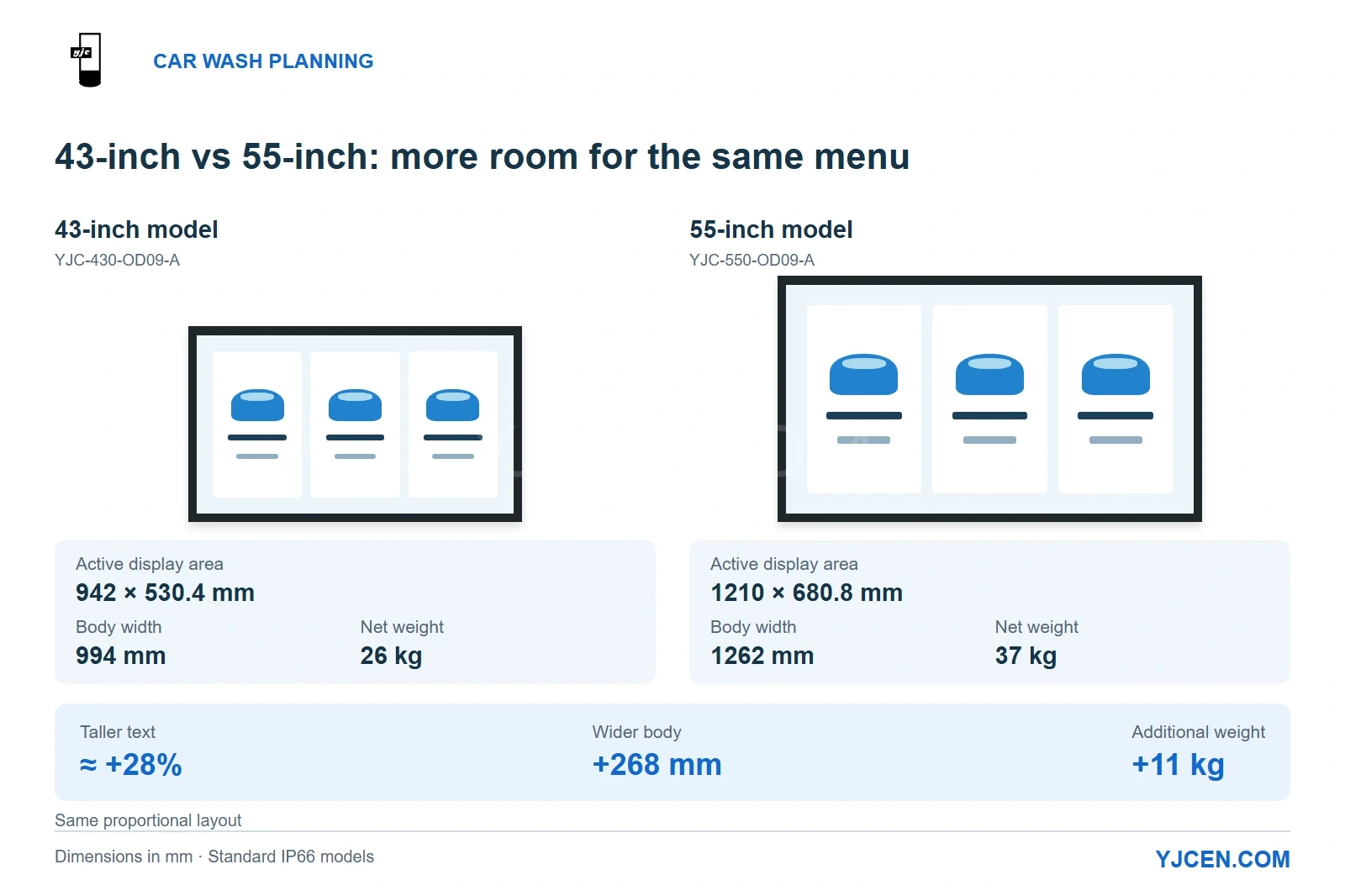
With the same proportionally scaled menu, YJCEN’s 55-inch IP66 display produces letters approximately 28% taller than the 43-inch model. The larger body also adds 268 mm of width and 11 kg of weight, so the gain in text size comes with a larger mounting requirement.
The text-height comparison is calculated from the published active heights: 680.8 ÷ 530.4 ≈ 1.28. Source: YJCEN’s 43-inch and 55-inch Outdoor IP66 Display specification sheets, page 2, and the 55-inch standard-model dimension drawing.
Start with 43 inches for a short, uncluttered menu read from a nearby stopping position. Move toward 55 inches when the same layout needs larger type and the wall or support can accommodate it; putting more small text on the larger screen gives away that advantage.
A landscape layout makes side-by-side package comparison straightforward. For a narrow position requiring portrait orientation, stack and simplify the packages instead of shrinking a landscape design.
Use an actual-size menu preview from the intended driver position to settle the size choice. This is more informative than selecting by resolution: even a sharp 4K image can contain prices that are too small to read from the queue.
4. Should the outdoor menu be wall-mounted or freestanding?
Choose wall mounting when the building already offers a useful sightline toward the queue. It keeps a separate pedestal out of the lane-side area, while the bracket, cabling and service access remain part of the installation space.
Choose a freestanding format when the best reading position is away from that wall. YJCEN’s Outdoor Digital Kiosk combines a fixed floor-standing enclosure, IP65 protection and 3,000-nit brightness for this alternative layout.
The freestanding format lets the menu follow the vehicle approach rather than the building. Its foundation and cable route then become part of the site works, and the enclosure should sit outside the space vehicles occupy when driving or turning.
Arrange the principal content for the seated driver’s view. A tall display designed around standing pedestrians can place the most important information too high for a close vehicle position.
5. How should the display handle sunlight, night use and wash water?
Use a high-brightness outdoor screen for an exposed daytime menu position, then use automatic adjustment to respond to changing ambient light. YJCEN’s 3,000-nit IP66 models combine those capabilities, allowing the same menu position to serve bright daylight and darker operating hours.
At night, the aim is comfortable reading rather than daytime brightness. Keep the light sensor clear of decorative trim, and orient the screen to reduce reflections from the sky and vehicle headlights; our automatic-brightness guide explains the control and placement details.
YJC’s IP66 outdoor displays are suited to car wash approach lanes and waiting areas, with enclosure protection against dust, rain and everyday splashes. Face the menu toward the queue so drivers can compare packages before payment, and position it outside the direct spray path of wash jets and cleaning chemicals.
For wider comparisons of outdoor hardware, see the outdoor digital signage selection guide.
6. When is an indoor self-service kiosk the right checkout point?
Use an indoor kiosk when the customer journey includes parking and entering an enclosed service room to buy a wash. Give that room a clear approach from the parking area, so customers can purchase before joining the vehicle queue.
YJCEN’s Self-Service Ordering Kiosk provides a touchscreen checkout point for the enclosed customer room. Choose the screen size around the package-selection interface, then use the wall-mounted or floor-standing format to fit the room’s pedestrian route.
Those choices should follow the transaction and the room:
| Requirement | Configuration starting point | Reason |
|---|---|---|
| A short package menu and simple purchase review | Start with the compact 21.5-inch format | Keeps the terminal compact when the interface needs relatively little display area |
| Larger controls or more explanatory images | Choose 27 or 32 inches for a roomier interface | Provides additional physical area for the interaction |
| A small room with a suitable wall | Wall-mounted arrangement | Preserves floor space for approaching the terminal |
| A separate purchasing position away from the wall | Floor-standing arrangement | Places checkout where customers naturally approach |
| Printed transaction records | Integrated 80 mm thermal printer | Produces the receipt content supplied by the application |
Install the kiosk in a dry, enclosed customer room kept within its 0–45°C operating range. Use a wall-mounted unit to leave the floor clear in a small room, or a floor-standing unit to create a distinct checkout position in a larger space.
Configure the application, payment provider and wash-system handoff as one transaction flow. The customer needs to know what was purchased and how to use it at the entrance, while the operator needs the payment and wash entitlement to correspond.
Build the checkout around the chosen car wash application and payment provider. Use the integrated 80 mm printer for receipts, and connect the application to the wash controller for the site’s code-redemption or wash-start process.
WashTec’s Touch operating terminal illustrates this joined-up flow: selection, payment and wash start are coordinated within the wash system. WashTec control and operation systems
For customers who stay in the vehicle, place a dedicated outdoor payment terminal beside the stopping position, with its controls within the seated driver’s reach. Keep this route separate from the pedestrian approach to an indoor kiosk.
7. How do these choices come together on one site?
The following are proposed layouts for two customer journeys.
Drive-up purchase: strengthen the menu before adding checkout hardware
At a site with an existing outdoor payment terminal, place the package menu upstream where the queue can read it. Keep the terminal responsible for the purchase and the wash equipment responsible for live entry guidance.
If the existing preparation instructions are clear, the outdoor menu may be the only additional display needed. The investment addresses the earlier package decision instead of duplicating a functioning transaction point.
Indoor purchase: combine an outdoor offer with an indoor checkout point
At a site with parking and an enclosed service room, use the outdoor screen to present the packages and direct customers to purchasing. Inside, the kiosk handles selection, purchase review and payment through the configured system.
The completed-purchase screen should explain the next action using the site’s actual redemption process. Keep a help contact visible at checkout, where a customer experiencing a transaction problem will need it.
For both layouts, maintain identical package names and coordinated prices across the menu and checkout interface. Keep general preparation instructions at the entrance, with live “enter,” “stop” and completion messages driven by the wash controller’s actual state.
Plan your car wash menu and checkout layout
Send YJCEN a photo or sketch of the approach lane and any enclosed customer area, your proposed package menu, approximate reading distance and required quantity. Tell us whether customers will pay from their vehicles or inside; for a kiosk project, include the application and payment-provider requirements.
We can use that brief to recommend display sizes, mounting formats and terminal hardware around the way your customers will purchase and enter the wash.