Quick Guide: Give Each Salon Screen One Job
The 21.5-inch indoor wall display uses a Full HD panel at 250 nits, while the 32-inch model is specified at 400 nits. Choose the size around the reception viewing distance and the length of the service menu, then assess readability under the salon’s lighting. Indoor Digital Signage.
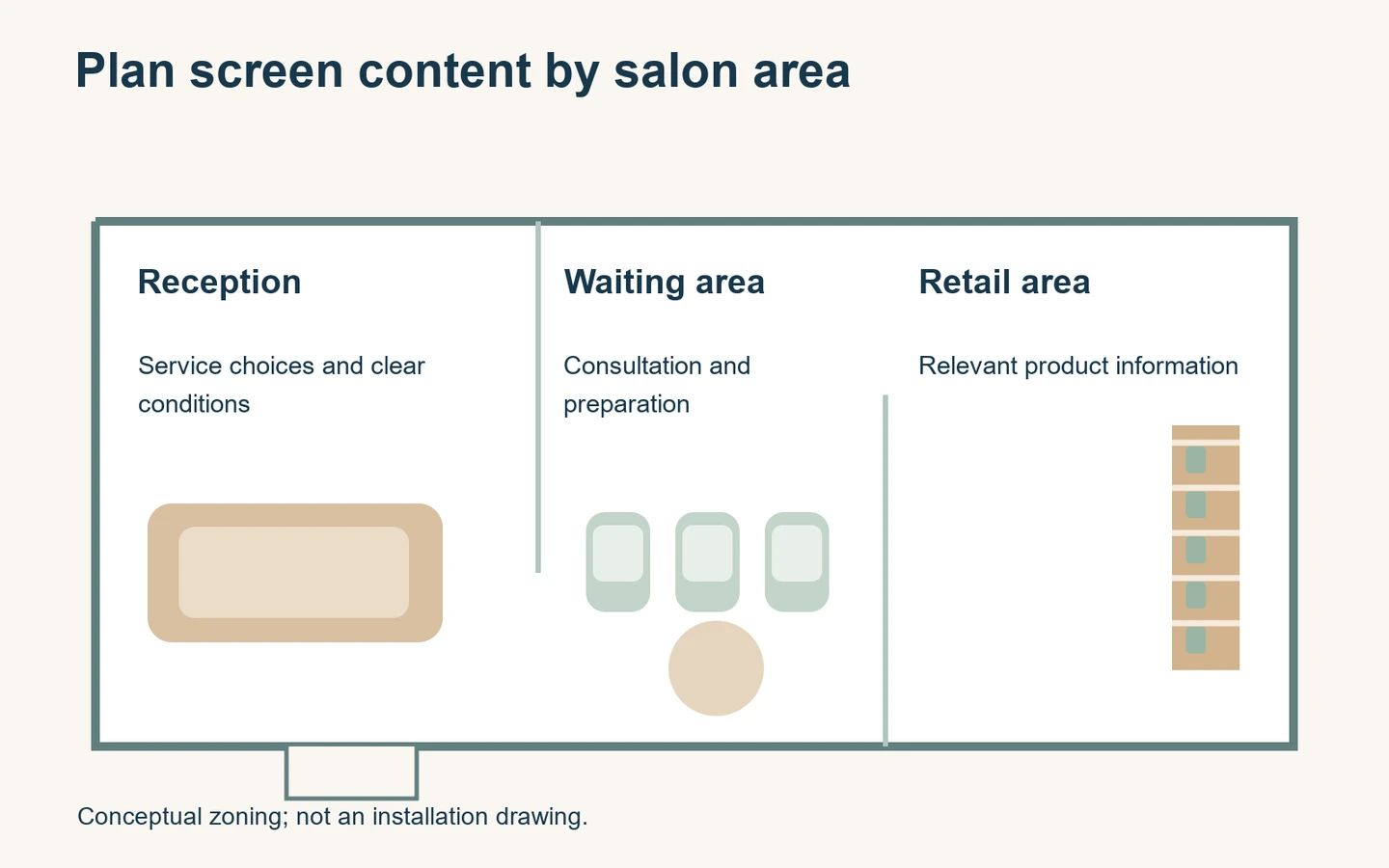
Plan the message around where clients stand or wait. A reception service menu and a styling-area inspiration screen need different content.
- Choose the question: Decide what clients should understand at that position.
- Check the viewing position: Test reflections, text size and sight lines in the actual room.
- Keep offers precise: Show relevant conditions and remove expired promotions.
- Assign an owner: Name who approves prices, publishes updates and checks the screen.
Digital signage for salons works best when it answers a specific client question. At reception, that may be which services are available. In a waiting area, it may be what a consultation includes. Near retail shelves, it may be how to use a product that staff already recommend.
Putting the same long promotional loop on every screen often weakens those distinctions. Start with the client’s position and the information needed there. Then select the display format, artwork and update process. This guide focuses on an indoor salon deployment, rather than treating a screen as a guaranteed way to increase sales.
Decide what belongs at reception
A reception screen can show service categories, appointment information and a small number of current messages. Clients should be able to understand the main information while speaking to staff. Keep the page stable long enough to read; rapid transitions are a poor fit for a menu that someone is trying to compare.
Separate the core service menu from temporary promotions. A special offer should not hide the standard choices or make it difficult to find the relevant service. If the salon uses starting prices, explain the conditions clearly and keep the display consistent with the booking process and staff explanation.
Do not compress every possible service into one slide simply to avoid a second screen. Group related services and decide which details belong in a consultation or booking page. A screen is useful for orientation, but it should not replace a conversation where the final service depends on the client’s needs.
Check how people actually arrive. Some will stop at the desk; others will wait near the door or sit immediately. A display mounted for the receptionist’s view may be poorly positioned for clients. Walk those routes before deciding the screen height or preparing a tightly packed menu layout.
Use the waiting area for explanation
Waiting-area content can explain preparation, consultation steps or aftercare at a more relaxed pace. Choose information that remains useful without sound. A short sequence about what to bring to a consultation may be clearer than a continuous mix of unrelated product clips and changing offers.
Match content length to the setting rather than assuming every visitor watches a full loop. Give each slide enough context to make sense on its own. If someone looks up halfway through, they should still know what the message concerns. Avoid placing an essential condition only on the previous or following slide.
For before-and-after photographs, use material the salon has the right to show and describe it accurately. Do not imply a result is typical or guaranteed if that has not been established. Keep client-identifying information out of public displays unless the salon has the appropriate permission and a defined purpose for showing it.
Where treatment advice needs professional judgement, the screen can direct clients to a consultation. It should not offer an automated diagnosis or make unsupported health claims. The content owner should review the wording with the relevant professional before it enters the public playlist.
Keep styling-area content comfortable
A client looking toward a mirror may see the screen indirectly or from an angle. Inspect both the direct view and reflections. A bright moving image behind the client can be distracting even when the screen itself is outside their forward view. Test content during a realistic appointment setup.
Use a calm sequence if the display remains in view for a long period. Consider whether repeated sound would interfere with conversation or the salon’s existing audio environment. A silent visual message often fits this setting better, but the final choice should follow the salon’s actual service experience.
Avoid making staff turn repeatedly to read a screen behind them. Information needed during consultation should be available where the conversation takes place. The public screen can introduce a style or service, while staff use a separate approved reference for detailed choices and any personalized discussion.
Do not put client names, booking records or private consultation notes into a general signage playlist. Public promotion and appointment administration are different functions. If the project includes a queue or booking integration, define exactly what is shown and have the responsible team review that workflow separately.
Select the display for the room
The YJCEN wall-mounted digital signage display is intended for indoor information and advertising. Its range offers portrait or landscape installation, Full HD or 4K UHD options, and optional Android or Windows systems. Select the actual configuration around the content application and mounting position.
A wall display can keep the floor available for chairs, reception furniture and client movement. The supporting wall, fixing method, cable route and service access still need checking. Use the selected model’s dimensions rather than assuming that screen diagonal describes the entire enclosure or the space required for installation.
Where the message position changes, the portable digital signage display provides a movable indoor format. This range uses mains power during operation. Moving it to a new position therefore includes planning a suitable outlet and a cable route that does not cross the customer walkway.
Neither indoor format should be treated as an exposed outdoor display. A bright shop window is also a different viewing condition from a reception wall. For a window-facing project, review a suitable high-brightness configuration and the actual light and heat conditions rather than assuming that an indoor screen will perform the same way there.
For a retail example of this distinction, see our Ireland shop-window display project. It used a 55-inch high-brightness display installed indoors behind street-facing glass. This is a retail project, not a salon installation, but it provides a useful reference for planning an outward-facing salon window separately from an indoor reception screen.
Test readability before final installation
Prepare a sample service menu using the salon’s real category lengths and representative prices. View it at the proposed size and distance. Test from the entrance, waiting chair and reception queue as appropriate. A layout that looks clear on a laptop may be difficult to read across a room.
Use strong contrast and a clear hierarchy. Service names and important conditions need more attention than decorative backgrounds. Avoid placing small text on detailed hair photographs. Give prices a consistent position so clients can compare choices without scanning across unrelated parts of the layout.
Check the design under daytime and evening lighting. Mirrors, windows and spotlights can change how the screen is seen. If reflections hide the content, reconsider the location or orientation before trying to solve everything by increasing brightness. The best position depends on the room and the way clients use it.
Ask a person who did not design the slide to read it from the intended position. Note which information they miss. Adjust spacing, wording or the amount of content, then repeat the same check. This practical test is more useful than choosing text size only from a design template.
Build a content plan with clear boundaries
Use separate content groups for the stable service menu, time-limited offers, salon information and product education. Each group should have an owner and an update trigger. A price change is different from a new photograph; the approval process should reflect the consequences of an incorrect message.
For an offer, record the start date, end date, included service and relevant conditions. Keep the displayed wording consistent with booking and reception information. If the content depends on availability, define how staff remove or pause it. Do not assume that a promotional slide reads live stock or appointment data unless that integration exists.
For product education, use claims and instructions that the salon can substantiate from appropriate supplier material. Avoid making the screen’s description stronger than the approved product information. Keep the message useful: what the product is for, where the client can ask about it and how it relates to the service conversation.
Prepare a neutral fallback slide for times when a campaign ends or a replacement is delayed. It can show stable salon information that has been checked. A fallback gives staff a safe choice without leaving an expired discount visible or displaying an unfinished content file.
Choose who updates the screens
One local screen may be manageable with an approved local update process. Several salons with frequent changes may benefit from a compatible networked application. Compare the real workflow: who creates artwork, approves prices, uploads files and confirms the display. Software licensing and remote management are separate configuration decisions.
Give the publisher only the access needed for their role. Keep a record of the approved version and where it should run. If different branches have different prices or opening hours, mark those differences in the content plan. A visually identical slide can still contain the wrong information for one location.
Confirm the application’s behavior when the network is unavailable. Some locally stored content may continue, while live data or remote changes may not. Ask the software supplier about the selected configuration and test the agreed behavior. Do not infer offline operation from the fact that the display has shown one cached image.
If updates use a USB drive, keep a clean release folder and an approved fallback. Staff should know whether the player copies files or reads from the drive. Our guide to online and offline digital signage explains the broader distinction between content playback and network-dependent services.
Establish an opening and closing check
At opening, confirm that the screen is on, the correct playlist is visible and the current prices or offers match the day’s plan. Look for an unexpected application screen, a missing file or an expired message. A brief visual check catches problems that a successful upload notification alone may not reveal.
During cleaning, follow the selected display’s instructions. Avoid applying a general salon cleaning routine directly to electronics without checking the manufacturer’s guidance. Keep access to the screen, cables and ventilation suitable for the actual unit, and arrange professional attention when the issue is outside routine staff maintenance.
At closing, use the configured schedule or normal shutdown procedure. Confirm who changes schedules for holidays and temporary opening hours. A timer that worked last month can become inappropriate when the business changes its hours. Keep responsibility with a named role rather than assuming someone will notice.
Evaluate the result without inventing a return
Start by checking whether the screen performs its intended job. Can arriving clients find the service categories? Do staff receive repeated questions about unclear conditions? Are promotions removed on time? These observations can guide improvements even before the salon has enough information to assess commercial outcomes.
If the business measures enquiries or product sales, record the time period and other changes that occurred. A new promotion, season, staffing change or pricing decision may affect the result. Do not attribute every change to the screen or promise that a particular layout produces a fixed percentage increase.
Review content that repeatedly needs verbal correction. The solution may be clearer wording, a more stable menu slide or a different screen position. Adding more animation or more messages is not always the answer. Keep the display focused on the client’s next useful decision.
For a hardware discussion, send YJCEN photographs of the intended indoor position, the viewing distance, preferred orientation and a sample content layout. Include how the salon plans to update the screen. Those details provide a practical basis for choosing a display configuration that fits the room and workflow.
Share your screen size, installation environment and quantity for a display quotation.