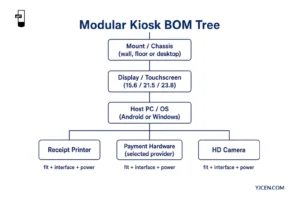
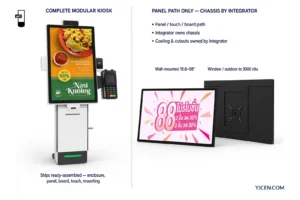
Name the payment terminal model first. Then compare its mechanical envelope, approved mounting method, operator face and cable path against the payment bay on a Self Service POS Kiosk before you lock any fascia cutout. Until those drawings match, keep the cutout open and treat the bay as provisional. Payment services and the ordering application stay outside the hardware scope.
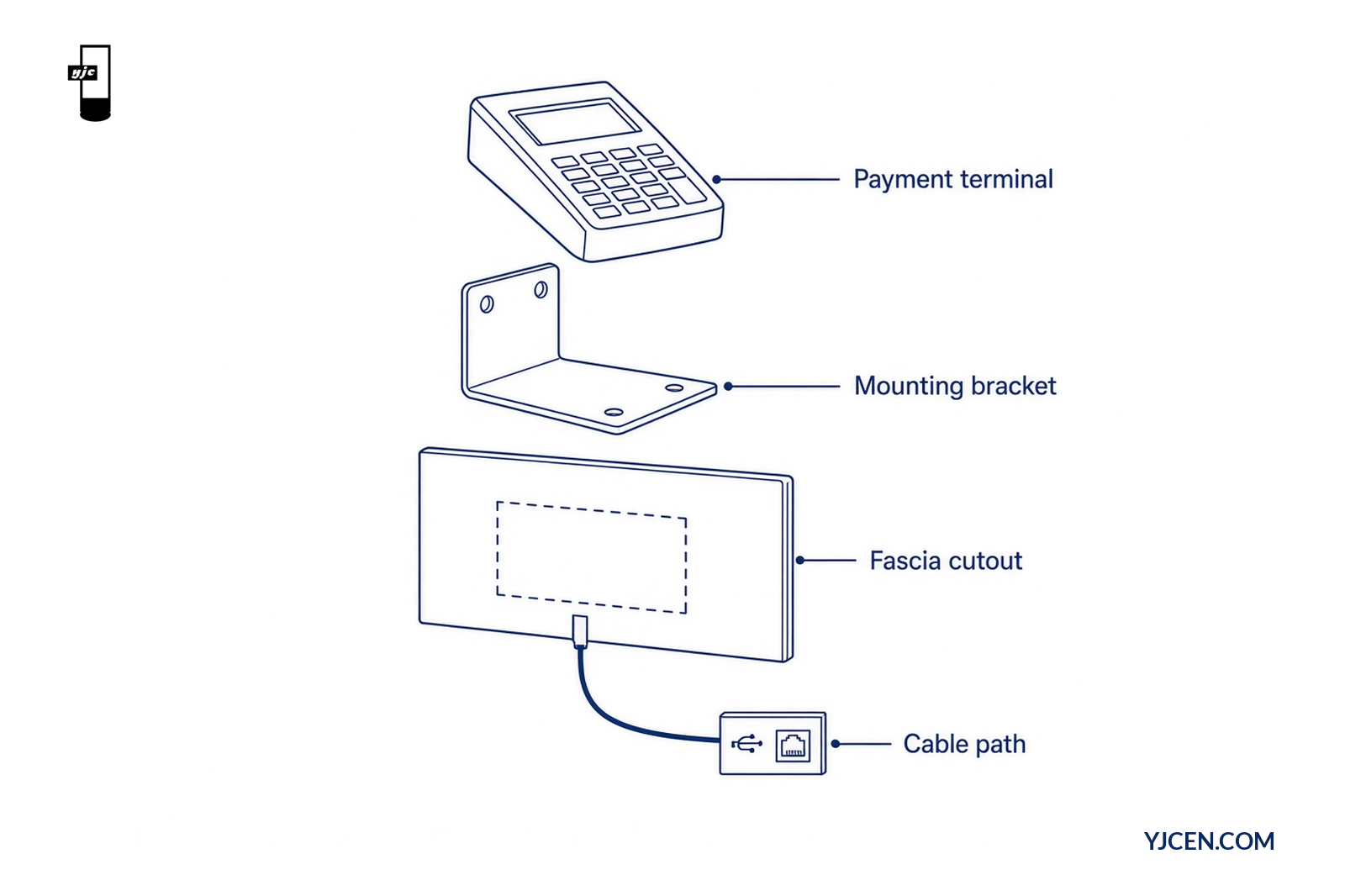
What must you collect from the terminal vendor before a cutout?
Collect four packages before any sheet-metal change:
- Exact model string — commercial name plus the revision the payment provider will ship.
- Official mechanical drawings — outline, depth, operator face, cable exit and mounting pattern from the terminal vendor (not a sales photo).
- Approved mount method — vendor-approved bracket, VESA plate, flush fascia pocket or side wing, with torque and fastener notes if published.
- Interface list — power, USB, Ethernet or proprietary link that the ordering application expects.
Without that set, a quotation can only hold a provisional bay. It cannot freeze a cutout that later blocks the operator face or leaves the cable short.
On this modular line, bank-card / mobile / QR / NFC payment runs through the selected terminal and provider. We arrange the bay around that terminal; the terminal’s own drawing still governs the hole and the bracket.
How do you check mechanical fit against the modular bay?
Walk the stack in this order. Stop at the first mismatch.
| Step | Check | Pass condition | Fail action |
|---|---|---|---|
| 1 | Envelope | Terminal outline and depth clear the bay and any printer or camera module | Change bay side, screen size or mounting format — do not enlarge a cutout by guess |
| 2 | Bracket | Vendor-approved mount seats on the modular wing or fascia without drilling a new pattern | Request OEM bracket review or a different terminal revision |
| 3 | Operator face | Card slot, contactless zone, PIN pad and display remain reachable and readable after install | Reposition height/offset or change mount method |
| 4 | Cable exit | Exit side matches the planned internal route to USB/Ethernet | Reroute or select a different cable exit option from the vendor |
| 5 | Service access | Paper, board and terminal can be serviced without removing the whole kiosk | Adjust bay depth or choose wall / floor / desktop layout that keeps rear/front access |
The modular hardware uses a detachable screen, stand and camera so the project team can define layout at component level. A module’s physical fit and interface are still part of its specification. Confirm dimensions and connection before treating any third-party part as a drop-in.
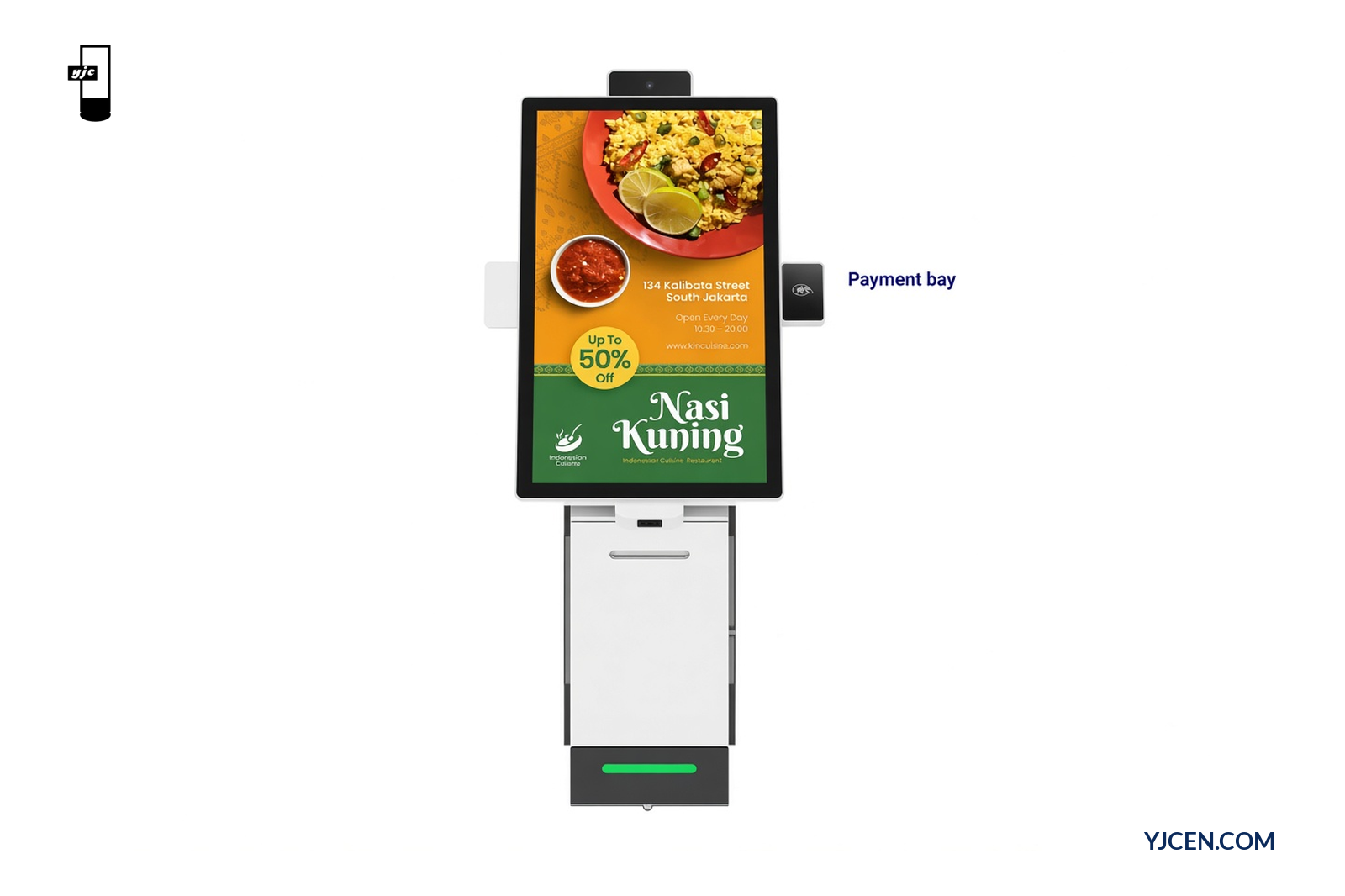
Available touchscreen sizes on this modular line are 15.6 / 21.5 / 23.8-inch (models YJC-156-K / YJC-215-K / YJC-238-K), with wall-mounted, floor-standing or desktop mounting. Screen size does not invent a terminal cutout; it only changes how much fascia and approach space you have around the bay.
For a complete wall-mounted or floor-standing ordering unit with an integrated 80 mm thermal printer and QR/NFC payment configurations, compare the Self-Service Ordering Kiosk. The fit process above is the same: name the terminal, then match drawings before production.
Which cable and interface fields belong in the RFQ?
Put electrical and routing fields next to the mechanical ones. Missing either set is why RFQs stall on “payment terminal TBD.”
Mechanical fields
| Field | What to write | Why it matters |
|---|---|---|
| Terminal model + revision | Exact vendor string | Prevents shipping a later housing that no longer fits |
| Outline W × H × D | From official drawing | Sets bay clearance |
| Mounting pattern / bracket P/N | Vendor-approved method | Avoids ad-hoc holes |
| Operator-face features | Contactless zone, card slot, PIN pad, display | Protects usability after fascia install |
| Cable exit location | Left / right / rear / bottom | Drives internal route |
| Service clearances | Front/rear open space | Keeps paper and board accessible |
Electrical / interface fields
| Field | What to write | Why it matters |
|---|---|---|
| Host interfaces | USB, Ethernet, serial or vendor link | Matches kiosk ports and application drivers |
| Power method | Powered USB, separate PSU, PoE (if vendor supports) | Avoids late PSU additions |
| Cable length needed | Path from bay to board | Prevents short harnesses after cutout |
| Network role | LAN drop vs Wi-Fi / optional 3G/4G | Aligns site cabling |
| Application handshake | Who owns drivers and payment result | Keeps hardware vs software scopes separate |
The modular kiosk provides USB × 2 and Ethernet RJ45 × 1, with Wi-Fi/LAN and optional 3G/4G. Those ports support a connected terminal; they do not replace the vendor’s interface requirements or prove every payment application will enumerate the device.
For software, printer and payment-provider responsibilities (outside this mechanical fit piece), use the self-ordering kiosk software and peripheral checklist.
How does operator reach change the mount decision?
Mechanical fit can pass on paper and still fail on site if the customer cannot reach the payment face after the screen height is set.
Check reach as one path: touchscreen → payment face → receipt outlet. A side-mounted bay that clears the bracket may still sit outside a comfortable reach band once the chosen mount (desktop on a high counter, wall plate, or floor pedestal) is fixed. Use the site counter height and the selected kiosk drawing together — the countertop vs floor-standing layout guide covers how base footprint and screen housing height interact.
If the project must meet a published accessibility reach range, record the target standard and measure the actual payment controls, not only the top of the cabinet. YJCEN can review mounting format options; the project’s accessibility sign-off stays with the site team.
What should you send YJCEN for a fit review?
Send one brief that an engineer can mark fit / no-fit / redesign:
- Exact payment terminal model and revision
- Official mechanical drawings (PDF preferred) and approved mount method
- Preferred kiosk size (15.6 / 21.5 / 23.8) and mount (wall / floor / desktop)
- Cable and interface list from the terminal vendor
- Site notes: counter height, ADA/reach target if any, country, quantity
- Ordering OS preference (Android or Windows) and whether a sample (MOQ 1) is required
OEM layout reviews and custom fascia work go through custom display solutions. Ask us for the size-matching manuals and dimension drawings, or download them from Product Downloads. Sample lead time for standard configurations is typically short; customized cutouts follow the longer custom window stated on quotation.
Decision this article settles: given a named payment terminal model, can this modular or self-service kiosk accept the mount, operator face and cable path without redesign? Yes only when the vendor drawings clear the five fit steps above. If drawings are missing, the honest next step is to request them — not to invent hole sizes or claim universal payment compatibility.
FAQ
Can any payment terminal fit without redesign?
No. Fit depends on the named model’s drawings.
Does YJCEN supply the payment application?
No. Hardware and payment services are separate scopes.
What must I send before locking a fascia cutout?
Exact terminal model plus official mechanical drawings.
Are USB and Ethernet available on the modular kiosk?
Yes. This modular kiosk provides USB×2 and Ethernet RJ45.
Should I guess hole sizes when drawings are incomplete?
No. Request the vendor drawing before any cutout.
Can YJCEN review an OEM hardware arrangement?
Yes. Share screen size, component list and interface requirements.
Next step: request a mechanical fit review
Contact YJCEN with the terminal model, mechanical drawings, mount method, cable/interface list and preferred kiosk size/mount. The engineering team will mark whether the bay accepts the terminal as drawn or needs a redesign before production.
Related reading: How to choose a self-service kiosk · Self-service kiosk vs POS system