Put reach-range, knee/toe and approach fields on the placement drawing before you freeze a Self-Service Ordering Kiosk height or mount. Measure operable controls — touch, payment and receipt — against the cited accessibility standard, not only cabinet top. Until those fields and a site check are on the sheet, treat height as provisional. This is a drawing-field checklist, not legal advice, and it does not certify any unit.
What is this article (and what is it not)?
This piece answers one purchasing question: which reach-range and knee-clearance fields must appear on a kiosk placement drawing for an accessibility review?
It is not a legal determination that a layout “meets ADA,” and it does not claim any YJCEN SKU is ADA-certified. Compliance sign-off stays with the project’s accessibility reviewer and the authority having jurisdiction. What we contribute as the hardware maker is unit size options, dimension drawings from Product Downloads, and a field list your PM can put on the title block before RFQ freeze.
Which reach-range fields belong on the placement drawing?
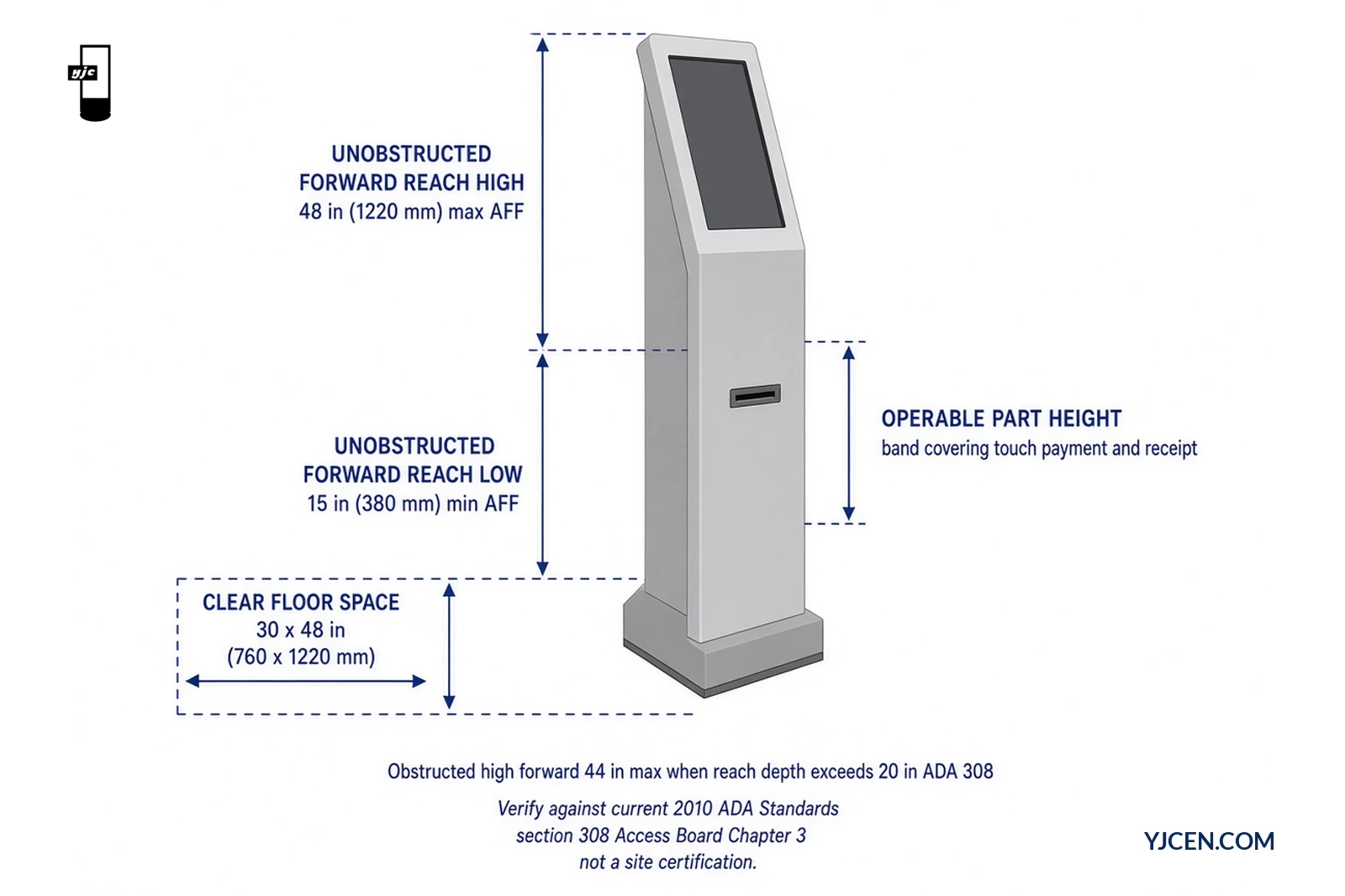
Name the approach type (forward or side) and put the operable-part heights on the sheet. Public Access Board / 2010 ADA Standards Chapter 3 building blocks that projects commonly cite for adult reach include:
| Drawing field | What to write | Public reference (verify current text) |
|---|---|---|
| Approach type | Forward and/or side | ADA Standards §308; Access Board operable-parts guide |
| Unobstructed forward reach | High 48 in (1220 mm) max AFF · low 15 in (380 mm) min AFF | §308.2.1 |
| Obstructed high forward reach | 48 in max if reach depth ≤ 20 in; 44 in max if depth >20 in (to 25 in max) | §308.2.2 |
| Unobstructed side reach | High 48 in max · low 15 in min; reach depth 10 in max | §308.3.1 |
| Obstructed high side reach | Obstruction ≤ 34 in high and ≤ 24 in deep; high reach 48 in ≤10 in depth, 46 in when depth >10 in | §308.3.2 |
| Operable parts on the unit | Touch targets, payment face, receipt outlet — each as AFF height | §309.3 (place within a reach range in §308) |
| Operation notes (if required by reviewer) | One-hand operation; no tight grasp/pinch/wrist twist; 5 lbf (22.2 N) max | §309.4 |
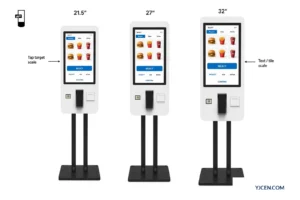
Write AFF (above finished floor) for every operable control, not only screen-housing top. On the self-service ordering line, available sizes are 21.5 / 27 / 32-inch in wall-mounted or floor-standing formats (models YJC-215-K / YJC-270-K / YJC-320-K). Screen size changes how much vertical band you have for UI and peripherals; it does not invent a compliant height by itself.
If your project cites a different edition, local amendment or children’s advisory ranges, put that citation on the title block and verify the numbers against that source — do not copy this table blindly into a sealed drawing set.
Which knee/toe clearance and approach fields belong on the drawing?
When the forward reach goes over a counter or other obstruction, the clear floor space must extend under the element and knee/toe clearances apply. Fields that belong on the placement sheet:
| Drawing field | What to write | Public reference (verify current text) |
|---|---|---|
| Clear floor space | 30 × 48 in (760 × 1220 mm) min at the operable approach | §305.3 |
| Approach orientation | Forward or side; alcove widening if obstructed on three sides | §305.5 / §305.7 |
| Toe clearance | Floor to 9 in (230 mm); required depth 17 in min where needed; 25 in max; 30 in wide min | §306.2 |
| Knee clearance | 9–27 in AFF band; 11 in deep min at 9 in; 8 in deep min at 27 in; 30 in wide min | §306.3 |
| Reach depth vs knee/toe depth | Knee/toe space at least as deep as the required reach over the obstruction | Access Board operable-parts guide · §308.2.2 |
| Obstruction leading edge | Counter front, fascia or canopy edge measured from clear floor space | Site survey + unit drawing |
Floor-standing ordering units on this line publish overall dimensions such as 1675 × 400 × 190 mm (21.5″), 1800 × 462 × 190 mm (27″) and 1898.6 × 520 × 190 mm (32″). Wall-mounted counterparts publish shorter overall heights (950 / 1075 / 1175 mm class). Those millimetre envelopes come from the product page; they are not a substitute for measuring the actual operable controls after install height is set.
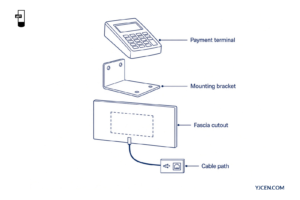
For modular countertop / wall / floor arrangements with detachable screen, stand and camera, compare the Self Service POS Kiosk (15.6 / 21.5 / 23.8-inch). Use the matching dimension drawing from downloads for the chosen mount — do not assume one base height applies to every format.
Countertop vs floor: what changes on the drawing?
Mount format changes which datum shifts the reach stack, not the public reach limits themselves.
- Countertop / desktop — counter height AFF becomes part of the installed elevation. Operable touch, payment and receipt heights = counter height + offsets from the desktop unit drawing. Approach clear floor space is usually under or in front of the counter; note whether a forward approach needs knee/toe space under the counter.
- Floor-standing — overall unit height and operable-part heights are taken from the floor datum on the pedestal drawing. Clear floor space and pedestal footprint sit on the finished floor.
- Wall-mounted — finished-floor to bottom/top of housing and to each operable control must be dimensioned after the wall plate height is chosen.
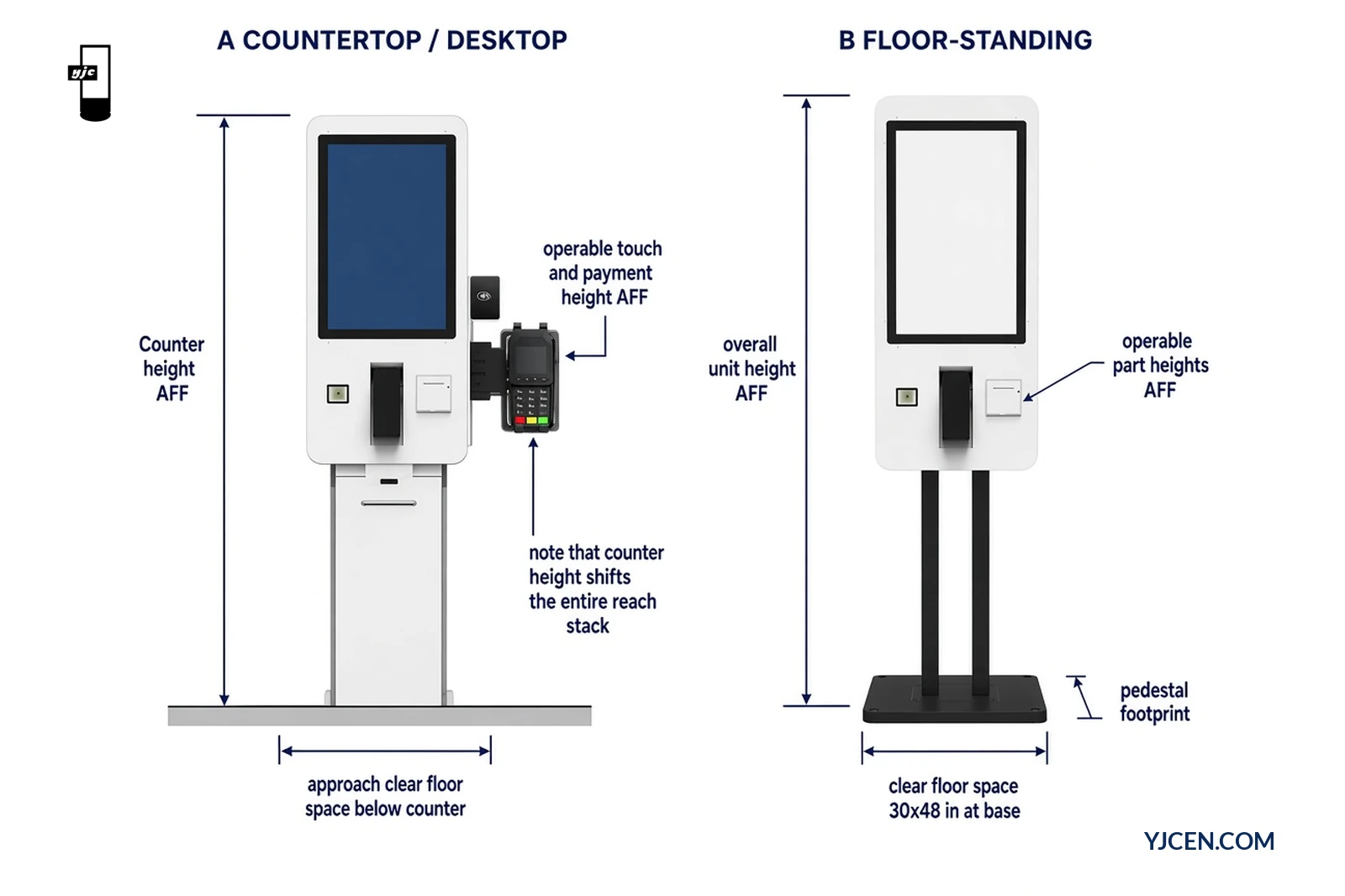
For base footprints, housing-top examples and service-access rules on the modular line, use the countertop vs floor-standing kiosks engineering guide — this ADA-fields article does not rewrite that layout piece. For visitor and directory layouts where reach still matters, see the digital wayfinding kiosk map and deployment guide.
What belongs on the drawing title block / RFQ checklist?
Keep this as a document table on the title block or RFQ — not as a screenshot graphic.
| Checklist item | Your entry | Review result |
|---|---|---|
| Cited accessibility standard / edition | e.g. 2010 ADA Standards + any local amendment | Pass / Fail / TBD |
| Approach type (forward / side) | Pass / Fail / TBD | |
| Clear floor space W × D at operable approach | Pass / Fail / TBD | |
| Unobstructed or obstructed reach case | Pass / Fail / TBD | |
| High reach AFF (touch / payment / receipt) | Pass / Fail / TBD | |
| Low reach AFF (lowest operable control) | Pass / Fail / TBD | |
| Knee / toe fields (if forward over obstruction) | Pass / Fail / TBD | |
| Counter height AFF (desktop) or wall-plate height (wall) | Pass / Fail / TBD | |
| Kiosk model + mount (self-service 21.5/27/32 wall·floor, or modular 15.6/21.5/23.8 wall·floor·desktop) | Info | |
| Dimension drawing P/N from downloads attached | Pass / Fail / TBD | |
| Site verification method (tape / mock-up / sample) | Pass / Fail / TBD | |
| Accessibility sign-off owner (site / AHJ / consultant) | Info |
Decision this article settles: which reach-range and knee-clearance fields must appear on the placement drawing for an accessibility review? The operable-control AFF heights, approach type, clear floor space, and — when reach is over an obstruction — knee/toe depth fields, plus the cited standard. A drawing that only shows cabinet overall height is incomplete. YJCEN can supply size options and dimension drawings; we do not issue an ADA certification for a site layout.
FAQ
Is this article legal advice or an ADA certification?
No. It is a drawing-field checklist for project review.
Does YJCEN claim any kiosk SKU is ADA-certified?
No. Site compliance stays with the project reviewer.
Which reach numbers should I put on the sheet?
Cite your standard, then verify current §308 figures.
Do I measure cabinet top or operable controls?
Measure touch, payment and receipt heights AFF.
Does countertop vs floor change the ADA reach limits?
No. It changes which datum shifts the installed stack.
What should I send YJCEN for a height review?
Model, mount, counter/wall height and cited standard.
Send one brief an engineer can mark against the checklist: preferred size and mount, site counter or wall-plate height, approach type, cited accessibility standard, and whether a sample (MOQ 1) is required. Ask us for size-matching manuals and dimension drawings, or use Product Downloads. For broader hardware selection beyond reach fields, use how to choose a self-service kiosk. Contact the team via Contact.