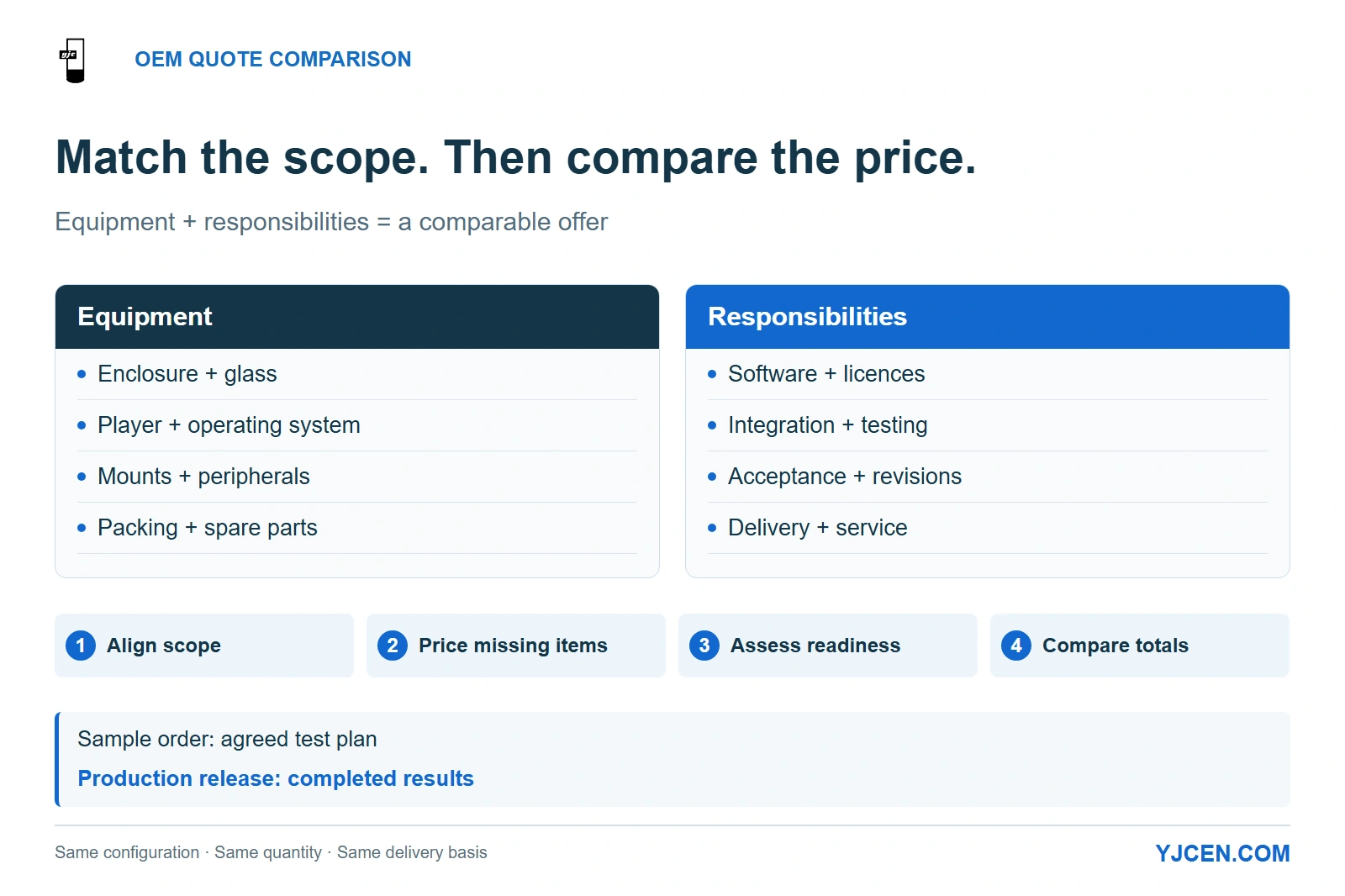
Compare the same equipment and responsibilities before ranking the total price. An agreed test plan supports the sample-order decision; completed results support production release.
Compare OEM commercial-display quotes by giving every supplier the same configuration, quantity, delivery basis and acceptance plan, then separating included hardware from options and work assigned to your team. Rank price only after the enclosure, glass, player, software, packing, documentation and spare-parts scope match; keep unresolved requirements visible rather than counting them as included.
A comparable quote has both a complete equipment list and a complete responsibility list. A missing component changes what you buy; unassigned integration work changes what your team must deliver.
1. Are the Suppliers Quoting the Same Finished Unit?
Start by defining the unit your receiving team should unpack. “Commercial display,” “OEM screen” and “kiosk” can describe different levels of assembly, even when the screen size matches.
| Quoted scope | What the comparison needs to include | What the SI must allocate separately |
|---|---|---|
| Panel or display module | Exact panel/module, controller arrangement, interfaces and supplied cables | Final housing, protective front, mounting, system integration and finished-product acceptance |
| Complete enclosed display | Panel, glass, housing, power supply, selected player, connectors and mounting accessories | Site installation and any customer-supplied player, application or network services |
| Configured kiosk | Display assembly, selected stand or mount, peripheral models, brackets, cables and internal computing hardware | Application, payment-provider integration and any customer-supplied devices |
Put the required assembly level at the top of the request for quotation (RFQ). If one supplier proposes a module and another a finished enclosure, request the missing assembly as a separate priced line before comparing totals.
A YJCEN example: a POS bracket and a payment terminal are different quote lines
YJCEN’s Self Service POS Kiosk has detachable screen, stand and camera components, with wall-mounted, floor-standing and desktop configurations. The 21.5-inch YJC-215-K accessory list identifies a supplied POS bracket; the payment device and receipt-printing configuration are selected for the project.
That distinction changes the comparison even if both offers say “21.5-inch POS kiosk.” Specify the mounting format, the payment-device model and who supplies it, then keep its bracket, connection and application integration as identifiable lines.
| Quote line for this modular configuration | What to settle | Why it affects the comparison |
|---|---|---|
| Screen and mounting format | Selected screen assembly plus wall, floor or desktop arrangement | A touchscreen assembly and a complete floor-standing terminal carry different hardware scope. |
| POS bracket | Bracket matched to the selected payment device | A bracket line covers mechanical mounting; the payment terminal needs its own supply line. |
| Printer, camera and other peripherals | Selected models, connections and included quantities | A picture of a fully equipped terminal does not define the purchased bill of materials. |
| Application and payment service | Software provider, licence scope and integration owner | Hardware fit and a functioning transaction workflow are separate deliverables. |
YJCEN can pre-install and test a customer’s application on the selected hardware. For a customer-led kiosk deployment, assign the application, payment account and transaction integration to the relevant software or payment provider, and list any included software or CMS explicitly in the offer.
2. Which Lines Must Be Identical Across Every RFQ Response?
Give every supplier the same requirement column and let them answer with included, separately priced, buyer-supplied or not offered. Require the offered configuration beside that answer: “included” without a component or scope description still leaves the comparison incomplete.
| RFQ line | Common basis for all suppliers | Cost or responsibility to separate |
|---|---|---|
| Configuration and quantity | Same drawing revision, size, orientation, touch choice and order quantity | Sample price, batch price and later quantity breaks |
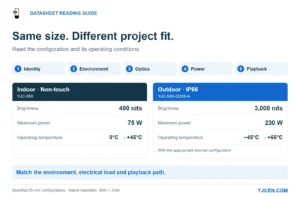
| Panel and protective front | Same native resolution, brightness definition, glass treatment and touch arrangement | Alternative panel or glass options |
| Enclosure and environment | Same mounting format, site exposure, protection requirements and thermal configuration | Changes needed for the actual installation |
| Player and operating system | Selected processor, memory, storage, OS and required interfaces | External player, OS licensing and application licensing |
| Mounts and cable entry | Base or bracket, fixing scope, cable-entry parts and supplied cables | Site fixings, glands, blanking parts or cables allocated to the installer |
| Peripherals and software | Exact devices, connections, application and payment responsibilities | Hardware options, integration work and recurring services |
| Branding and engineering | Artwork, enclosure changes, drawings and revision deliverables | One-time engineering, tooling and ownership terms |
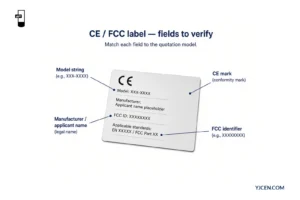
| Documentation | Destination-market document list tied to the offered configuration | Additional testing or documentation work included in the proposal |
| Sample and acceptance | Sample configuration, planned checks, records and approval owner | Sample, freight, rework and repeat-test terms |
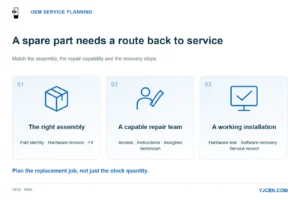
| Service and spares | Replacement parts, identifiers, supply route and warranty handling | Initial spare kit, later parts orders, labour and transport responsibilities |
| Packing and delivery | Packing scope, shipment quantity, currency and delivery basis | Freight, insurance, destination handling and other charges allocated to the buyer |
| Schedule and validity | Sample/standard/custom/repeat-order class, start trigger and quoted milestone | Quote expiry, payment timing and approval dependencies |
For an outdoor build, set the exposure first: sheltered under a canopy and direct sun on an exposed island are different inputs. Carry those conditions into the outdoor LCD buying checklist before fixing the comparison BOM, so each factory prices the same installation duty.
Build a comparable total without hiding unknown costs
Separate the offer into recurring equipment, one-time engineering, project-selected extras and delivery charges. Add only the required items omitted from the quoted subtotal, and use the same quantity and delivery boundary for every supplier.
Comparable order total = quoted subtotal + priced additions needed to meet the agreed scope + buyer-arranged costs up to the common delivery boundary.
Keep each addition in one place to avoid double counting. An unpriced required item stays open, so its offer remains provisional rather than appearing artificially cheaper.
Record the selected Incoterms® rule, named place and edition alongside the price. ICC’s Incoterms® rules allocate delivery tasks, costs and risks; freight included in one offer and arranged by the buyer in another must be reconciled before the totals are ranked.
Keep software subscriptions and support costs visible with their charging period. Calculate a longer-term comparison only when your purchasing team has chosen a common period and obtained the relevant charges.
3. How Should You Score Suppliers Before Ranking Price?
Use a readiness grade for each dimension: Ready, Conditional or Unresolved. Ready means the supplier’s response is specific enough for the purchasing stage you are approving; Conditional means an identified action has an owner and an agreed completion point; Unresolved means the response cannot yet support that decision.
| Dimension | A Ready response contains | What keeps the row Conditional or Unresolved |
|---|---|---|
| Configuration documentation | Itemised BOM, applicable drawing revision and an explicit deviations list | A generic brochure or unnamed component substitutions |
| Certification documentation | The agreed document set with traceable model/configuration coverage | Required files or configuration mapping still outstanding |
| Sample path | Priced sample scope, representative hardware, test inputs and approval route | A demonstration unit whose differences from production are not resolved |
| Spare-parts path | Identifiable replaceable parts, ordering route and written supply/repair terms | “Full support” without a usable parts or repair process |
| Lead-time class | Sample, standard, customised or repeat build; start condition and dispatch/delivery milestone | A duration without a start trigger, or dispatch presented as arrival |
| Acceptance and change control | Agreed acceptance records, sign-off owner and handling of proposed substitutions | Approval tied only to appearance or an unrecorded sample configuration |
| Commercial scope | Comparable total, delivery basis, payment terms, validity and allocated responsibilities | An attractive unit price with unpriced mandatory additions |
Set the mandatory conditions before opening the prices. A missing required input, an incompatible application configuration or an unmet destination-document requirement keeps an offer out of the final award ranking until it is resolved.
For the remaining offers, rank the comparable total alongside the Conditional rows and their effect on your rollout. A scheduled software test is a different dependency from an unidentified replacement controller; describe that consequence instead of averaging both into a reassuring overall score.
Separate sample approval from production release. An agreed test plan can make a supplier ready for a sample order, while the completed results are still needed for the production decision.
4. Which Quote Omissions Change the Apparent Price Most Directly?
Focus on omissions that add hardware, labour or another supplier to the project. Resolve each one by changing a specific quotation line.
| Quote wording or omission | What the buyer may be assuming | Correction to the offer |
|---|---|---|
| “Player included” | The required OS, memory, inputs and application are ready | Name the player configuration and allocate application installation, licensing and testing. |
| “Protective glass” | Every offer has the same treatment and touch stack | Specify the selected glass/touch arrangement and price alternatives separately. |
| “Outdoor enclosure” with no cable-entry scope | Glands, blanking parts and installer work are included | Itemise supplied entry components and allocate final cable-entry assembly. |
| “POS supported” | The terminal and payment integration are included | Separate device, bracket, cable, payment service and integration. |
| “Export packing” | The same protection and shipment arrangement are priced | Describe packing contents and transport method; separate freight from packing. |
| “Custom logo included” | Enclosure engineering and tooling are also included | Separate artwork/branding from mechanical changes and one-time engineering. |
| “Warranty included” | An initial spare kit and local repair labour are included | List spare stock, warranty remedy and service responsibilities independently. |
Map the required commercial display certification documents to the offered model and configuration in the same comparison. This turns “certified” into a defined delivery requirement rather than a reason to skip the document line.
5. What Should the Sample and First-Article Approval Actually Settle?
Use the sample to resolve the differences that could alter the order: mechanical fit, playback, peripheral operation and service access. Set those acceptance conditions when ordering it, then carry the accepted configuration and any agreed changes into production.
YJCEN’s factory process includes part inspection, assembly, function and display testing, ageing and a final check before packing. Tie those inspection-to-packing steps to the records agreed for your order, while your integration team exercises the intended application and connected devices.
| Approval item | Evidence to retain | Decision it supports |
|---|---|---|
| Mechanical fit | Selected enclosure/mount drawing, relevant measurements and installation photographs | The equipment fits the intended position and allows the planned servicing. |
| Hardware identity | BOM revision, controller/peripheral identities and accessory list | The tested configuration is the configuration being purchased. |
| Application workflow | Results using the intended software, content, connections and peripherals | The selected hardware supports the project workflow under the agreed test conditions. |
| Finish and packing | Approved appearance reference, label artwork and agreed packing record | Production appearance and shipment contents have a defined reference. |
| First-article sign-off | Inspection record, deviations, corrective actions and approval owner | The initial production build can be released against the accepted configuration. |
For a customised build, agree what the first-article inspection (FAI) will record before production starts. Record any differences between the prototype and the first production unit, then assign the affected fit or function checks before accepting the change.
Use the accepted sample configuration as the reference on the production order. If a controller, glass stack or peripheral changes, update the BOM and repeat the checks affected by that change.
6. What Can You Paste into a Supplier Comparison Sheet?
Copy the block below for each supplier, attach the same baseline BOM/drawing, and place the responses side by side. Enter an exclusion or an open action explicitly; use a numeric zero only when the supplier has confirmed there is no charge for that line.
7. OEM Display Quote Comparison FAQ
Should I compare unit prices before aligning the BOM?
No. First align the equipment, quantity, delivery basis and responsibilities so the totals describe the same purchase.
Does a supplied POS bracket mean the payment terminal is included?
No. List the terminal, its bracket and its payment integration as separate scope items.
Can an offer with missing information remain on the shortlist?
Yes. Keep its unresolved items and owners visible, and resolve mandatory gaps before the relevant purchasing approval.
Does an approved demo prove the production configuration will work?
No. Link approval to the actual hardware and software configuration, then check any production changes.
Does a warranty automatically include an initial spare-parts kit?
No. Quote the initial kit separately from warranty remedies and the route for later replacement parts.
Should I separate sample timing from production and shipping timing?
Yes. Record the start trigger and milestone for each stage so dispatch and site arrival remain distinct.
Can YJCEN pre-install and test our application on the selected hardware?
Yes. Supply the application and operating-system requirements, with the intended peripheral configuration and test workflow.
Send the BOM You Want Every Factory to Price
Send your baseline BOM, installation drawing, quantity, destination and a list of unresolved scope differences for OEM display configuration and mechanical-fit review. Include the selected application and peripheral models so the quotation can separate hardware, engineering changes and integration responsibilities on the same basis.